
Animated selection focus
Adds a configurable animated border and glow around single- or multi-line code selections while retaining the editor’s standard selection behavior.

CodeSpotlight is a JetBrains IDE plugin with animated borders, glows, and visual effects for selected code—without modifying source files, ideal for tutorials and reviews.
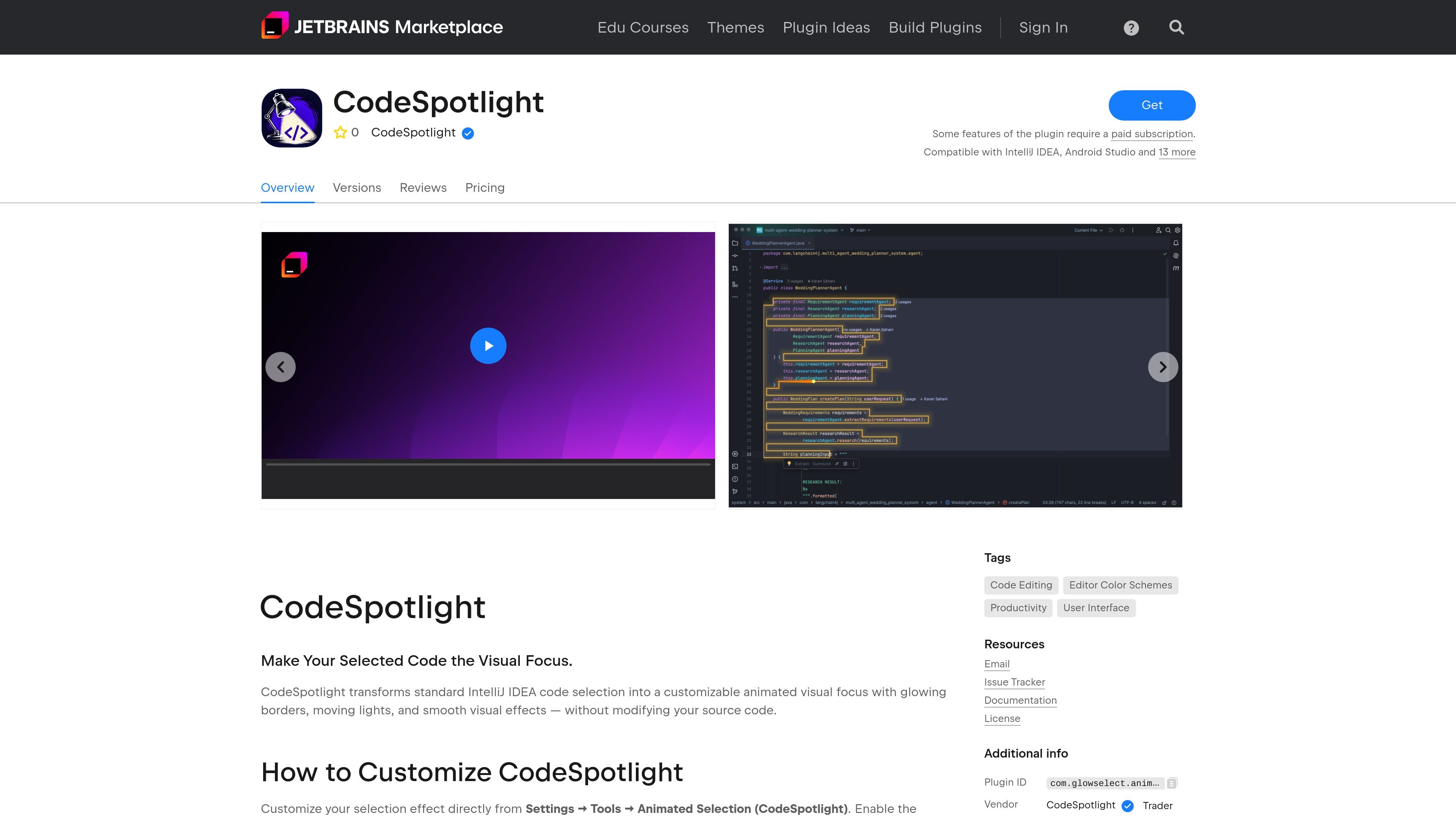
CodeSpotlight is an IntelliJ IDEA and Android Studio plugin that turns ordinary code selection into a configurable animated visual focus. It draws effects such as glowing borders, moving lights, and smooth transitions around selected code, including multi-line selections, without changing the underlying source code.
The plugin is configured from IntelliJ IDEA’s Settings under Tools → Animated Selection (CodeSpotlight). Users can enable the effect, select an animation mode, set colors, and tune visual parameters while continuing to use the editor’s native selection and editing behavior. A Free tier provides core effects, while Pro expands the animation, color, trail, preset, and focus options.
Adds a configurable animated border and glow around single- or multi-line code selections while retaining the editor’s standard selection behavior.
Choose among Traveling Border, Pulse, Breathing Glow, Static Glow, and Pro animation modes including Travel + Pulse, Energy Sweep, Aurora, and Orbit.
Adjust animation speed, glow intensity, border thickness, glow radius, corner radius, animation FPS, moving-light segments, and light trails from IntelliJ IDEA settings.
Use built-in color presets in Free, or define custom primary and secondary colors with Pro.
Save up to two configurations in Free or unlimited presets in Pro for switching between visual setups.
Pro includes Focus Mode, while the plugin also offers optional CodeSpotlight Dark color-scheme integration.
Use an animated border or glow to keep the active selection visually distinct while walking through code in a technical tutorial or classroom-style explanation.
Make the selected block easier for viewers to follow in screen recordings and live coding sessions without altering the project files.
Direct attention to the relevant lines during code demonstrations, presentations, or review discussions while retaining normal editor interaction.
Apply a consistent visual treatment to selected code during everyday development when large or multi-line selections are difficult to track.
In IntelliJ IDEA, open Settings, go to Tools → Animated Selection (CodeSpotlight), enable animated selection, choose an animation mode and colors, adjust the available visual parameters, then select code in the editor.
No. CodeSpotlight adds a visual focus layer around selected code while preserving IntelliJ IDEA’s normal selection and editing behavior. It does not modify source files.
The plugin is compatible with IntelliJ IDEA, Android Studio, and 13 more JetBrains IDEs according to its Marketplace listing.
Yes. The Marketplace pricing page offers a 30-day trial for individual use. It also lists monthly and yearly subscriptions; the displayed United States prices are $2.00 monthly and $20.00 yearly, with a perpetual fallback license after 12 uninterrupted monthly payments and for all yearly subscriptions.
The free tier includes animated selection highlighting, four animation modes, built-in color presets, one moving-light segment, standard light-trail controls, core visual controls, up to two saved presets, and optional CodeSpotlight Dark color-scheme integration. Pro adds further modes, custom colors, additional moving-light segments, advanced trail controls, unlimited presets, and Focus Mode.

ByteAsk is a terminal-first AI coding agent for C and C++ that edits repos and verifies changes with compilers, debuggers, sanitizers, and tests.

CreateOS Sandbox is an isolated compute environment for running code and agent workloads in Firecracker micro-VMs with private networking and SDK, CLI, or MCP control.

hob is an independent workspace for coding agents, with local control over sessions, terminals, history, routing, and follow-up work.

Ably Chat is a chat API platform for custom realtime chat apps, with rooms, typing indicators, presence, reactions, message updates and usage-based pricing.

Manta AI is an autonomous web app testing tool that maps app behavior, catches regressions, and generates tests from a URL, no scripts or selectors needed.

SonOf connects to your repo and PM tool, audits your codebase, and turns approved work into shipped tickets with senior engineering review.