

Crickets
Crickets is a calm GitHub dashboard showing which issues, PRs, and replies still need follow-up, ranked by urgency for managers.
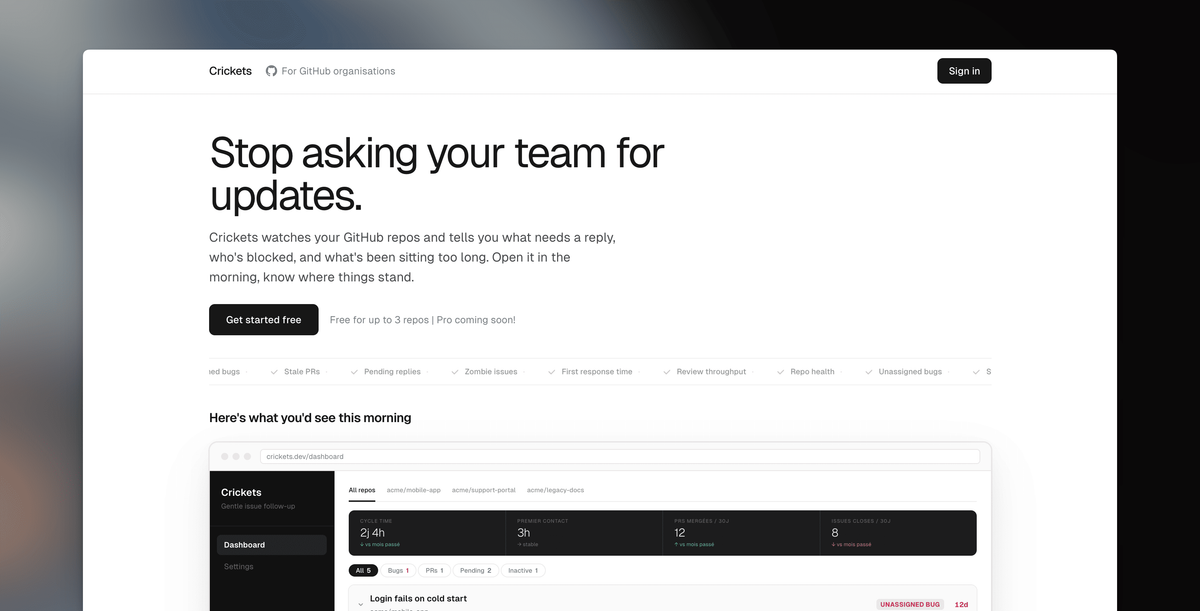
What is Crickets?
Crickets is a GitHub issue follow-up dashboard designed for engineering managers and tech leads. It surfaces which issues, pull requests, and replies still need attention, so you can review blockers and overdue items without repeatedly checking GitHub.
The core idea is a daily, urgency-ranked view of what’s unassigned, stale, waiting for a reply, or otherwise at risk of slipping through the cracks—paired with supporting signals related to repo health and production errors.
Key Features
- Issue follow-up dashboard with urgency ranking: Shows what needs attention first, helping you prioritize quickly when you open the dashboard.
- Signals for unassigned and neglected work: Flags unassigned bugs, stale PRs, and zombie issues (open issues with no activity for weeks).
- Reply and responsiveness tracking: Highlights pending replies with an age indicator (e.g., “reply needed” for support/issue threads).
- Repo hygiene indicators: Reports missing safety nets such as CI pipeline and Dependabot configuration, plus security policy gaps (as shown in the dashboard example).
- Security- and operations-related workflow hooks: Connects Bugsnag so production errors can be flagged when there is no linked GitHub issue.
- Repository health signals: Includes review throughput (ratio of created vs reviewed work), tech stack/version detection, and bus factor (whether one developer is carrying too much load).
- Configurable thresholds: Lets you set what counts as “overdue” so alerts match your organization’s pace.
- Permissions and privacy stance: Reads issues, pull requests, and comments only; source code is neither accessed nor stored. Admins can verify permissions before installing.
- Planned notification support: The site mentions upcoming Slack notifications (daily digest or instant alerts), without needing to open the dashboard.
How to Use Crickets
- Connect Crickets to your GitHub organization and choose which repositories to monitor.
- Open the dashboard each morning to review the ranked list of items needing attention (e.g., unassigned bugs, stale PRs, pending replies).
- Adjust overdue thresholds in Crickets so the dashboard’s urgency signals align with how your team works.
Use Cases
- Close the loop on unassigned bugs: When a bug has no owner, Crickets surfaces it so you can assign it to a team member before the day is out.
- Reduce PRs that wait without review: For PRs open longer than your review expectations, Crickets flags them so you can prompt review and unblock merging.
- Monitor support/issue responsiveness: If a support issue has been waiting too long for a team reply, Crickets highlights it, helping you intervene before customer patience runs out.
- Spot work that has gone stale: Crickets flags stale PRs and “zombie issues” with no recent activity, supporting decisions to close, re-engage, or plan next steps.
- Detect production errors missing GitHub follow-up: With Bugsnag connected, Crickets flags production errors that don’t have a corresponding GitHub issue, reducing the chance of operational problems going untracked.
FAQ
-
What data does Crickets use from GitHub? Crickets reads issues, pull requests, and comments. It does not access or store source code.
-
How does Crickets decide what needs attention? It surfaces items such as unassigned bugs, stale PRs, pending replies, and zombie issues, and ranks them by urgency. You can also configure what counts as overdue.
-
Does Crickets integrate with tools outside GitHub? The product page indicates integration with Bugsnag for production error detection tied to whether a corresponding GitHub issue exists.
-
Is notification support available? The page mentions upcoming Slack notifications (daily digest or instant alerts). It does not specify full availability or setup steps on the provided content.
-
Which GitHub repositories are supported? Crickets is set up by connecting an organization and selecting repositories to monitor; the page does not list additional limits beyond repo selection.
Alternatives
- GitHub-native workflows (saved searches, labels, and automation): You can approximate follow-up by using GitHub search queries and label-based processes, but it typically requires more manual triage than a dedicated dashboard.
- Issue management / triage tools: Category solutions that centralize triage can also help track pending replies and stale items; they may differ by how tightly they focus on GitHub-specific signals.
- Monitoring/incident tools with ticket creation: For production error tracking, incident tooling that creates issues/tickets can reduce missing follow-up, though it may not provide the same GitHub issue aging and review-throughput views.
- Team chat alerts from GitHub events: Slack or other chat integrations can notify you of GitHub events, but they often notify on events rather than compiling a daily “what still needs attention” overview.
Alternatives

GitBoard
GitBoard is a native macOS menu bar app for GitHub Projects to view your kanban board, filter by status, search issues, and create or assign.

Polsia
Polsia is an autonomous AI system that plans, codes, and markets your company on a daily cadence while you sleep.

Biji
Biji is a versatile platform designed to enhance productivity through innovative tools and features.

Falconer
Falconer is a self-updating knowledge platform for high-speed teams to write, share, and find reliable internal documentation and code context in one place.

OpenFlags
OpenFlags is an open source, self-hosted feature flag system with a control plane and typed SDKs for progressive delivery and safe rollouts.

Planndu: Daily Task Planner
Planndu is an intuitive productivity application designed to help users organize tasks, manage projects, build routines, and enhance focus using tools like AI generation and a built-in Pomodoro timer.