

Databox MCP
Databox MCP connects Databox business data to AI tools like Claude, n8n, Cursor, and ChatGPT for plain-language questions, data ingest, and automation.
What is Databox MCP?
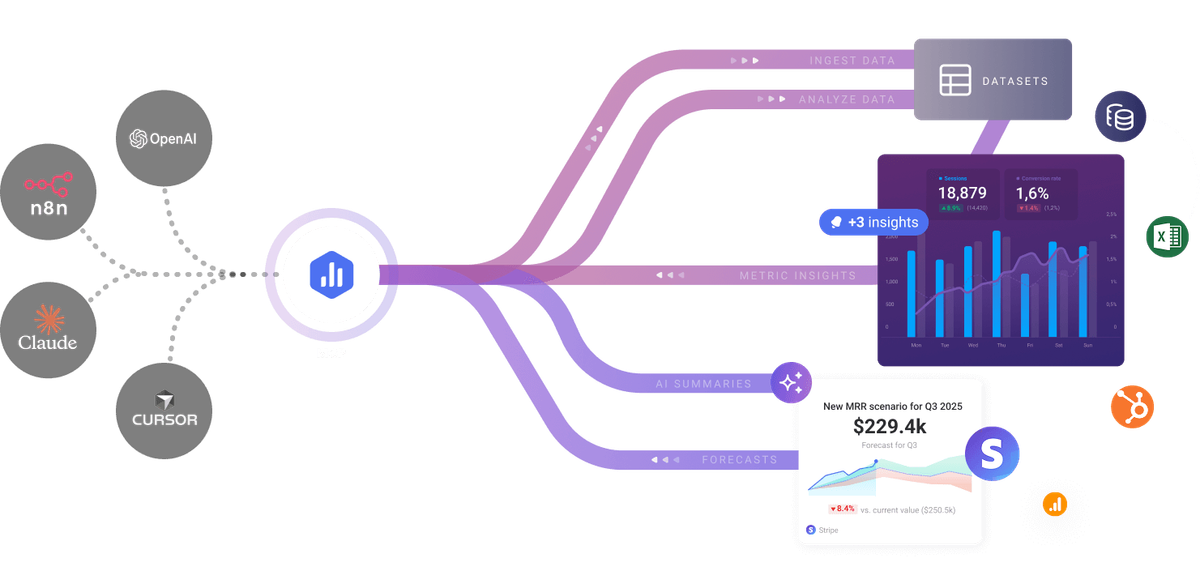
Databox MCP is a Model Context Protocol endpoint that connects Databox business data to AI tools such as Claude, ChatGPT, n8n, and Cursor. It lets users ask questions about performance data in plain language, push new data into Databox, and trigger automated actions from within compatible AI clients.
The product is designed to let teams work with metrics without building dashboards, writing SQL, or moving between tools. According to the page, Databox MCP uses real metrics, definitions, and historical context so the AI can return answers, clean and structure incoming data, and support workflows that turn analysis into actions.
Key Features
- Connects Databox to MCP-compatible clients through a single endpoint at
https://mcp.databox.com/mcp, which simplifies setup across supported tools. - Supports conversational analysis of business data, allowing users to ask for trends, explanations, and performance answers in plain language.
- Lets AI tools ingest data into Databox, including cleaning and standardizing messy CSV data, pulling from APIs, and storing custom internal metrics.
- Can be used to automate recurring outputs such as summaries, reports, alerts, and follow-up workflows.
- Supports multiple client environments, including Claude Desktop, Claude Web, n8n workflows, Cursor, ChatGPT developer mode, and other MCP-compatible tools.
- Provides guided setup paths for different clients, including connector setup, configuration snippets, and authentication methods.
How to Use Databox MCP
Start by connecting an MCP-compatible AI tool to the Databox endpoint and authenticating with the required header or OAuth flow, depending on the client. The page provides setup steps for Claude, n8n, Cursor, ChatGPT, and generic MCP clients.
Once connected, users can ask questions about Databox metrics, send data into Databox for cleanup or storage, or configure workflows that turn insights into alerts and recurring summaries. The typical flow is connect, query or ingest, then automate follow-up actions where needed.
Use Cases
- A revenue or marketing team asks an AI assistant to explain changes in trends, campaign performance, or user behavior using Databox metrics and historical context.
- An operations or finance user uploads a messy CSV through an AI workflow, standardizes the data, and stores it in Databox for later reporting.
- A team builds an automated n8n workflow that queries Databox on a schedule and sends recurring summaries to stakeholders.
- A manager sets up smart alerts so the team is notified when key metrics cross a threshold or change unexpectedly.
- An executive workflow generates context-rich summaries that combine current metrics with historical definitions and notes, reducing manual reporting.
FAQ
What tools work with Databox MCP?
The page lists Claude Desktop, Claude Web, n8n, Cursor, ChatGPT developer mode, and other MCP-compatible clients.
Does Databox MCP only answer questions, or can it also ingest data?
It supports both. The page describes analysis, ingestion of new data into Databox, and automation of actions from insights.
How is access handled?
The page says data stays protected and access is under the user’s control. Setup examples show either OAuth 2.0 or bearer token authentication, depending on the client.
Do users need to build dashboards or write SQL first?
No. The page says users can ask questions without building dashboards, writing SQL, or waiting on the data team.
Alternatives
- Native dashboards in Databox: Useful when teams want to build visual reports directly in the Databox app rather than ask questions from an AI tool.
- General-purpose BI tools: These are better suited to traditional dashboarding and analysis workflows, especially when teams prefer manual exploration over conversational querying.
- Custom API or workflow integrations: A fit for teams that want to wire business data into automation systems directly, but they typically require more implementation work than an MCP connection.
- Other MCP servers for business data: Similar in approach if they expose data to AI clients, but they may differ in the data source, authentication setup, or the set of available tools.
Alternatives

AakarDev AI
AakarDev AI is a powerful platform that simplifies the development of AI applications with seamless vector database integration, enabling rapid deployment and scalability.

Arduino VENTUNO Q
Arduino VENTUNO Q is an edge AI computer for robotics, combining AI inference hardware and a microcontroller for deterministic control. Arduino App Lab-ready.

PromptScout
PromptScout tracks how your brand is mentioned, which competitors are recommended, and what sources are cited in AI answers—plus website audits.

SaveMRR
SaveMRR scans Stripe billing data to find SaaS MRR leaks and help recover failed payments, save cancellations, and win back churn—60-sec Free Revenue Scan.

Sleek Analytics
Lightweight, privacy-friendly analytics with real-time visitor tracking—see where visitors come from, what they view, and how long they stay.

Codex Plugins
Use Codex Plugins to bundle skills, app integrations, and MCP servers into reusable workflows—extending Codex access to tools like Gmail, Drive, and Slack.