

Devin Desktop
Devin Desktop is a workspace for managing local and cloud agents in one place. Plan, delegate, review, and coordinate multi-agent work without leaving your editor.
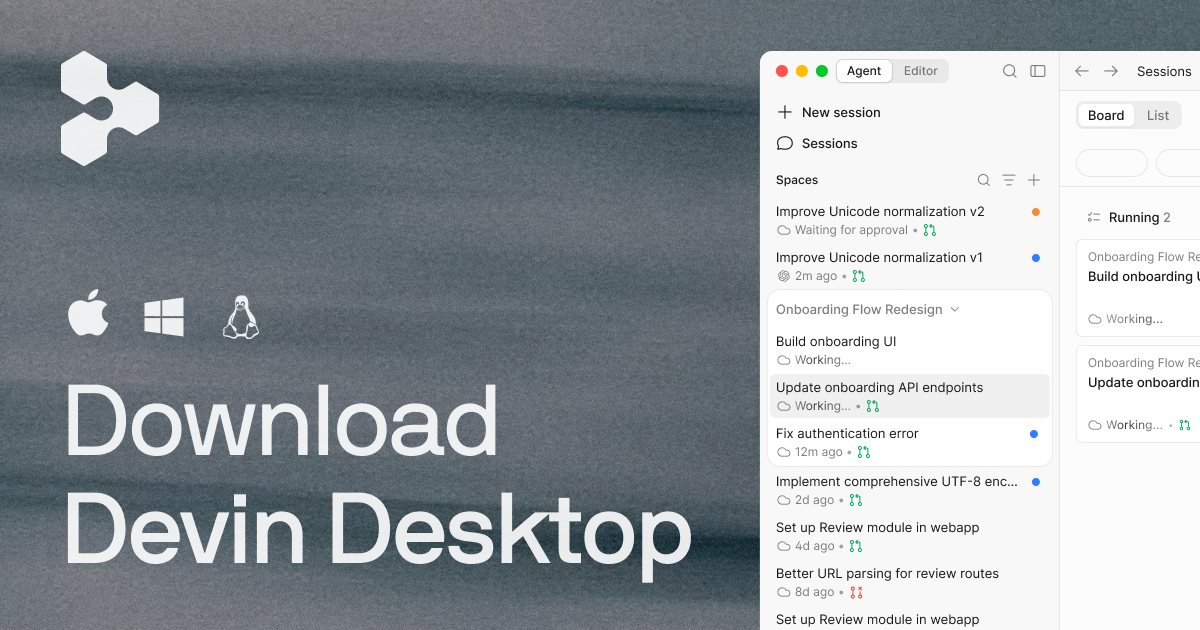
What is Devin Desktop?
Devin Desktop is a desktop workspace for managing local and cloud agents from one place. It is designed to let engineers plan work, delegate tasks to agents, review progress, and continue without leaving their editor.
The product emphasizes shared context across multiple agents and teams. Based on the source, it supports custom background agents and multi-agent workflows, so users can coordinate several ongoing tasks from a single command center rather than switching between separate tools or sessions.
Key Features
- Single surface for multiple agents: Devin Desktop is built to dispatch and monitor an array of agents from one command center, which helps keep work organized across concurrent tasks.
- Local and cloud agent management: The product is described as a way to manage fleets of local and cloud agents together, so users can work across different execution environments from the same interface.
- Shared context across agents: The page highlights shared context as a core capability, which helps agents and humans work from the same understanding instead of restarting context for each task.
- Support for custom background agents: Teams can use custom background agents, allowing internal workflows and long-running engineering work to be represented inside Devin Desktop.
- Multi-agent coordination: The source mentions research preview support for multi-agent workflows, indicating that users can run several agents at once and monitor how they share context.
- Use from a local machine: Devin Desktop brings the agent experience to engineers’ laptops with the permissions and flexibility of local machines, which is useful for hands-on development work.
How to Use Devin Desktop
A typical workflow starts by opening Devin Desktop and using it as a control surface for the agents you want to run. From there, you can assign tasks, watch progress, and move between active work without rebuilding context each time.
Teams that have their own background agents can connect them to the desktop workflow and use the shared workspace to coordinate ongoing engineering tasks. Engineers can then review outputs, continue work in their editor, and keep related tasks in one place.
Use Cases
- Managing several engineering agents at once: An engineer can run multiple agents on different tasks and keep track of each one without switching between separate tools.
- Coordinating long-running background work: Teams with persistent internal agents can use Devin Desktop to handle work that continues over time and needs organizational context preserved.
- Sharing context across a team workflow: When legal, product, design, and engineering teams rely on the same background agent process, the desktop workspace can help maintain continuity across functions.
- Working on local-machine development tasks: Developers who prefer a more hands-on environment can use the product for work that benefits from the speed and flexibility of a local machine.
- Reviewing and continuing agent output in the editor: Engineers can monitor agent progress, then jump back into their editor to inspect results and keep moving without context resets.
FAQ
What does Devin Desktop manage?
It manages local and cloud agents from a single workspace, including custom background agents and multi-agent workflows mentioned in the source.
Is Devin Desktop only for one agent at a time?
No. The page specifically describes support for multiple agents and a command center for dispatching and monitoring them together.
Does Devin Desktop replace the editor?
The source suggests it is meant to work without forcing users to leave their editor, so it appears to complement existing development workflows rather than replace them.
Can teams use their own internal agents with it?
Yes. The page explicitly mentions support for custom background agents, which is how teams can bring internal workflows into the shared workspace.
Is this limited to cloud-based work?
No clear limitation is stated. The page refers to both local and cloud agents and also mentions use on engineers’ laptops.
Alternatives
- Agent orchestration platforms: These tools also coordinate multiple agents or tasks, but they may be centered on workflow management rather than a desktop-native engineer experience.
- Standalone coding agents: Single-agent tools are useful when one task can be handled in isolation, but they do not necessarily provide the same multi-agent command center or shared context workflow.
- Task runners and automation tools: These can automate repeatable work, but they are usually narrower in scope than a system built for monitoring and coordinating active agents.
- Internal background-agent systems: Some teams may build their own agent infrastructure, which can be tailored to specific needs but requires more maintenance than using a product like Devin Desktop.
Alternatives

AakarDev AI
AakarDev AI is a powerful platform that simplifies the development of AI applications with seamless vector database integration, enabling rapid deployment and scalability.

Arduino VENTUNO Q
Arduino VENTUNO Q is an edge AI computer for robotics, combining AI inference hardware and a microcontroller for deterministic control. Arduino App Lab-ready.

BotBoard
Manage AI agents like a team with a shared backlog, structured context, and human review workflow to assign, track, and approve outputs.

Devin
Devin is an AI coding agent that helps software teams complete code migrations and large refactoring by running subtasks in parallel.

open-codex-computer-use
open-codex-computer-use is an open-source “Computer Use” MCP server that lets AI agents run desktop GUI actions on macOS, Linux, and Windows.

Biji
Biji is a versatile platform designed to enhance productivity through innovative tools and features.