
Doraverse
Doraverse captures meetings with live translation and transcription in 60 languages, generates notes and action items, and offers an AI assistant for key moments.
What is Doraverse?
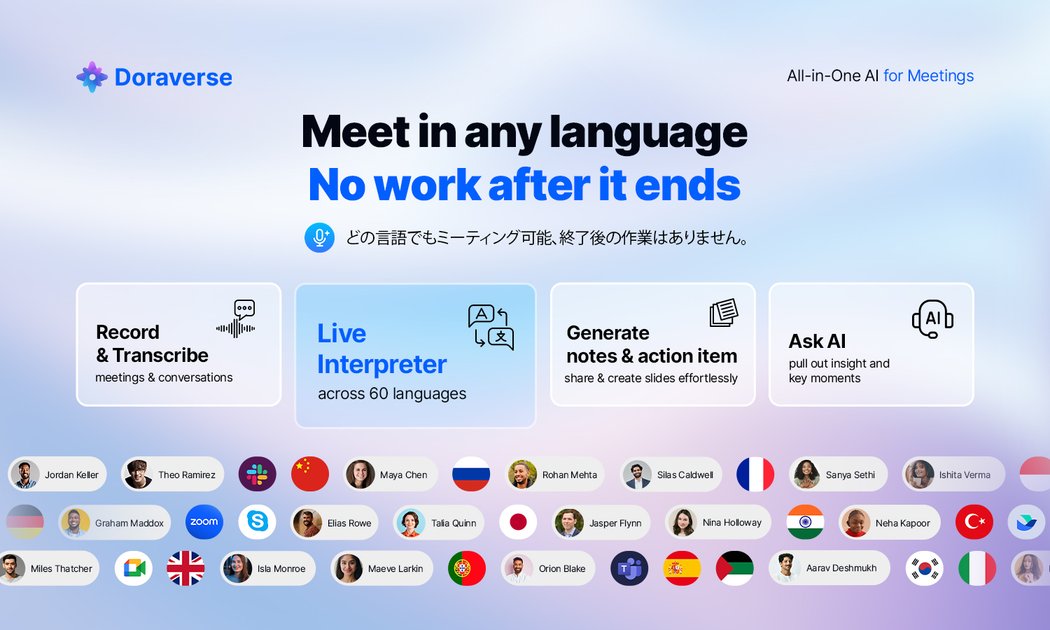
Doraverse is an all-in-one AI meeting tool that captures meetings and supports live translation and transcription across 60 languages. It also generates meeting notes and action items, and includes an AI assistant you can ask during or about the meeting to help identify key moments.
The core purpose is to reduce manual meeting work (like note-taking and scanning transcripts) while keeping multilingual teams aligned through live, real-time translation and structured outputs for follow-up.
Key Features
- Live AI translation for multilingual meetings, translating conversations as they happen to keep discussion aligned across languages.
- Real-time transcription to capture what was said and turn speech into readable text for later reference.
- Notes and action item generation, with outputs that can be generated in a preferred language.
- AI assistant for “catch what matters,” including the ability to pinpoint specific moments (e.g., decisions) and extract insights without scanning the full transcript.
- Speech clarity enhancement, including noise reduction and accent normalization intended to improve understanding and translation quality in noisy environments.
- Language and output support for 60 languages, including auto-detection and note generation in the user’s preferred language.
- Regional data residency support for US, UK, and Japan data residency requirements.
- Bot or no-bot capture options, with the ability to run bot-free capture for sensitive calls or use bot-assisted capture for convenience.
- Follow-up sharing for notes and action items via email or in the user’s workspace (as described on the page).
- Enterprise-grade security controls, including claims of SOC 2 Type II, GDPR compliance, and ISO 27001.
How to Use Doraverse
Start a trial (the page notes a “14 day trial, no credit card required”) or book a demo for your team. During setup, choose the language(s) you need so Doraverse can auto-detect the meeting language and generate notes in your preferred language.
Run your meetings using Doraverse’s capture mode (bot-free for sensitive calls or bot-assisted for convenience). After the meeting, use the generated notes, action items, and transcript/insights features to create follow-ups and share outputs via email or your workspace. You can also ask the AI assistant to locate key moments such as decisions.
Use Cases
- Multilingual customer meetings: Translate conversations in real time across 60 languages while capturing transcripts to keep stakeholders aligned.
- Team status meetings with noisy audio: Use speech clarity enhancement to improve understanding and translation quality when there is background noise or varied accents.
- Executive or leadership debriefs: Ask the AI assistant to pinpoint key moments (such as decisions) and summarize insights without manually searching through the full transcript.
- Project kickoffs and planning sessions: Generate notes and action items after the meeting to reduce administrative work and speed up follow-up.
- Customer support and ongoing account coordination: Turn meeting discussions into structured notes and action items that can be shared with the team via email or workspace.
FAQ
-
How many languages does Doraverse support? The page states Doraverse supports 60 languages, with auto-detection and note generation in a preferred language.
-
Does Doraverse support live translation during a meeting? Yes. It provides live, real-time translation as conversations happen.
-
What capture options are available for sensitive calls? The page describes both bot-free capture (for sensitive calls) and bot-assisted capture (for maximum convenience).
-
Where is data hosted? The page states regional data residency support for US, UK, and Japan.
-
What security and compliance claims does Doraverse list? It lists enterprise-grade security controls and mentions SOC 2 Type II, GDPR compliance, and ISO 27001.
Alternatives
- Standalone transcription tools: These focus on turning speech into text but may require additional translation and note/action-item workflows to match Doraverse’s combined meeting outcomes.
- Live interpretation and translation solutions: These concentrate on real-time multilingual communication, but often don’t provide the same transcript-to-notes/action-items automation.
- Meeting summarization platforms: These may generate summaries and action items from recorded meetings, but may not offer the same emphasis on live translation and speech clarity enhancement during the meeting.
- Secure meeting capture/recording tools (with separate AI): Organizations may use secure recording/capture software and add translation/transcription services separately to meet governance needs.
Alternatives

Captions.ai
Captions.ai is an online video editor and app with AI-powered editing, automatic captions, music, and AI avatars for faster video creation.

Pewbeam
Pewbeam listens as you preach, detects Bible verses in real time, and displays them instantly on screen—no typing or clicking for pastors.

LIAM
LIAM is an AI copilot that drafts email replies, organizes your inbox with auto-labels and prioritization, and schedules meetings from your calendar.

Tactiq
Tactiq is an AI meeting assistant that provides live transcription, AI summaries, action items, and custom AI prompts for Google Meet, Zoom, and Teams.

garden-md
Turn meeting transcripts into a structured, linked company wiki with local markdown and an HTML browser view. Sync from supported sources.

CAMB.AI
Turn a single live stream into a multilingual broadcast with real-time AI audio dubbing for YouTube, Twitch, X and more.