

Google Vids
Create, edit, and share work-focused videos in Google Workspace with Google Vids—Gemini-powered storyboards, recording tools, and AI video generation.
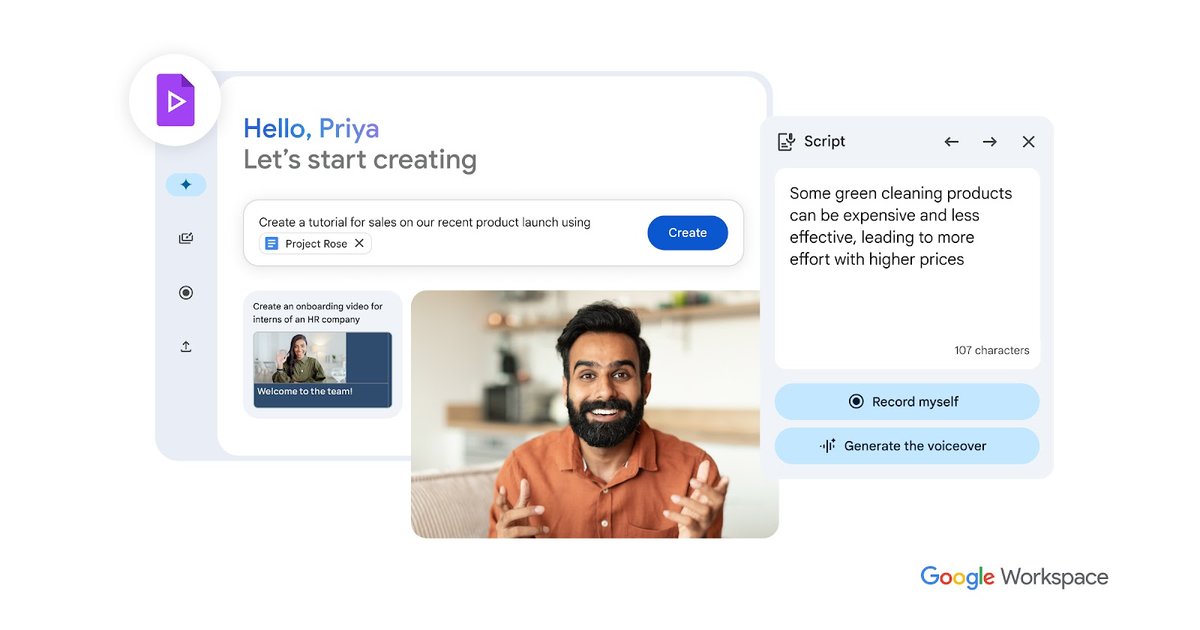
What is Google Vids?
Google Vids is an online video creator and editor built for creating, editing, and sharing work-related videos in Google Workspace. It combines recording tools and a browser-based editor with AI features powered by Gemini, along with additional AI video generation capabilities.
The core purpose of Google Vids is to help teams produce videos for communication and training workflows—without requiring video-editing experience—while keeping collaboration and sharing inside Workspace.
Key Features
- Gemini-assisted storyboards from a prompt or file: Create an initial, editable outline with suggested scenes and stock media, then refine it toward a final draft.
- Recording studio for screen, audio, and self-recording: Record yourself, your screen, or your audio and insert those takes into your video.
- Script support with a read-along teleprompter: Use a read-along view during recording and get suggested scripts per scene to speed up revisions.
- AI voiceovers and voice selection presets: Choose from preset professional-sounding voiceovers for your video content.
- Veo 3 video and image-to-video features: Generate short video clips from a text prompt (including AI avatar presentation) and animate uploaded images with native audio generation.
- Media library and scene enrichment: Add high-quality stock media and music from a content library, alongside custom visuals.
- Rich editing and customization: Insert visuals, music, transitions, animations, photo effects, and use object tracking to enhance scenes.
- Collaborate and share in Workspace: Collaborate and share videos similarly to Docs, Sheets, and Slides, including permission controls for who can edit, comment, or view.
- Browser playback with captions support: View videos in the browser with auto-generated closed captions to help viewers follow along.
How to Use Google Vids
- Sign in to Vids from your Google Workspace account (or use Vids in supported consumer plans).
- Start with a Gemini prompt or a Drive file to generate an initial storyboard with suggested scenes and media.
- Record or add media using the recording studio (screen, audio, or camera) and upload additional assets from Drive or Google Photos.
- Customize the video by editing scenes, adding templates, selecting voiceovers, enriching with stock media and music, and adjusting animations/transitions.
- Generate AI clips when needed using Veo in Vids (prompt-based clips or image animation), then review and share using Workspace permission controls.
Use Cases
- Customer or team education videos: Use screen sharing in the recording studio and enrich scenes with stock media and music to produce training-style videos at scale.
- Employee training and onboarding: Build videos from an editable outline, incorporate scene-level scripts, and include recorded segments or AI-generated visuals.
- Company-wide announcements and meeting updates: Record updates, add consistent formatting via templates, and share with controlled access for employees.
- Marketing or product creative with generated clips: Create short AI-generated 8-second video clips from prompts, animate product images with native audio, and combine them with editable scenes.
- Collaborative internal communication: Draft the first version with Gemini, then collaborate with teammates using Workspace-style sharing and edit/comment/view permissions.
FAQ
Is Google Vids available for businesses and consumers? Yes. Google Vids is generally available on all Business and Enterprise Google Workspace plans, and it’s also available to consumers on Google AI Pro and Ultra plans.
What kinds of media can I add to a video in Google Vids? You can record yourself, your screen, or audio, add your own photos/videos from Google Drive or Google Photos, and enrich scenes with stock media and music from the Vids content library.
Does Google Vids support captions? Videos include auto-generated closed caption support so viewers can follow along during browser playback.
Can I generate video clips and avatars with AI in Vids? Yes. Veo in Vids can generate video clips from a text prompt, animate uploaded images with native audio generation, and can also present an AI avatar based on a script.
Are there video length limits? The page states that each video can be a maximum of 10 minutes to maximize viewer engagement.
Alternatives
- Other web-based video editors: Typically focused on manual editing in-browser; they may not provide the same Gemini-assisted storyboard workflow or Workspace-style permissions and collaboration.
- AI video generation tools for short clips: These emphasize prompt-to-video creation, but may offer less integrated recording and editing/asset management inside a document-style collaboration environment.
- Traditional desktop video editing software: Offers fine-grained control and advanced timelines, but generally requires more editing expertise and workflow setup than a guided, prompt-and-template approach.
- Presentation/video authoring tools: Often simplify slide-to-video workflows for internal communications, but may not include the same recording studio, script/teleprompter, and AI avatar or image animation capabilities described for Vids.
Alternatives

Captions.ai
Captions.ai is an online video editor and app with AI-powered editing, automatic captions, music, and AI avatars for faster video creation.

FlexClip
FlexClip is an AI-powered online video maker and editor with templates and built-in tools. Generate videos, subtitles, translation & more faster.

Bansi
Bansi is an AI video editor that turns raw footage into a polished first draft in minutes—upload supported formats and generate review-ready edits.

Merra AI
Merra is an AI-powered video editor designed for automatic and batch video creation, transforming raw content into polished social media videos complete with voiceovers, captions, and music.

CAMB.AI
Turn a single live stream into a multilingual broadcast with real-time AI audio dubbing for YouTube, Twitch, X and more.

Tavus
Tavus builds AI systems for real-time, face-to-face interactions that can see, hear, and respond, with APIs for video agents, twins & companions.