
Ticket-level cost attribution
Attribute token and dollar spend to the ticket, then roll usage up by model, repository, and teammate so cost reporting can be reviewed at the level teams actually manage work.
HAR for teams is a shared control layer for coding agents, with Mission Control for visibility, cost attribution, and governance across shared workspaces.
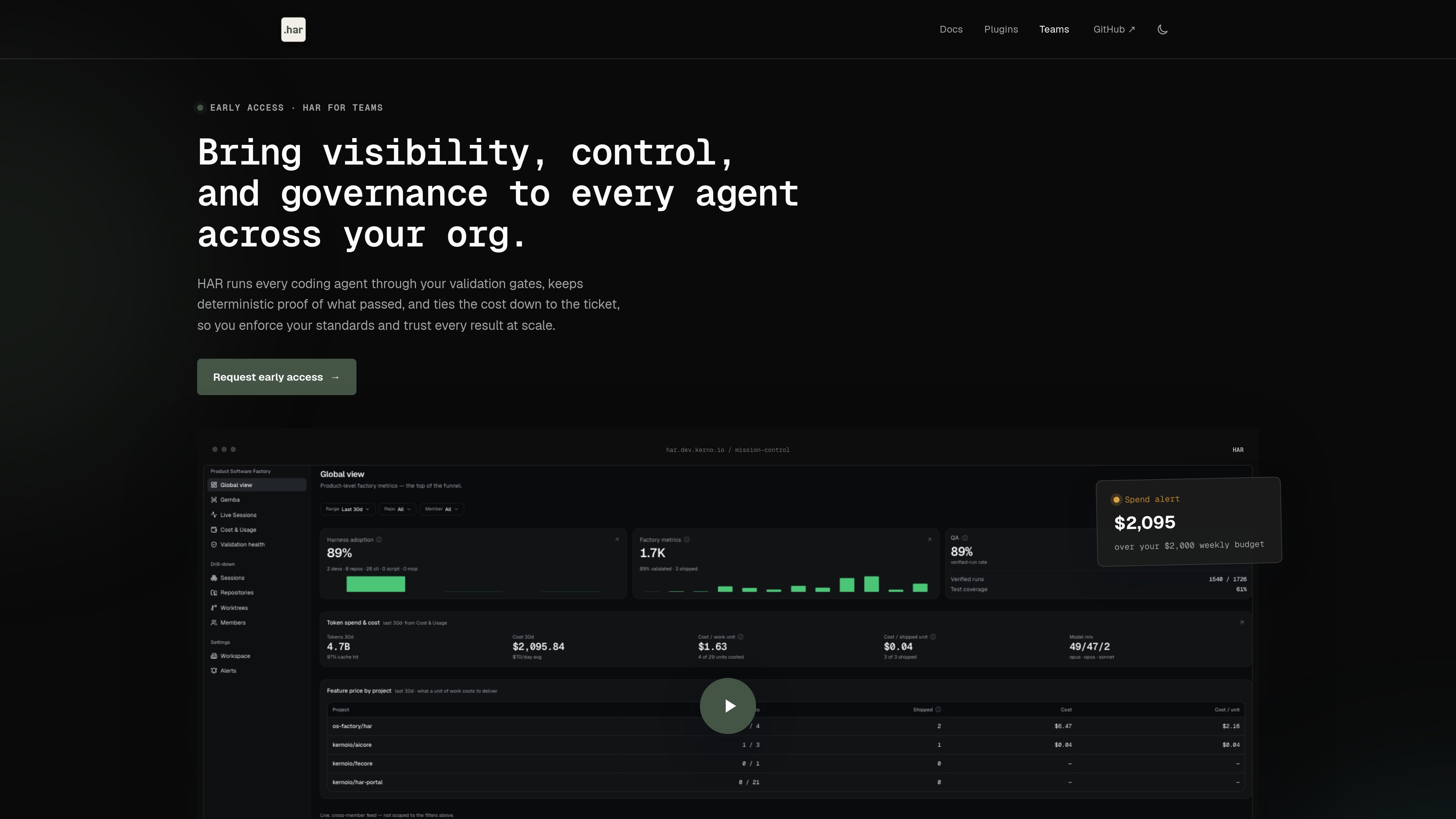
HAR for teams is a shared control layer for running coding agents across an organization. It builds on the open HAR core and adds Mission Control features for visibility, cost attribution, and governance so teams can manage many agent runs in one place.
The product is aimed at organizations that want each agent run to follow the same validation gates, produce proof of what passed, and keep spend tied back to the ticket. The source also describes it as an early-access offering with shared workspaces, roles, alerts, and security controls for team use.
Attribute token and dollar spend to the ticket, then roll usage up by model, repository, and teammate so cost reporting can be reviewed at the level teams actually manage work.
Show where agent work passes or drops off with a stage funnel and per-session matrix, plus the exact tree each run validated for review and auditability.
Compare higher-performing contributors with the rest of the team on throughput, efficiency, and pass rate, giving managers a concrete basis for coaching and process review.
Monitor every agent, run, and preview URL in one live organization-wide view, including worktrees and session status.
Support org-scoped workspaces with Owner, Admin, and Member roles, invites, and per-member adoption and cost tracking.
Send email alerts when spend or harness failures cross thresholds you set, helping admins catch overages and broken runs quickly.
Centralize many agent runs in a shared operational view so engineering leaders can see live sessions, worktrees, and preview URLs without checking separate machines or logs.
Track what each run cost and roll spend up by ticket, model, repository, or teammate when you need a clearer picture of agent usage across the org.
Use validation gates, session verification, and validated tree hashes to check that a run completed the project’s required tests before handoff.
Set up roles, invites, SSO/SAML, and org-scoped workspaces so different teams can share the system without exposing everything to everyone.
Watch for budget overruns or harness failures with alerts that email admins when a threshold is exceeded.
HAR is an open-source framework for multi-agent coding workflows. The docs describe it as agent-agnostic and extensible, with a CLI, MCP server, harness runtime, and Mission Control for visibility across runs.
The quick start begins with "har onboard," which walks through telemetry, Mission Control, optional plugins, and parallel agent slots before scaffolding the .har/ folder and ADAPT-PROMPT.md. You can also use the manual init commands if you prefer to configure pieces separately.
The team page says agents run through validation gates and that completion records the exact validated tree hash. The docs also describe quick verification and a full completion gate that can include unit tests, lint, readiness checks, browser E2E, and other project-defined stages.
Mission Control is described as a local dashboard for every repository, worktree, run, validation, and artifact, and the enterprise page adds global fleet observability, live sessions, and preview URLs across the organization.
The enterprise page says HAR for teams is in early access. The pricing URL in the collected evidence returns a 404 page, so no public pricing details are available from the source content.

SonOf connects to your repo and PM tool, audits your codebase, and turns approved work into shipped tickets with senior engineering review.

ByteAsk is a terminal-first AI coding agent for C and C++ that edits repos and verifies changes with compilers, debuggers, sanitizers, and tests.

CreateOS Sandbox is an isolated compute environment for running code and agent workloads in Firecracker micro-VMs with private networking and SDK, CLI, or MCP control.

hob is an independent workspace for coding agents, with local control over sessions, terminals, history, routing, and follow-up work.

Manta AI is an autonomous web app testing tool that maps app behavior, catches regressions, and generates tests from a URL, no scripts or selectors needed.

Ghost is a terminal-based AI assistant for chatting, code generation, and CLI tasks. Includes free models, supports Linux, macOS, Windows, and is open source.