

LocalPDF
LocalPDF is a native macOS app to chat with your PDFs using Apple Intelligence entirely on-device. Offline, no cloud analysis, private answers.
What is LocalPDF?
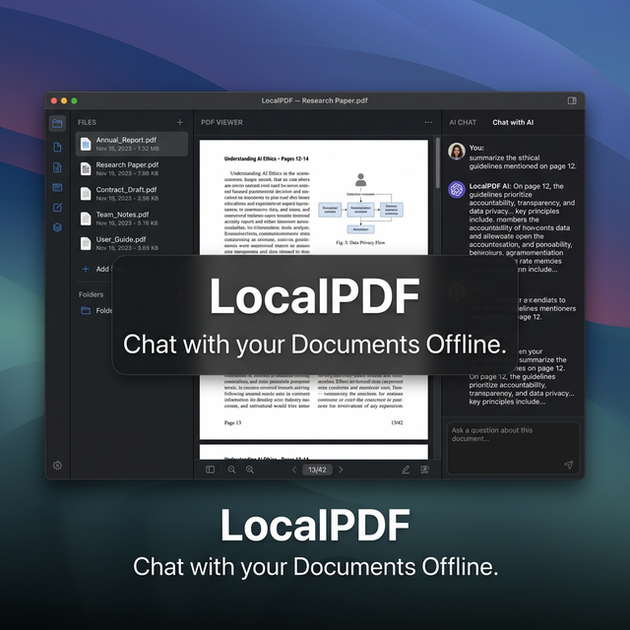
LocalPDF is a native macOS application that lets you chat with your documents using Apple Intelligence while keeping document processing entirely on-device. It is designed for people who want AI-assisted answers from their own files without sending data to the cloud.
The app analyzes supported file types locally on your Mac and provides intelligent responses with real-time streaming. It’s positioned as an offline “copilot” for private documents such as legal, financial, and personal files.
Key Features
- 100% local processing on macOS (offline use): Document analysis runs on your Mac with no cloud analysis and no API calls mentioned, so your files are not sent to remote services.
- Apple Intelligence–powered analysis: Uses Apple’s Foundation Models and NaturalLanguage embeddings to interpret document content and generate responses.
- Real-time streaming answers: Responses are delivered with streaming for interactive Q&A rather than waiting for a single finished output.
- Multi-format local knowledge base: Import files including PDF, TXT, MD, CSV, JSON, DOC, and DOCX to create a local set of documents you can query.
- macOS-native performance: Built with SwiftUI and Apple native frameworks, and described as avoiding Electron-style wrappers for responsive performance on Apple Silicon.
- LocalPDF Pro for expanded usage: The Pro plan is described as offering unlimited PDF uploads, on-device vector search, and the same Apple Intelligence AI chat with 100% offline behavior.
How to Use LocalPDF
- Download LocalPDF for macOS (provided as a .dmg file).
- Install and open the app, then import your documents in the supported formats (PDF, TXT, MD, CSV, JSON, DOC, DOCX).
- Start an AI chat about your documents inside the app; answers are generated locally using Apple Intelligence with streaming output.
- Choose Pro if needed: LocalPDF Pro offers the features listed for expanded document analysis, including unlimited PDF uploads and on-device vector search.
Use Cases
- Answer questions about a legal document: Import PDFs or DOC/DOCX files and ask questions to find relevant information within the text while keeping processing on your Mac.
- Review financial statements offline: Load CSV/JSON or PDF statements into a local knowledge base and use chat to summarize or locate details without relying on cloud services.
- Work with mixed-format personal notes: Combine MD/TXT notes with PDFs and query across formats to retrieve specific passages or themes.
- Explore data from structured files: Import CSV or JSON and ask questions that reference the contents of those files using local embeddings and on-device analysis.
- Build a private document library for recurring research: Keep files imported on-device and repeatedly ask follow-up questions as you refine your understanding.
FAQ
-
Is LocalPDF offline? Yes. The site states it operates completely offline and that your data stays on your Mac.
-
Does LocalPDF send documents to the cloud? The site describes a “no cloud” approach and “absolute privacy guarantee,” stating that sensitive files never leave the local drive.
-
Which file formats does LocalPDF support? It lists support for PDF, TXT, MD, CSV, JSON, DOC, and DOCX.
-
What is included in LocalPDF Pro? Pro is described as including unlimited PDF uploads, on-device vector search, and Apple Intelligence AI chat, while remaining 100% offline.
-
What macOS technologies does the app use? The site says the app is built with SwiftUI and Apple native frameworks, and that it uses Apple’s Foundation Models and NaturalLanguage embeddings for on-device analysis.
Alternatives
- Offline document question-answering tools: Tools that run locally to search and chat over local PDFs/notes can serve a similar purpose; the key difference is whether they are macOS-native and whether processing is fully local/offline.
- Desktop knowledge-base apps with local search: Apps that index documents locally and let you retrieve answers can be a comparable workflow, typically focusing on search or retrieval rather than Apple Intelligence–style chat.
- General AI chat clients with local document upload (if available): Some clients support uploading documents, but users should verify whether they truly keep processing on-device/offline, since cloud-based options may differ in privacy.
- Privacy-focused PDF reader and annotator workflows: For users who mainly need to locate information within PDFs (rather than conversational Q&A), annotation and search-centric tools can be an adjacent alternative.
Alternatives

Jenni
Jenni is an AI workspace to read PDFs, draft essays and papers, and generate in-text citations in 2.6k+ styles.

Lasso
Lasso is an AI-first PIM for ecommerce teams that enriches product attributes and descriptions, processes supplier data, and monitors competitors via app or API.

Struere
Struere is an AI-native operational system that replaces spreadsheet workflows with structured software—dashboards, alerts, and automations.

AI PDF Summarizer
An AI-powered tool that summarizes PDF documents quickly and efficiently, providing clear insights and allowing users to interact with the content.

garden-md
Turn meeting transcripts into a structured, linked company wiki with local markdown and an HTML browser view. Sync from supported sources.

Falconer
Falconer is a self-updating knowledge platform for high-speed teams to write, share, and find reliable internal documentation and code context in one place.