

Memory Sync
Memory Sync lets you use one editable Memory.md to sync long-term context and preferences across ChatGPT, Claude, Gemini, Grok, Kimi, Mistral, and Copilot.
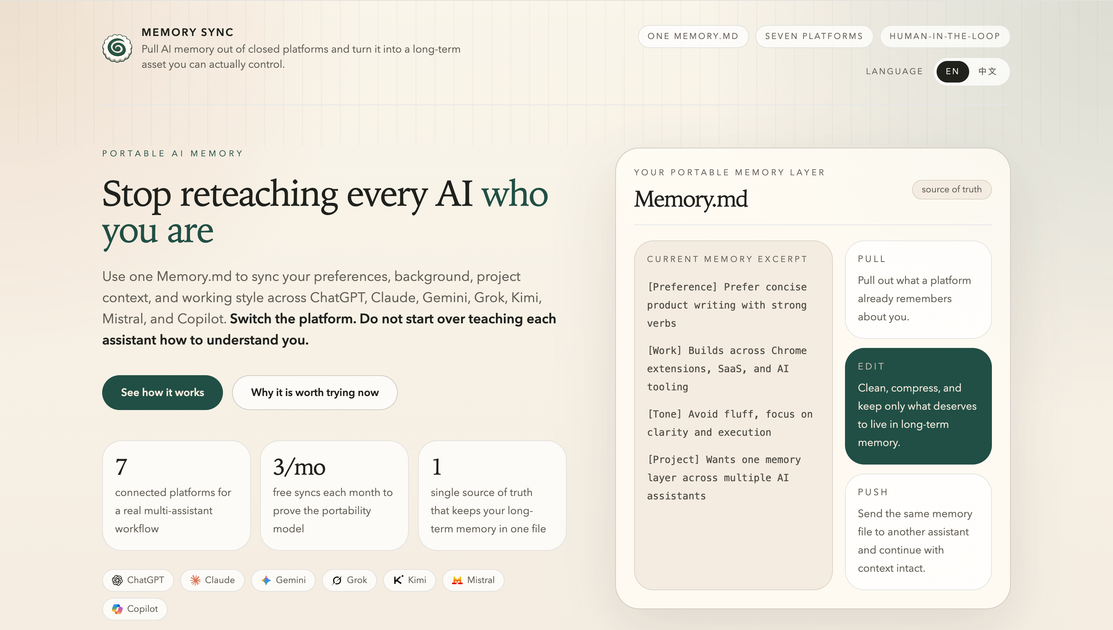
What is Memory Sync?
Memory Sync is a portable memory layer built around a single editable file called “Memory.md”. Its core purpose is to help you reuse the same long-term context—such as preferences, background, project context, and working style—across multiple AI assistants.
Instead of rebuilding your context from scratch each time you switch platforms, Memory Sync provides a “Pull / Edit / Push” workflow that moves your curated memory document between supported AI environments.
Key Features
- One shared “Memory.md” as your single source of truth for long-term preferences and context you want to keep across assistants.
- Pull memory from supported platforms so you can retrieve what a platform already remembers about you and bring it into your control.
- Edit and curate the memory in Memory.md by refining content, removing noise, and keeping only what should persist.
- Push the same Memory.md to another assistant so context transfers while the underlying model or platform changes.
- Browser extension workflow for syncing that opens the target platform, injects the sync prompt, tracks sync state, and manages Memory.md during the sync process.
- Visibility into per-platform sync status, so you can see where syncing has been completed.
How to Use Memory Sync
- Install the extension and start with your first sync flow.
- Pull: connect a source assistant (e.g., ChatGPT, Claude, Gemini, Grok, Kimi, Mistral, or Copilot) to retrieve the relevant memory excerpt into Memory.md.
- Edit: open Memory.md and refine the document into a clean, consolidated memory layer (remove noise, keep the instructions and context you actually want).
- Push: send the same Memory.md to a different assistant, then continue your work with the new platform using the preserved context.
The workflow is semi-automated: the extension handles navigation, prompt injection, and sync state, while you review and confirm what gets synced.
Use Cases
- Switching between multiple AI assistants for the same project: pull your established project context from one assistant, edit it once in Memory.md, and push it to another so you don’t re-explain goals and constraints.
- Maintaining consistent writing and work preferences: extract preferences (for example, how you want responses formatted and what tone to use), consolidate them in Memory.md, then reuse them whenever you change platforms.
- Reducing “amnesia” when starting new chats in different tools: keep a curated long-term memory file that travels with you, so new windows in different assistants start with the same foundation.
- Curating what should persist across models: instead of accepting a platform’s inferred long-term memory, rewrite and trim Memory.md to decide what remains and what gets removed.
- Migrating incrementally without rebuilding from zero: perform a first real cross-platform sync today by pulling from one assistant, editing once, and pushing to another while you keep control of the content.
FAQ
Which AI platforms does Memory Sync support?
The site states Memory Sync supports 7 major AI platforms: ChatGPT, Claude, Gemini, Grok, Kimi, Mistral, and Copilot.
What is “Memory.md”?
Memory.md is the editable memory document used as the single source of truth for your long-term context. Memory Sync pulls memory content into this file, lets you refine it, and pushes the same file to other assistants.
Does the extension automatically decide what to sync?
No. The extension manages the syncing process (navigation, prompt injection, sync state), but the workflow is described as human-in-the-loop: you review and confirm the content that gets sent.
How does the “Pull / Edit / Push” workflow work?
- Pull retrieves a memory excerpt from a platform.
- Edit consolidates and cleans it in Memory.md.
- Push sends the same Memory.md to another assistant.
Is there a limit on syncing?
The page mentions “3 free syncs each month” and “Unlimited syncs for Pro users.” Specific details beyond that are not provided.
Alternatives
- Manual copy/paste of instructions and context: you can recreate a tailored prompt or preference block each time you switch assistants, but you don’t get an editable cross-platform memory file.
- Export/import features offered by individual platforms: some assistants allow exporting chat history or data, but the source here emphasizes that export alone is often not a reusable, editable memory layer.
- General-purpose prompt management tools (template libraries): these can standardize recurring instructions, but they don’t provide the same Pull/Edit/Push memory portability workflow described for Memory Sync.
Alternatives

Struere
Struere is an AI-native operational system that replaces spreadsheet workflows with structured software—dashboards, alerts, and automations.

garden-md
Turn meeting transcripts into a structured, linked company wiki with local markdown and an HTML browser view. Sync from supported sources.

Falconer
Falconer is a self-updating knowledge platform for high-speed teams to write, share, and find reliable internal documentation and code context in one place.

BookAI.chat
BookAI allows you to chat with your books using AI by simply providing the title and author.

skills-janitor
Audit, track usage, and compare your Claude Code skills with skills-janitor—nine focused slash commands and zero dependencies.

BeFreed
BeFreed is a personalized audio learning platform that transforms knowledge into engaging audio content tailored for individual learning preferences.