

Mixels.ai
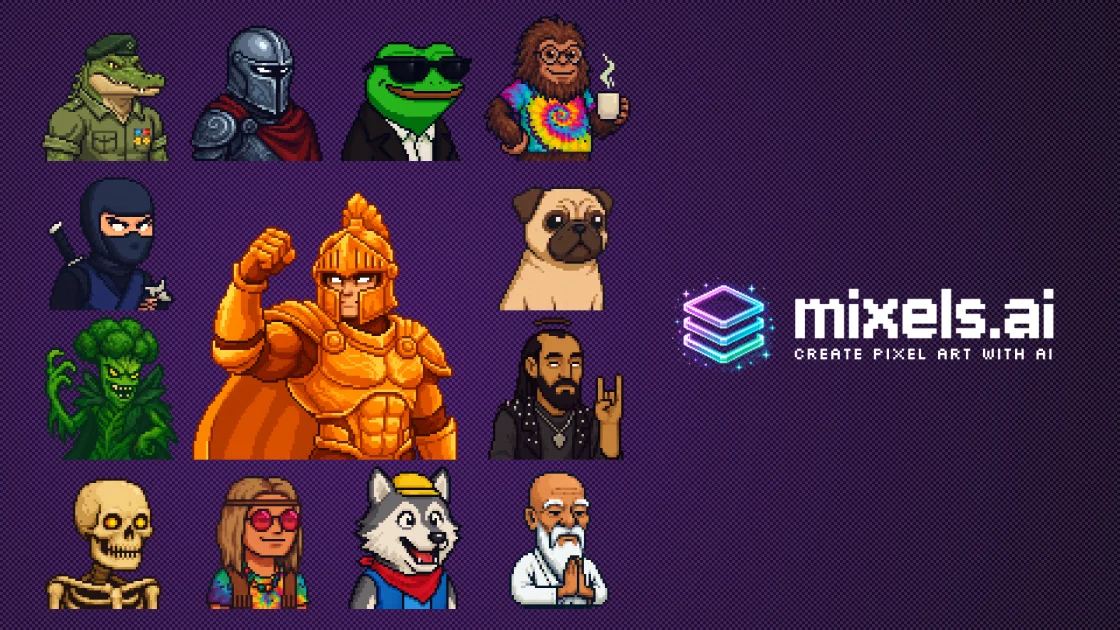
Mixels.ai is an AI pixel art generator creating grid-aligned 8-bit characters, sprites & avatars from prompts or photos. Browser editor + PNG export.
What is Mixels.ai?
Mixels.ai is an AI-powered pixel art generator focused on producing grid-aligned, 8-bit style characters, sprites, and avatars. It’s designed for game developers, digital artists, and retro enthusiasts who want pixel art that keeps a consistent look and aligns to a pixel grid.
Rather than functioning like a general-purpose image generator, Mixels.ai emphasizes pixel-art characteristics such as limited color palettes and sprite-ready output. The goal is to help you generate assets that can be used in games, social media, and other digital projects.
Key Features
- AI character generator with customizable traits: Generate pixel art characters by specifying features such as species, clothing, accessories, colors, and expressions.
- Photo to pixel art converter: Turn an image or photo into pixel art with “perfect grid alignment” for a consistent sprite-style result.
- Free studio editor (browser-based): Edit or refine generated art and create from scratch using a pixel editor with layers, brush tools, selections, palette management, and export options.
- Game-ready sprite export: Export pixel art as PNG with transparent backgrounds, suitable for use in game engines like Unity, Godot, and GameMaker.
- Consistent art style across generations: Generate multiple characters or collections (such as enemy sprites or NPC sets) while maintaining a consistent pixel-art style.
- Metadata and organization for character libraries: Support organizing character assets with attributes like species, colors, accessories, and custom tags.
How to Use Mixels.ai
- Generate pixel art: Use the AI character generator or the photo-to-pixel converter to create a starting sprite/character/avatar.
- Refine in the Studio editor: Open the result in the browser-based editor to adjust details using layers, brush and selection tools, and a custom color palette.
- Export for your project: Export the final sprite as a PNG with transparency for direct use in a game engine or other digital workflow.
- Organize your outputs: Use metadata support to keep your created characters organized by their attributes and tags.
Use Cases
- Indie game sprite creation: Produce character sprites, enemies, NPCs, and item art with consistent grid alignment and a sprite-friendly PNG workflow.
- Photo-to-avatar pipelines: Convert photos into pixel-art avatars for profile pictures or community content where a retro style is desired.
- Avatar and character set generation: Generate collections of characters with shared styling so you can expand a cast (e.g., a town of NPCs) without switching art direction.
- Streaming and content assets: Create custom pixel emotes or channel visuals that match an 8-bit aesthetic for overlays and social graphics.
- Pixel art collections for personal projects: Create posters, album covers, or other digital artworks using AI generation combined with manual editing in the studio.
FAQ
-
Does Mixels.ai specialize in pixel art rather than general image generation? Yes. The site describes Mixels.ai as focused on authentic pixel art with proper grid alignment and sprite-style output.
-
What image format can I export from the Studio editor? The Studio editor supports exporting PNG files, including transparency.
-
Can I edit AI-generated pixel art after generating it? Yes. The Studio editor is described as a full-featured browser-based editor with layers, brush tools, palette management, and undo/redo history.
-
What can I generate besides characters? The page indicates you can create game-ready sprites and avatars, including assets derived from photos using the photo-to-pixel feature.
-
Is the editor browser-based or desktop software? The page describes the Studio editor as browser-based.
Alternatives
- Dedicated pixel art editors (desktop/web): Tools focused on manual pixel creation and editing can be used after you generate ideas elsewhere; they typically shift the workflow toward hand-authoring rather than AI-first generation.
- General AI image generators with manual pixelization: General tools can create images quickly, but they won’t inherently guarantee grid-aligned pixel art or sprite-ready formatting, so you may need additional steps to achieve consistent pixel-grid output.
- Sprite/asset pipelines within specific game engines: Some developers prefer engine-centric workflows for sprite preparation; these focus on importing and arranging assets, while Mixels.ai focuses on generating and editing pixel-art source assets.
Alternatives

Mixels.ai
Mixels.ai is an AI-powered pixel art generator that allows users to convert images into pixel art and create 8-bit style avatars with perfect grid alignment.
GameGrad
GameGrad turns PDF class notes into arcade study games, with quiz questions from your notes when you lose to keep you learning.

Terraforge: Alchemy Craft Game
Tier-based puzzle game: drag and mix elements to discover new creations, saved in an in-app grimoire. Optional Master Forger hints; offline + iCloud sync.

DailyPlay.ai
Turn passive visitors into loyal customers with DailyPlay.ai—create personalized, data-driven mini games built for your brand’s engagement goals.

Wallie
Wallie is an open-source AI streamer framework with real-time vision, persona profiles, chat, TTS, and avatar output for VTuber-style streams.

MOG BATTLE | Who Mogs Who?
MOG BATTLE | Who Mogs Who? is a head-to-head attraction ranking app with an ELO-style rating, real votes, and a global leaderboard.