

MusicLib
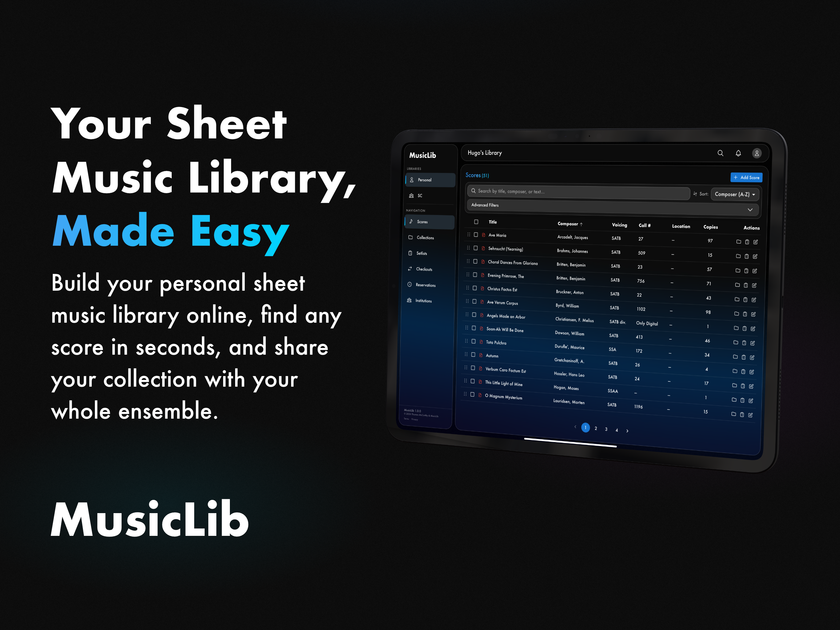
MusicLib is a free online sheet music library app to organize, search with OCR, track score checkouts, build setlists, and share a catalog.
What is MusicLib?
MusicLib is a web-based sheet music library app for organizing and managing digital sheet music collections. It helps musicians, choirs, ensembles, and institutions catalog scores, make them searchable, and share access with a group.
The core purpose of MusicLib is to replace manual spreadsheet-style tracking and reduce friction around finding the right score, checking which copies are in circulation, and assembling setlists for performances—whether you manage a personal library or a shared ensemble collection.
Key Features
- Upload and organize your library (PDFs with metadata or CSV, plus forScore import): build a searchable collection from files you already have.
- Instant search with OCR-backed PDFs: titles, composers, arrangers, voicing, and other score details can be searched, and OCR reads text inside your PDFs so score text is searchable.
- OCR built in: extracts text from uploaded PDFs automatically so you don’t need separate conversion steps.
- Track checkouts and returns: record which physical scores are out, set due dates, and view overdue items.
- Build and export setlists: drag and drop scores into rehearsal and concert order, add notes and performance dates, and export directly to forScore.
- Reserve workflows for group libraries: members can request scores they need for upcoming performances, and directors approve and track requests in one place.
- Nested collections for organization: group scores by how you think about your music (e.g., season, voicing, event).
- Group roles and permissions: directors manage, contributors add/edit, and members browse/check out with role-specific controls.
- Shared catalog updates for teams: when a score or its details are updated, the group sees changes instantly.
- Portable data export/import: export the entire library to a single file and import from forScore backups.
How to Use MusicLib
- Create a free account (no credit card required) using email, Google, or Apple ID.
- Start your library by uploading score PDFs, importing from forScore via a backup file, or adding metadata manually; OCR runs automatically for searchable text.
- For a group or institution, create an organization and invite members (by email) so everyone can access the shared catalog.
- Organize scores into collections, then create setlists by dragging scores into rehearsal/concert order and adding notes or dates.
- Use the checkout and reservations features to manage which physical copies are out, track due dates, and approve member requests.
Use Cases
- A choir or ensemble managing a shared catalog: directors and contributors maintain the shared list of scores and metadata while members can browse and check out items.
- A performance planner assembling setlists: rehearsal and concert order are built from the score library, with notes and performance dates, then exported to forScore.
- A musician converting a forScore workflow into a searchable library: import a forScore backup to restore the library, use OCR to make score text searchable, and keep your personal collection accessible in the cloud.
- An institution tracking physical copies: assign due dates, see what’s overdue at a glance, and reduce follow-up after rehearsals.
- A seasonal organization organizing by events or voice parts: build nested collections (for example, by season, SATB voicing, or upcoming concerts) so members can quickly find relevant repertoire.
FAQ
-
Does MusicLib require installation? MusicLib is available through the web, and it also offers a native iPad app. The site describes browser access and an iPad app; it also notes there’s no software to install and no files to sync.
-
What file types does MusicLib use for uploading scores? The site describes uploading PDF scores and supports import from forScore backups. It also mentions bulk import via CSV and adding metadata manually.
-
How does MusicLib make my scores searchable? It supports search by score details such as title, composer, arranger, and voicing. It also includes built-in OCR that reads text within uploaded PDFs so that score text is searchable.
-
Can groups control what different members can do? Yes. The product describes role-based controls for directors (manage the library), contributors (add and edit), and members (browse and check out).
-
Can I move my library data later? MusicLib supports exporting your entire library to a single file, and it also supports importing from forScore backups.
Alternatives
- Personal sheet music library software (local or cloud): alternatives that focus on cataloging and organizing personal PDFs may help you store and search scores, but may not provide shared checkout/reservation workflows for ensembles.
- Spreadsheet-based inventory + setlist planning tools: if your current workflow uses spreadsheets to track copies and a separate process for setlists, you may recreate functionality, but you’d likely lose the built-in OCR search and ensemble role workflows.
- forScore-based library management only: staying entirely within forScore may simplify your setlist workflow, but you would not gain MusicLib’s catalog organization, shared-library permissions, and OCR-backed searchable library described on the MusicLib site.
- General-purpose digital asset management (DAM) tools: storing PDFs in a DAM can centralize files, but it may require more manual setup to enable music-specific search fields, setlist ordering, and checkout tracking.
Alternatives

Lasso
Lasso is an AI-first PIM for ecommerce teams that enriches product attributes and descriptions, processes supplier data, and monitors competitors via app or API.

Codex Plugins
Use Codex Plugins to bundle skills, app integrations, and MCP servers into reusable workflows—extending Codex access to tools like Gmail, Drive, and Slack.

Struere
Struere is an AI-native operational system that replaces spreadsheet workflows with structured software—dashboards, alerts, and automations.

garden-md
Turn meeting transcripts into a structured, linked company wiki with local markdown and an HTML browser view. Sync from supported sources.

Falconer
Falconer is a self-updating knowledge platform for high-speed teams to write, share, and find reliable internal documentation and code context in one place.

AI Song Maker
Create royalty-free songs effortlessly with our AI Song Maker and Music Generator.