

Nest Doorbell (Battery)
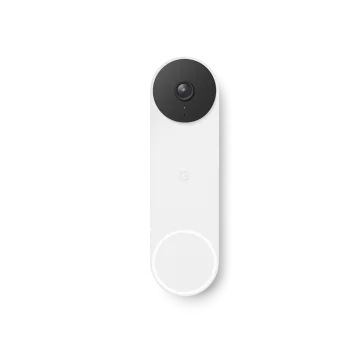
Nest Doorbell (Battery) is a battery-powered smart video doorbell that sends alerts and lets you view and speak to visitors in the Google Home app.
What is Nest Doorbell (Battery)?
Nest Doorbell (Battery) is a battery-powered video doorbell designed to help you see and respond to activity at your front door. It captures video and delivers alerts to your phone so you can check in when you’re away.
The doorbell uses built-in intelligence to help categorize what it detects (for example, people, parcels, animals, and vehicles) and can alert you accordingly. Depending on how you’re set up, it also supports speaking to visitors through a built-in speaker and microphone.
Key Features
- Battery-powered, no wires required: Built to work with almost any home setup, with an option to use existing doorbell wiring for a wired installation.
- Smart alerts by detected activity: The doorbell can distinguish between people, parcels, animals, and vehicles and send relevant alerts to help reduce guessing.
- Live view and look back: Use smart notifications to check what’s happening in real time and review events after you miss an alert.
- HDR and night vision: HDR is used to help with bright, high-contrast lighting, and night vision helps provide a clear image in low light and darkness.
- Vertical field of view (3:4 ratio): Designed to show people from head to toe and parcels left on the ground.
- Two-way communication: Built-in speaker and microphone let you talk and listen to visitors from anywhere, with a choice of pre-set responses.
- Works with Google Home app: The product requires the Google Home app for setup and management.
How to Use Nest Doorbell (Battery)
- Set up the doorbell using the included installation approach: choose battery (wire-free) installation or connect to existing doorbell wires for a wired installation.
- Install and configure in the Google Home app: the product requires the Google Home app to get started and to manage alerts and viewing.
- Pair with compatible devices for alerts/chimes: with battery installation, you’ll receive alerts on your phone and on Google Assistant-enabled speakers or displays when someone rings the doorbell; you can also pair with Nest Mini to get an audible chime.
- Use alerts for viewing and responding: when notified, open the app to check the live view or look back at recorded event video (depending on your subscription status).
Use Cases
- Answer your door while away: Receive a ring or activity notification, then use the two-way audio to speak to visitors in real time or send a pre-set response.
- Monitor deliveries (parcels left outside): Get parcel-related alerts and use the vertical field of view to see parcels left on the ground.
- Reduce uncertainty about who (or what) is at the door: When alerts come in, the system differentiates between people, animals, and vehicles to help you decide what to do next.
- Check missed activity later: If you miss a notification, review event video using the free event history window; longer look-back is available with Nest Aware.
- Handle different lighting conditions: Use HDR and night vision to get clearer images when lighting is bright/high-contrast or when it’s dark outside.
FAQ
-
Is Nest Doorbell (Battery) wired or wire-free? It’s battery-powered and supports a wire-free installation, and it can also be installed using existing doorbell wiring (wired installation).
-
Does Nest Doorbell (Battery) record 24/7 video history? No. The source states it cannot continuously record 24/7 video history. For 24/7 recording, the site points to other Nest cameras and a wired-only doorbell with Nest Aware Plus.
-
How do I receive alerts and view events? You can receive alerts on your phone, and with Google Assistant-enabled speakers or displays when installed on battery. The page also indicates you can check live or look back after an alert.
-
How does the doorbell decide what to alert on? The device can tell the difference between people, parcels, animals, and vehicles and triggers alerts based on activity.
-
Do I need the Google Home app? Yes. The page explicitly says the Google Home app is required.
Alternatives
- Wired video doorbells (24/7-capable setups): If your priority is continuous 24/7 recording, consider a wired-only doorbell option and a compatible Nest Aware Plus subscription, as referenced on the page.
- Other battery-powered home cameras: Battery-powered security cameras can provide similar “check from anywhere” workflows, but may differ in field of view shape and how event history/subscriptions work.
- Smart doorbell systems with different detection categories: Other smart doorbells may focus on motion detection or person-only detection; compare whether they categorize people vs parcels vs animals vs vehicles.
- Standalone indoor/outdoor cameras with app alerts: If you don’t need doorbell-style two-way communication, a camera system can still provide event alerts and look-back viewing, though visitor interaction may differ.
Alternatives

Tavus
Tavus builds AI systems for real-time, face-to-face interactions that can see, hear, and respond, with APIs for video agents, twins & companions.

Scriptmine
Scriptmine turns real audience conversations into camera-ready scripts with community questions and trending angles—helping you write, edit, and record faster.

Bezel
Mirror iPhone to your Mac with wireless AirPlay or USB, plus recording and screenshot tools with bezel and background.

Capso
Capso is a free, open-source macOS app to capture, annotate, record MP4/GIF, and extract text with OCR—built with Swift 6 and SwiftUI.

Naoma AI
Naoma AI runs personalized, conversational product demos 24/7 in multiple languages—qualifying leads in real time and logging to your CRM.

ProdShort
ProdShort automatically records online meetings and converts selected segments into short, captioned clips with custom branding for fast social sharing.