

Cockpit
Cockpit is an operating system for AI agents with native file system, inbox/contacts/calendar tools, and persistent memory—keep control while orchestrating research and outreach.
What is Cockpit?
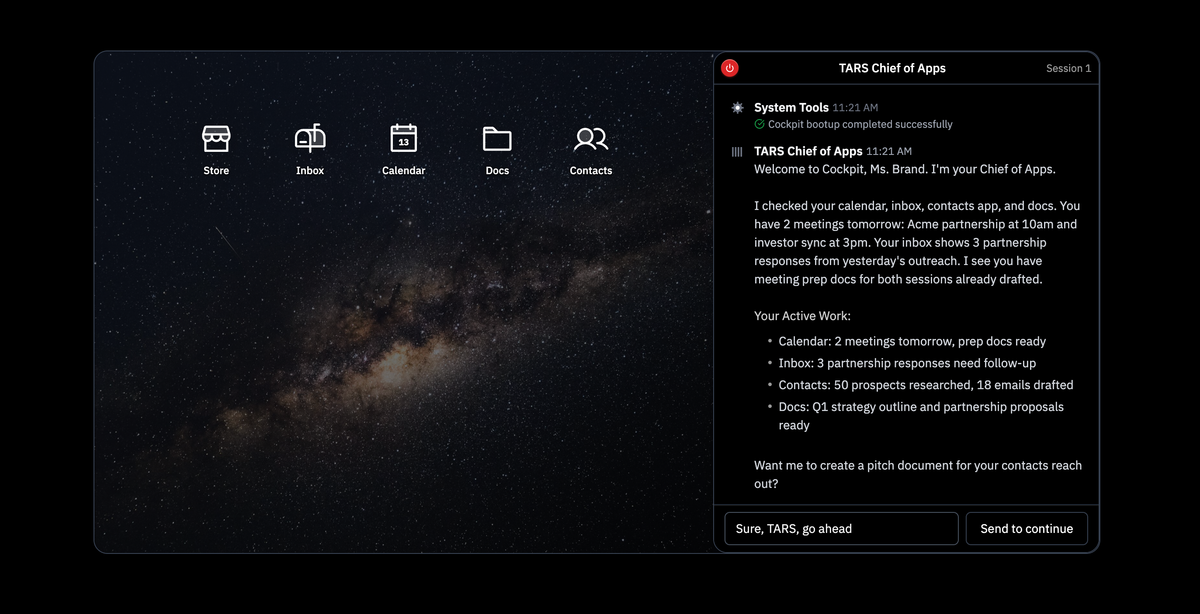
Cockpit is an operating system for AI agents that is designed to let agents do work end-to-end while you maintain control. Instead of using a desktop-like, stateless workflow, Cockpit provides agents with their own “native” environment—so they can access the tools and data they need and carry tasks forward over time.
The core purpose is orchestration: agents can handle activities such as research, outreach, and follow-ups, while Cockpit coordinates where that work happens (for example, using an inbox/contacts/calendar-style set of system tools) and supports a persistent operating context for ongoing sequences.
Key Features
- Native file system, inbox, contacts, and calendar: Agents can access these system tools directly, rather than relying on a human-style “clicking through apps” flow.
- Infinite memory / persistent state: Each agent run can remember prior conversations and signals, supporting continuity across a work sequence.
- Cloud-native orchestration: Cockpit is described as running 500 conversations in parallel, indicating support for scaled agent workloads.
- Headless agents (no physical hardware): Agents run without a required desktop or manual interaction, oriented toward background execution.
- Multi-channel outreach and follow-up workflows: Example sequences include generating emails, sending LinkedIn connection requests and DMs, and scheduling follow-ups based on conditions such as whether a response occurs within a time window.
- Document workspace for agent-driven outputs: Agents can create and manage documents (for example, a revenue narrative/pitch document) and collaborate around them as part of the workflow.
How to Use Cockpit
- Start by deploying your first AI agent in Cockpit.
- Provide or connect the work context the agent needs through the available system tools (for example, calendar, inbox, contacts, and documents).
- Define the task goal (such as researching prospects and preparing outreach materials).
- Let the agent execute a sequence across channels (e.g., draft emails, prepare outreach documents, send connection requests/messages) while scheduling follow-ups.
In the example shown on the site, the agent boots, checks the user’s calendar/inbox/contacts/docs, reports active work, and asks how it should proceed with creating a pitch document.
Use Cases
- Research + outreach sequencing for growth teams: An agent can research prospects, draft outbound messages, and run a sequence that includes email plus LinkedIn connection and DM steps.
- Meeting and follow-up preparation: Using calendar context, an agent can identify upcoming meetings and locate or draft preparation documents, then proceed to outreach follow-ups as needed.
- Personalized pitch document creation: Based on contacts and prior outreach signals, an agent can generate a pitch or revenue narrative document and attach or link it as part of the outbound workflow.
- Multi-step follow-ups driven by response timing: The example describes scheduling follow-ups if an email is not answered within a specified number of days and then sending additional messages if a LinkedIn request is accepted.
- Centralized “source of truth” narrative building: The site describes a content layer for building a master revenue narrative in Docs, then distributing that narrative consistently across channels.
FAQ
-
Is Cockpit designed for agents that use a desktop (mouse/keyboard) workflow? No. The site contrasts “stateless” desktop-like agents (one screen at a time) with Cockpit’s agent-first OS approach that provides native access to tools like inbox/contacts/calendar.
-
How does Cockpit handle memory between steps? Cockpit is described as having persistent state (“infinite memory”), so agents can remember prior conversations and signals across a workflow.
-
Can agents run without a physical machine? Yes. The site describes headless agents running at scale without requiring physical hardware.
-
What kinds of outputs can agents produce? From the on-page examples, agents can create outreach messages (emails, LinkedIn DMs) and generate documents (such as a “Revenue Narrative” / pitch document).
-
Does the site describe pricing or specific integrations? No pricing, compatibility details, or specific third-party integrations are provided in the content shared here, so those details would need to be confirmed on additional pages or documentation.
Alternatives
- General-purpose workflow automation platforms: Tools that automate tasks across email/CRM/calendar can be used for similar outreach workflows, but they typically don’t provide an agent-specific operating system with native file/inbox/contacts/calendar access as described here.
- Agent frameworks with custom tool-building: Developers can build AI agent workflows using frameworks and connect tools themselves; this shifts responsibility for orchestration and persistence from the platform to the implementer.
- Desktop-based RPA or “app-clicking” agent approaches: These can automate research and outreach by interacting with user interfaces, but the source explicitly positions Cockpit as avoiding stateless, one-task-at-a-time, screen-bound execution.
- Document-and-CRM-centric sales enablement tooling: Systems focused on content management and CRM hygiene can support narrative consistency and outreach asset creation, but they may not orchestrate multi-channel agent execution with persistent agent state.
Alternatives

Struere
Struere is an AI-native operational system that replaces spreadsheet workflows with structured software—dashboards, alerts, and automations.

garden-md
Turn meeting transcripts into a structured, linked company wiki with local markdown and an HTML browser view. Sync from supported sources.

Tavus
Tavus builds AI systems for real-time, face-to-face interactions that can see, hear, and respond, with APIs for video agents, twins & companions.

Falconer
Falconer is a self-updating knowledge platform for high-speed teams to write, share, and find reliable internal documentation and code context in one place.

HiringPartner.ai
HiringPartner.ai is an autonomous recruiting platform with AI agents that source, screen, call, and interview candidates 24/7, reducing time-to-hire from weeks to as little as 48 hours.

AgentMail
AgentMail is an email inbox API for AI agents to create, send, receive, and search email via REST for two-way agent conversations.