OpenLogi icon

OpenLogi

OpenLogi is a native, local-first alternative to Logitech Options+ for supported Logitech devices, with button remapping, DPI and SmartShift control over HID++, and portable TOML settings.

OpenLogi

Overview

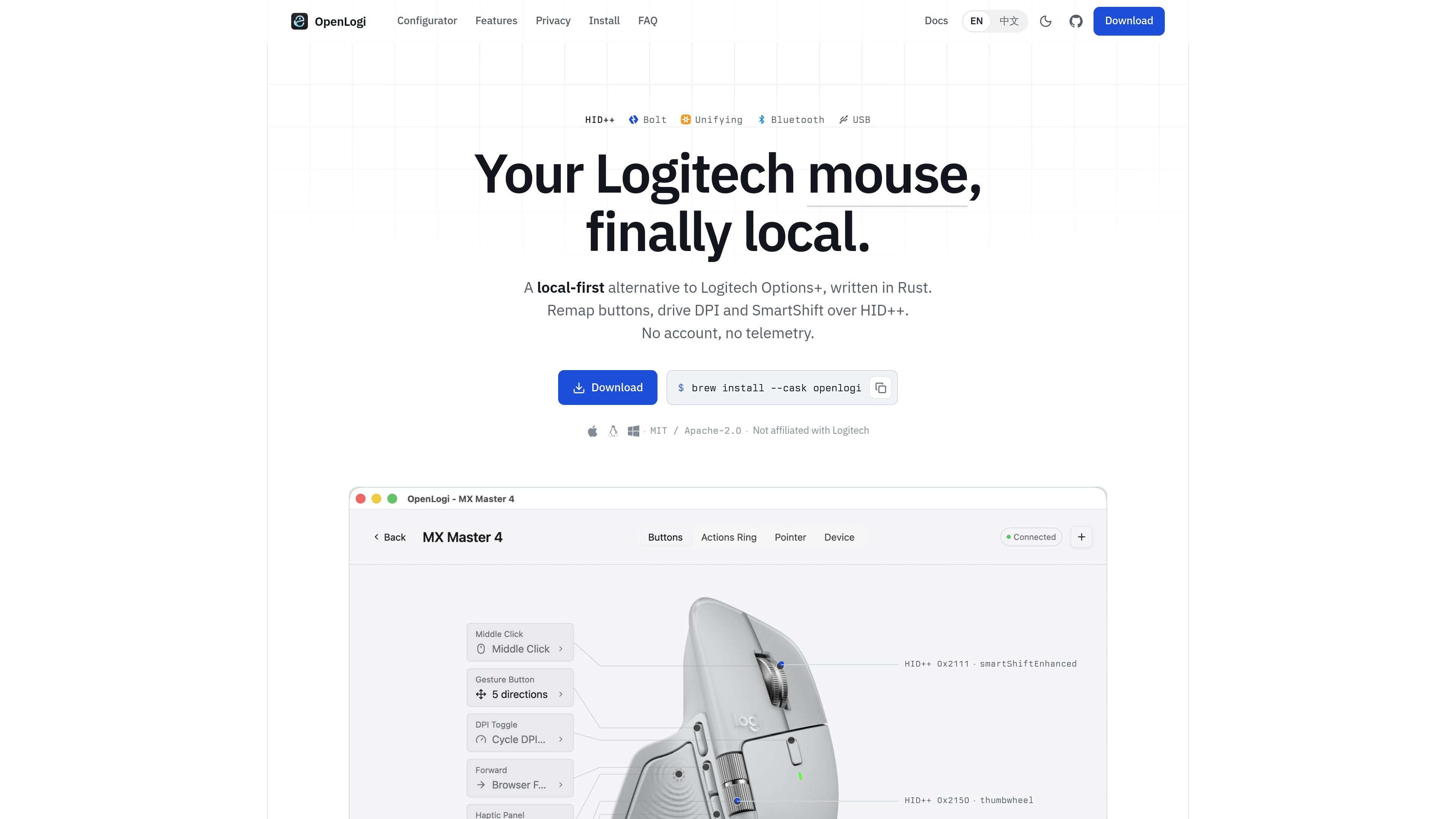
OpenLogi is a native desktop alternative to Logitech Options+ for Logitech devices. It is written in Rust and is built around local control: the app remaps buttons, drives DPI and SmartShift over HID++, and stores bindings in a plain TOML file rather than in an account-backed cloud profile.

The product page emphasizes that changes are sent directly to the device, with no account, no telemetry, and no cloud dependency. It also states that signed builds are available for macOS, Linux, and Windows, with installation options including Homebrew on macOS and platform-specific installers for the other operating systems.

Features

Button remapping

Rebind physical mouse and keyboard buttons to built-in actions such as Back, Forward, Middle Click, Mission Control, App Exposé, and browser navigation. The page also notes support for custom shortcuts, app launchers, and scripted actions.

DPI control and presets

Set pointer resolution and cycle through user-defined DPI presets. OpenLogi writes the changes directly to the sensor over HID++ rather than keeping the setting only in the app.

SmartShift control

Switch between ratchet and free-spin modes manually, or let the wheel change automatically based on scroll speed. The site identifies this as SmartShift control over HID++.

Local config file workflow

Manage devices through a local TOML configuration file. The page shows per-device bindings in config.toml, with settings keyed by the device or receiver identity.

Multi-connection support

Work with devices over Bolt, Unifying, Lightspeed, Bluetooth, or USB connections. The homepage describes OpenLogi as a local app that reaches Logitech hardware without requiring a receiver in every case.

Live device status

View paired devices and their battery or charge state in a live device list. The homepage shows this as a carousel-style overview of connected devices.

Use Cases

  • Customize everyday input shortcuts

    Set up a Logitech mouse or keyboard so the side buttons, wheel click, and other inputs trigger the actions you use most often, such as browser navigation or system controls.

  • Adjust sensitivity for precise pointer control

    Tune pointer speed for different screens or tasks by creating DPI presets and switching between them from the device.

  • Manage scroll behavior on compatible wheels

    Use SmartShift to move between ratchet and free-spin scrolling modes, or let the wheel switch automatically based on scroll speed.

  • Carry settings to a new system

    Keep the same mappings across machines by copying a single TOML file and reusing device-specific bindings on another computer.

  • Stay local instead of using cloud profiles

    Use a local desktop app when you want Logitech device configuration without an account, telemetry, or cloud-synced profiles.

Pros and Cons

Pros

  • Local-first design with no account and no telemetry.
  • Direct HID++ control for remapping, DPI, and SmartShift.
  • Settings are stored in a portable TOML file you own.
  • Supports signed builds for macOS, Linux, and Windows.
  • Works with Bolt, Unifying, Lightspeed, Bluetooth, and USB connections.

Cons

  • The site says per-application overlays are coming later, so app-aware profiles are not part of the current release.
  • Bolt pairing is included in the GUI, but Unifying and Lightspeed pairing are still in progress.
  • OpenLogi can conflict with Logitech Options+ and, on Linux, with Solaar when they try to access the same receiver.

FAQ

What is OpenLogi for?

OpenLogi is a native desktop app for remapping Logitech device buttons and adjusting controls such as DPI and SmartShift over HID++. Bindings are stored locally in a TOML file you own, and the app is designed to avoid accounts and telemetry.

Which platforms does it support?

The page says signed builds are available for macOS, Linux, and Windows. It also notes a setup walkthrough in the docs and recommends Homebrew on macOS, with signed installers available for each platform.

How are settings saved and moved between machines?

OpenLogi writes bindings to config.toml. Devices are keyed by physical identity, so you can copy that file to another machine and keep the same bindings as long as the device identity matches.

What devices and connection types does it work with?

OpenLogi drives Logitech devices over HID++ and supports Logitech Bolt, Unifying, Lightspeed, Bluetooth, and USB connections. The page also notes that Logi Options+ and, on Linux, Solaar can conflict with OpenLogi because only one app can own a receiver at a time.

Why does macOS ask for Accessibility permission?

The site says remapping of side buttons on macOS uses a CGEventTap, which requires Accessibility permission. HID++-based controls such as gesture button, thumb wheel, DPI, and SmartShift do not need that permission.

Quick Facts

Category
Device management
Platform
macOS, Linux, Windows
Primary workflow
Remap buttons and adjust DPI or SmartShift over HID++
Config format
config.toml
Connection types
Bolt, Unifying, Lightspeed, Bluetooth, USB
License
MIT / Apache-2.0