
Browser-based encounters
Encounter wild Pokémon during ordinary web browsing, then toss a Poké Ball to add a new friend to the collection.

Poke Finder turns web browsing into Pokémon collecting: encounter, catch, and organize nine generations with Shiny variants, Mega forms, and local storage.
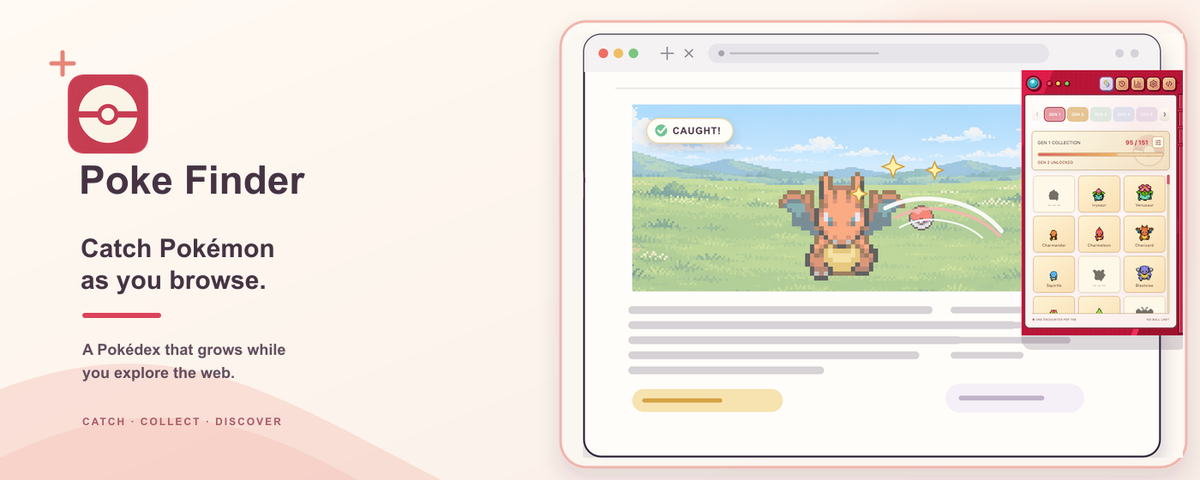
Poke Finder is a browser-based Pokémon collection experience that turns routine web browsing into a series of collectible encounters. Users find wild Pokémon, catch them with Poké Balls, and build a personal Pokédex rather than managing a separate game session.
The collection covers 1,025 species from Generations 1 through 9, with search and filtering tools for names, Pokédex numbers, types, and owned variants. Shiny Pokémon, Mega forms, achievement paths, and optional on-screen companions add additional ways to explore the collection. Data is stored locally on the device, with no sign-in required, and can be backed up for restoration in another profile.
Encounter wild Pokémon during ordinary web browsing, then toss a Poké Ball to add a new friend to the collection.
Track 1,025 species across nine generations, search by name or Pokédex number, and filter by type or owned variants.
Collect Shiny variants and find Mega Stones that unlock Mega forms in the Pokédex or on screen.
Place up to six caught Pokémon on the screen. They can wander, react, show emotions, and undergo Mega transformations.
Complete 26 achievement paths and view completion progress by generation, while each Pokémon record includes types, stats, abilities, evolution forms, and the date first encountered.
Keep the collection locally without signing in, export a backup for restoration in another profile, and switch between English and Vietnamese.
Keep Poke Finder active during ordinary research, reading, or other web sessions to add an occasional collecting activity without switching to a separate game.
Use the Pokédex search and filters to inspect owned species, check generation or type coverage, and identify remaining collection goals.
Pursue Shiny encounters, Mega Stones, and achievement paths when looking for objectives beyond catching standard species.
Place a small group of caught Pokémon on the screen for a more visible, companion-like browsing experience, or hide them when a distraction-free view is needed.
Export a local backup before changing profiles or devices, then use the restore workflow to recover the collection.
Poke Finder lets users encounter and catch Pokémon while browsing, then add them to a local Pokédex. The site describes a browser-based collection workflow with wild encounters and Poké Balls.
The collection includes 1,025 Pokémon species from Generations 1 through 9, along with Shiny variants and Mega forms.
The collection is saved locally on the device, and no account is required. Users can export a backup and restore it in another profile.
Yes. Users can bring up to six caught Pokémon onto the screen. The companions can wander, react, and display emotions while browsing.
The site states that Poke Finder can be switched between English and Vietnamese. It also includes settings to pause encounters and hide companions.

GameGrad turns PDF study material into quiz questions inside arcade games for active recall. Free tier for one PDF; Pro adds more uploads, questions, and explanations.

DailyPlay.ai is a behavioral growth platform using AI site scans and micro-games to boost engagement and conversions across web, mobile, and more.

ChessWoodie is a chess tactics training app based on the Woodpecker Method. Build pattern recognition, track speed and accuracy, and review missed tactics from your own games.

PixelForge turns a single photo into a game-ready 2D character sprite pack with a 4×4 sheet, transparent frames, direction strips, and looping walk GIFs for Godot, Unity, Phaser, GameMaker, and web games.

Loniva is a calm daily puzzle app for memory, attention, language, speed, logic, and focus on iPhone, iPad, and Android, with a free 7-day trial.

Mixels.ai is a browser-based AI pixel art generator for 8-bit characters, sprites, avatars, and photo-to-pixel conversions—no software install needed.