

QA.tech
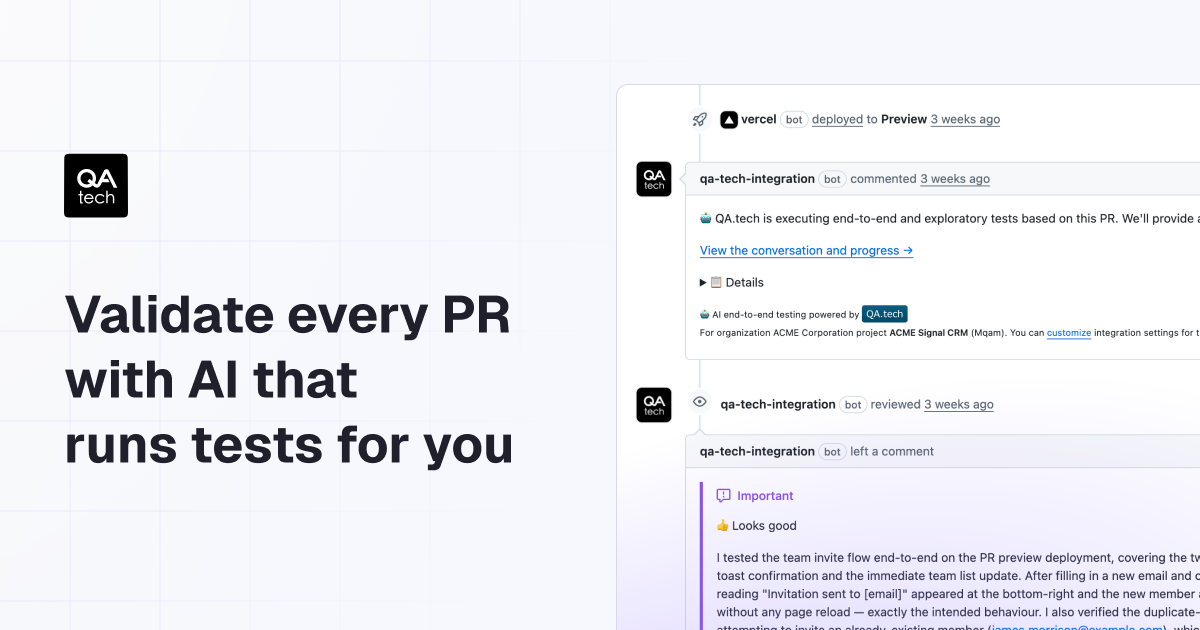
QA.tech runs AI agent regression and exploratory tests on every GitHub PR via Vercel preview, reporting pass/fail with screenshots, logs, and network.
What is QA.tech?
QA.tech is a PR testing platform that uses AI agents to run automated regression and exploratory testing for every pull request before it’s reviewed or merged. The goal is to validate changes early by reporting results back in GitHub, helping teams catch failures sooner and reduce the time spent on manual test maintenance.
Instead of relying on brittle, code-level selectors, QA.tech runs tests in the cloud and validates your UI visually. It also provides step-by-step debugging artifacts such as screenshots, logs, and network activity to help teams pinpoint what broke.
Key Features
- Dynamic PR testing with AI agents: AI runs regression and exploratory tests for each PR preview, supporting earlier detection before review or merge.
- GitHub-integrated pass/fail reporting: Test results (including what broke) are posted back to GitHub so reviewers can see outcomes in the PR context.
- Detailed debugging insights: For each test run, QA.tech provides screenshots, logs, and network activity to speed up root-cause analysis.
- Auto-adaptation to UI changes: AI agents are described as adapting to UI changes automatically, aiming to reduce manual upkeep for brittle selectors.
- Vision-based UI testing: QA.tech “sees” the UI visually and finds elements similarly to how a user would, helping tests remain resilient to certain design or flow changes.
- Natural-language test creation: Users can create tests using prompts in plain English and generate new test case ideas.
- Cross-platform and flow coverage: The platform supports tests spanning mobile, web, and API flows, including journeys that jump between mobile apps, web, and API calls.
- Accessibility checks per change: Accessibility testing runs on every change to help catch accessibility regressions earlier.
- Dynamic test data generation: It generates realistic datasets intended to cover standard paths, edge cases, and error-inducing inputs for complex workflows.
- Cloud execution with no infrastructure setup: Agents run in the cloud; users point them at their environment to start testing.
How to Use QA.tech
- Connect your GitHub repository: Add the GitHub connection so QA.tech can automatically pick up pull requests.
- Provide or use your Vercel preview: QA.tech automatically associates PRs with the corresponding Vercel preview so tests run against the preview build.
- Start running tests on PRs: Once connected, QA.tech runs regression and exploratory testing on every PR before merge.
- Create or update tests using natural language: Use plain-English prompts to define test behavior and generate additional test case ideas.
- Review results in GitHub and debug with run artifacts: Check pass/fail outcomes in the PR and use screenshots, logs, and network activity to investigate failures.
Use Cases
- Pre-merge regression detection for UI changes: Catch UI regressions on each PR preview and see what broke before reviewers spend time investigating failures.
- Exploratory testing for high-uncertainty areas: Use AI-driven exploratory coverage alongside regression tests to surface issues that scripted tests may miss.
- Reducing maintenance of UI test selectors: When UI layout or flow changes frequently, rely on vision-based element finding and AI adaptation to avoid repeated selector updates.
- End-to-end coverage across app surfaces: Validate cross-platform user journeys that move between mobile apps, web, and API calls without manually managing device-specific selectors.
- Accessibility and edge-case workflow validation: Run accessibility checks and generate realistic datasets (including error-inducing inputs) to detect regressions and data-handling problems early.
FAQ
Does QA.tech require reading or access to my code? The page states there is no need for a lengthy approval process to try it and that QA.tech can test your product without reading your code.
How does QA.tech run tests for each PR? After connecting GitHub, QA.tech automatically picks up each PR and its Vercel preview and runs tests before merge.
What kind of debugging information does QA.tech provide when a test fails? For every step of the test run, QA.tech can provide screenshots, logs, and network activity to help identify the cause of a failure.
What testing types are included? The platform runs regression and exploratory testing on every PR, and it also includes accessibility testing on each change.
Is QA.tech executed in the cloud? Yes. The page says AI agents run in the cloud and that there is no infrastructure setup required.
Alternatives
- Cypress (E2E web testing): Code-based end-to-end testing for web apps; typically requires test maintenance when UI changes, whereas QA.tech emphasizes vision-based finding and dynamic PR execution.
- Playwright (cross-browser automation): Scripted browser automation for UI and end-to-end testing; may require more manual upkeep for selectors depending on how tests are authored.
- SaaS test runners for CI (test automation platforms): Instead of PR-focused AI agents, some tools center on running existing test suites within CI pipelines; the key difference is whether the workflow includes automated PR preview testing and AI-driven adaptation.
- Manual QA + scripted regression (human-led process): A human testing workflow can catch issues but generally doesn’t provide the same automated, per-PR feedback loop described for QA.tech.
Alternatives

Falconer
Falconer is a self-updating knowledge platform for high-speed teams to write, share, and find reliable internal documentation and code context in one place.

OpenFlags
OpenFlags is an open source, self-hosted feature flag system with a control plane and typed SDKs for progressive delivery and safe rollouts.

skills-janitor
Audit, track usage, and compare your Claude Code skills with skills-janitor—nine focused slash commands and zero dependencies.

Rectify
Rectify is an all-in-one operations platform for SaaS, combining monitoring, analytics, support, roadmaps, changelogs, and agent management—via conversation.

GitBoard
GitBoard is a native macOS menu bar app for GitHub Projects to view your kanban board, filter by status, search issues, and create or assign.

Studio CLI
Control WordPress Studio features from the terminal with Studio CLI—manage local sites, create/update/delete WordPress.com preview sites, and authenticate.