

rivva
rivva is an AI daily planner that auto-schedules tasks and meetings into a live, energy-aware workday plan using calendar and email context.
What is rivva?
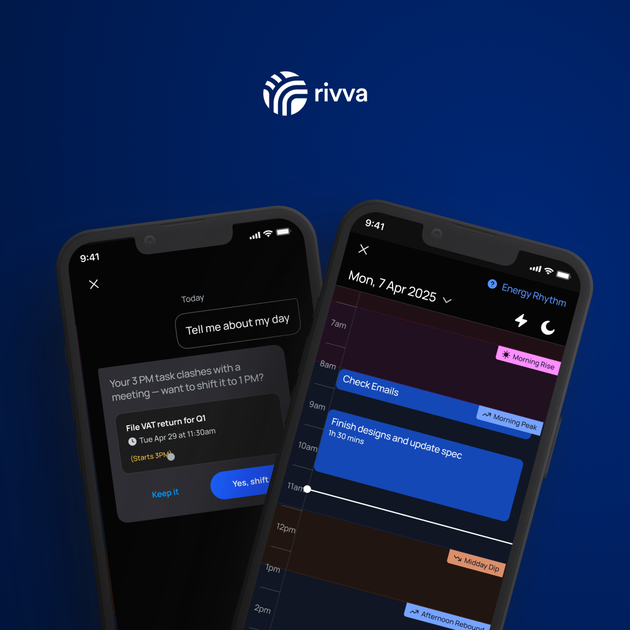
rivva is an AI productivity assistant and daily planner that turns your tasks and meetings into a live, day-specific schedule. It aims to place work into the right hours, protect deep work time, and reshuffle your plan when meetings or urgent events change.
The assistant, Nia, uses context from your calendars and inbox and can also incorporate energy data (via a connected wearable and Apple Health or Android Health Connect) to support energy-aware scheduling. The core purpose is to keep a practical plan up to date with minimal manual re-planning.
Key Features
- Live daily planner that reshuffles: rivva builds a day plan from tasks and meetings and automatically rebalances when schedules shift, so items don’t fall through the cracks.
- Task ranking and real-time scheduling: tasks are analyzed and placed into time slots based on focus requirements, energy forecast, and calendar constraints.
- Deep-work and admin batching behavior: deep work gets blocked into focus-appropriate hours, while lighter/low-effort work can be used to fill capacity dips.
- Automatic task capture from email: rivva connects to your email to surface meeting-related action items and other task-like items hiding in your inbox, with options to review before scheduling.
- Energy-aware smart scheduling (optional): by linking Apple Health or Android Health Connect (and a wearable), rivva forecasts energy highs/lows using sleep and movement data to schedule heavier work when you’re sharper.
- Nia AI assistant for orchestration: Nia helps manage tasks and the plan through coaching and actions such as planning, rescheduling, canceling, creating, and breaking down tasks based on your workload and context.
- Scheduling links for protected focus windows: you can let others book time with you while preserving your deep work/peak hours by sharing all availability or filtering to specific energy windows.
How to Use rivva
- Connect your calendar and email so rivva can pull in meetings and surface tasks from your inbox.
- Add tasks in the way that fits your workflow—type them in, chat with Nia, or let rivva extract task-like items from your email.
- Review and let rivva schedule: rivva ranks tasks and places them into time slots, protecting focus time and reserving appropriate space for deep work.
- (Optional) Enable energy-aware scheduling by linking Apple Health or Android Health Connect and a wearable so the planner can adjust based on your energy rhythm.
Use Cases
- Daily planning from existing commitments: You connect multiple calendars and your email, and rivva creates a single daily plan that combines meetings with tasks and follow-ups you might otherwise miss.
- Protecting peak focus for deep work: You schedule demanding tasks during your sharpest hours while having rivva fill gaps with admin or lighter work when your capacity dips.
- Rescheduling when meetings run long: An urgent event disrupts your day; rivva automatically reshuffles the remaining plan so you don’t lose track of scheduled work.
- Turning inbox follow-ups into scheduled work: You send a weekly list to your email (or rely on email task extraction), review task titles, and have rivva schedule the items into appropriate time slots.
- Coaching and task breakdowns with Nia: You ask Nia to help you manage workload and context—planning, rescheduling, canceling, creating new tasks, or breaking tasks down—while keeping the day plan organized.
FAQ
-
What does rivva connect to? rivva can connect to your calendar and email to pull in meetings and surface task-like items from your inbox.
-
Does rivva schedule tasks automatically? Yes. rivva ranks tasks and schedules them into real time slots within your day, and it can rebalance the schedule when things change.
-
How does energy-aware scheduling work? When enabled, rivva can use Apple Health or Android Health Connect data (from a connected wearable) to forecast energy highs and lows and schedule deep work during sharper periods.
-
Can others book time with me without disrupting deep work? Yes. rivva offers scheduling links that let you protect deep work time by sharing all availability or filtering availability to specific energy windows.
-
Can I add tasks in different ways? Yes. you can type tasks in, chat with Nia, or have rivva extract tasks from your email.
Alternatives
- Calendar-first time blocking tools: Tools that let you manually block focus time can achieve similar scheduling, but they typically require you to manage re-planning when events change and may not pull tasks from email or energy data.
- AI task managers: General task management platforms with AI assistance can help organize and prioritize work, but may not offer energy-aware scheduling or automatic rebalancing tied to deep-work windows.
- Email-to-task productivity workflows: Approaches that use email parsing rules or inbox-to-task capture can surface action items, but usually stop short of turning them into a live day plan that reshuffles around capacity and calendar changes.
- Wearable/energy tracking dashboards with manual planning: Energy tracking apps provide insights into sleep and movement, but you typically still need a separate tool or manual steps to translate that into a scheduled day.
Alternatives

LIAM
LIAM is an AI copilot that drafts email replies, organizes your inbox with auto-labels and prioritization, and schedules meetings from your calendar.

Planndu: Daily Task Planner
Planndu is an intuitive productivity application designed to help users organize tasks, manage projects, build routines, and enhance focus using tools like AI generation and a built-in Pomodoro timer.

Biji
Biji is a versatile platform designed to enhance productivity through innovative tools and features.

Gemma AI
Gemma AI is a smart application that calls you directly with personalized, intelligent voice reminders to ensure you never miss important tasks, appointments, or deadlines.

Tactiq
Tactiq is an AI meeting assistant that provides live transcription, AI summaries, action items, and custom AI prompts for Google Meet, Zoom, and Teams.

garden-md
Turn meeting transcripts into a structured, linked company wiki with local markdown and an HTML browser view. Sync from supported sources.