

Stakpak
Stakpak is an open source agent running on your machines to keep apps running 24/7 with production automation and human escalation when needed.
What is Stakpak?
Stakpak is an open source agent that runs on your own machines to keep your applications running 24/7. It schedules and performs production “autopilot” tasks, then only pings a human when it needs input.
Instead of acting like a hosted PaaS, Stakpak installs locally as a system service and persists across reboots. The intent is to provide some of the operational automation you’d expect from a managed platform, while keeping the agent and data within your environment.
Key Features
- Single binary, runs locally: The product is described as “the whole product in three commands,” and Autopilot is a single long-running process installed on your machine.
- Autonomous agent with scheduling and local API: Autopilot combines scheduling, messaging, and a local API to run ongoing tasks in the background.
- Interactive terminal workflow (TUI): Users “drive” Stakpak via an interactive terminal interface for control from the command line.
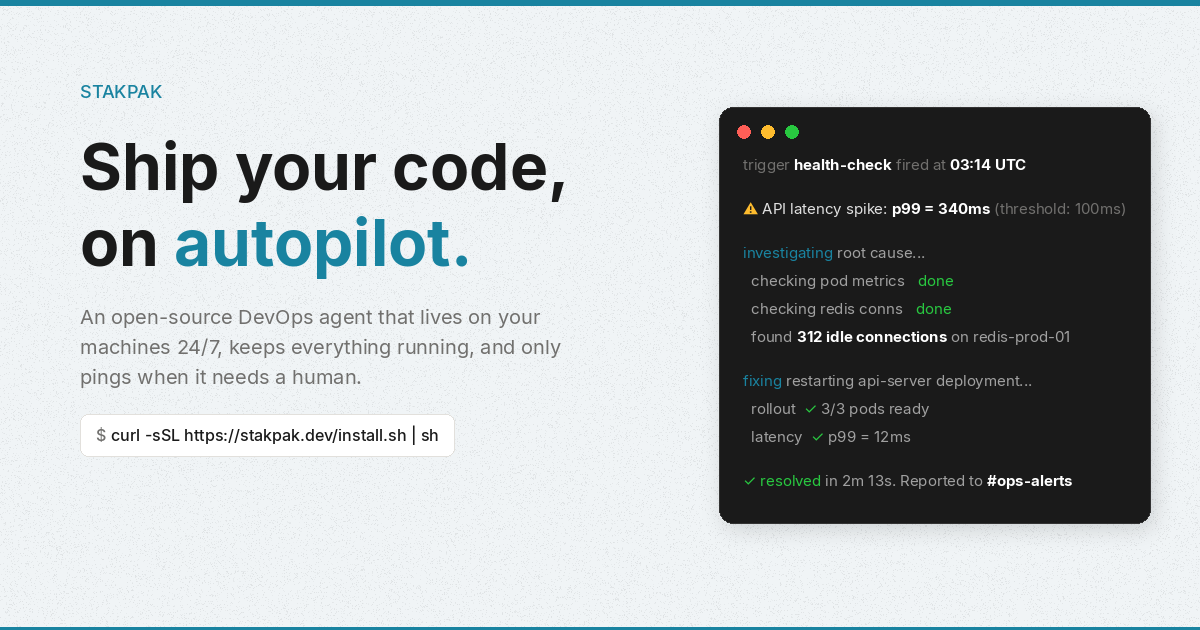
- App health and production automation: The example flow shows health checks detecting issues (e.g., API latency spikes), investigating via metrics/connections, applying remediation (restart), and reporting results.
- Network sandbox with policy-enforced proxy: Every network request the agent makes (e.g., curl, Python, MCP servers) is routed through a transparent proxy with Cedar policies to constrain what the agent can access.
- Secret substitution before model access: The agent detects 210+ secret types and swaps them with placeholders so real values are only restored at execution time.
- Full session audit logs and backups: Every action includes full context in audit logs; changes are backed up locally and over SSH, with support for replaying sessions and rolling back.
- Written in Rust (Apache 2.0) with local encryption: Stakpak is open source under Apache 2.0 and runs entirely on your machines with mTLS encryption (per the provided description).
How to Use Stakpak
- Install by running the provided install command:
curl -sSL https://stakpak.dev/install.sh | sh - Initialize your stack:
This discovers your stack and generates anstakpak initAPPS.mdfile. - Start autopilot:
Autopilot runs 24/7 in the background.stakpak up - Check status when needed:
Use the TUI to monitor schedules, channels, and recent activity.stakpak autopilot status
Use Cases
- Incident response and automated remediation: When an app health check fails (e.g., API latency p99 exceeds a threshold), the agent can investigate metrics and database connections, restart the affected service/instances, and report a summary to a configured channel.
- Automated cost watchdog reports: Stakpak can run daily scans to find idle infrastructure resources (example includes idle RDS instances and orphaned EBS volumes) and generate savings reports.
- Defusing operational “time bombs”: The agent can track expiring TLS certificates and auto-renew them with zero downtime; it can also handle expiring secrets, deprecated APIs, and end-of-life runtimes as described.
- Ongoing production monitoring with escalation: For tasks that need a human decision, Stakpak is designed to “only ping when it needs a human,” reducing noise while keeping you informed when intervention is required.
- Audited changes and rollback: If Stakpak edits files or runs commands during maintenance, it logs actions with full context, backs up changes locally and over SSH, and supports session replay and rollback.
FAQ
Is Stakpak a hosted service?
No. The product runs on your machines as a system service and persists across reboots; it also includes protections designed to keep data within your environment.
What does “autopilot” do?
Autopilot is the single long-running process that combines scheduling, messaging, and a local API to keep apps running and execute production tasks in the background.
How does Stakpak handle secrets?
The agent performs secret substitution: it detects secret types, replaces them with placeholders before any model interaction, and restores real values only at execution time.
Does Stakpak provide audit logs?
Yes. It records full session audit logs with context, backs up changes locally and over SSH, and supports replaying sessions and rolling back changes.
What protections are applied to network access?
The agent’s network requests go through a transparent proxy with Cedar policies, and the provided description states that requests are sandboxed under this policy enforcement.
Alternatives
- Hosted PaaS / managed deployment platforms: These typically handle uptime, health checks, and operational automation as a service, but they may require more trust in the provider’s hosted environment compared with a locally running agent.
- Self-hosted orchestration + monitoring stacks: Tools focused on scheduling and observability (e.g., health checks and incident automation) can run on your infrastructure, but may not bundle the same combination of local-agent control, secret substitution, and audit logging described here.
- Generic automation/CI agents for ops tasks: Systems that automate scripts and deployments can address some of the same “keep it running” workflows, but they may not include the same policy-enforced network sandboxing and secret placeholder workflow.
- Other open-source “agents” that run locally: If you’re looking for an agent model that operates on your machines, consider local-first agent runtimes—but verify whether they provide policy-controlled networking, secret substitution, and full audit/replay capabilities similar to Stakpak.
Alternatives

Codex Plugins
Use Codex Plugins to bundle skills, app integrations, and MCP servers into reusable workflows—extending Codex access to tools like Gmail, Drive, and Slack.

OpenFlags
OpenFlags is an open source, self-hosted feature flag system with a control plane and typed SDKs for progressive delivery and safe rollouts.

BenchSpan
BenchSpan runs AI agent benchmarks in parallel, captures scores and failures in run history, and uses commit-tagged executions to improve reproducibility.

Sleek Analytics
Lightweight, privacy-friendly analytics with real-time visitor tracking—see where visitors come from, what they view, and how long they stay.

Struere
Struere is an AI-native operational system that replaces spreadsheet workflows with structured software—dashboards, alerts, and automations.

MacSpoof
MacSpoof is a macOS MAC address changer that lets you change or randomize your Wi‑Fi MAC to reconnect and limit device logging on public Wi‑Fi.