

TaskShell
TaskShell is a terminal/IDE-inspired cloud task manager for developers with commands, workspace-aware autocomplete, weekly calendar view, and custom UI modes. Try free 14 days.
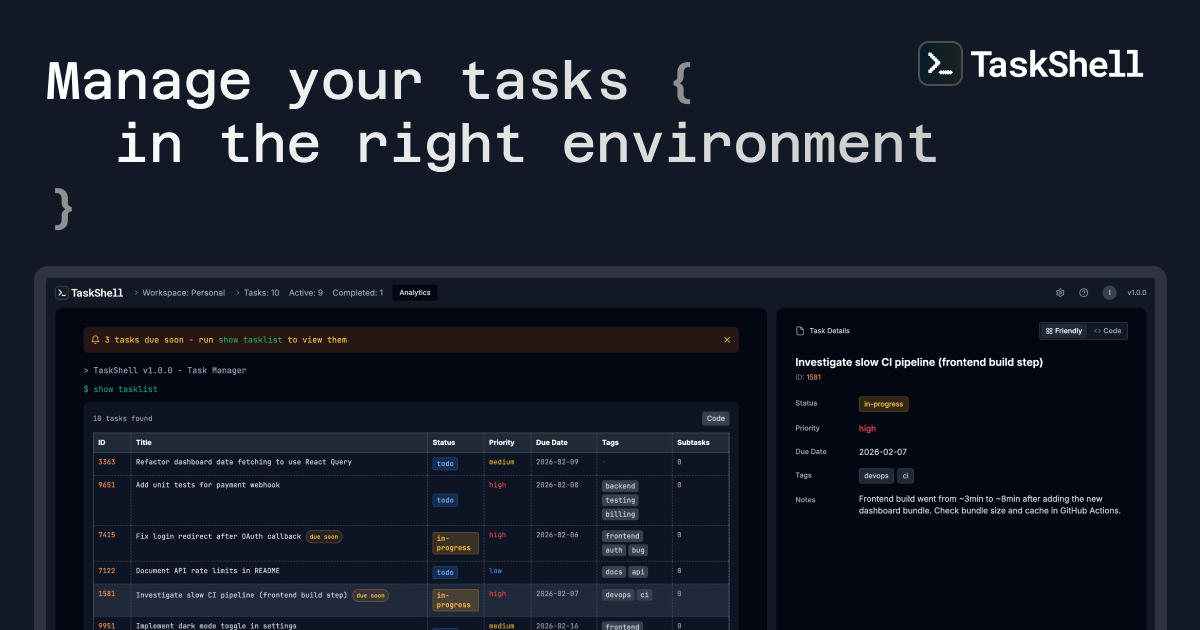
What is TaskShell?
TaskShell is a terminal/IDE-inspired task manager for developers, designed to help you create and manage tasks in a workflow that feels like working in a command line. It runs as a cloud-synced web app, so you can access your tasks from any device without installing a local app.
The core purpose is to keep task capture and updates close to the coding mindset: you can manage tasks via commands, use context-aware autocomplete for faster input, and view the same task data either in an assistive “Friendly” UI mode or a command-style “Hardcore” mode.
Key Features
- Terminal/IDE-inspired command interface: Create, edit, complete, delete, move, and search tasks using commands aligned with a coding workflow.
- IntelliSense-like autocomplete (workspace-aware): Autocomplete provides context-aware suggestions for task IDs and fields such as properties and tags, reducing the need to remember exact formats.
- Two UI modes (“Friendly” and “Hardcore”): Switch between an assistive interface with cards/buttons and a code-first view focused on commands and responses.
- Rich task data beyond titles: Add optional properties, notes, tags, priorities, statuses, deadlines, images (via URL or upload), and subtasks.
- Weekly calendar view: Display tasks by day with options like week/bi-week while keeping due dates and priorities visible for planning.
- Customizable priority/status labels and UI preferences: Define your own status and priority values (e.g., P0–P2 or High/Medium/Low), set default values for new tasks, and customize accent colors and terminal symbols; settings sync across devices.
- AI prompt-style task creation with approval mode: Use natural language to create structured tasks from intent, with an option to review AI suggestions before they are created.
- Task analytics and export: Track completion rates and counts such as high-priority and overdue tasks, and export analytics data to CSV or JSON.
How to Use TaskShell
- Start with the web app: open TaskShell and begin a 14-day free trial (no credit card required, per the site).
- Use the command workflow: type task commands in the terminal-style interface, and rely on autocomplete for task IDs, fields, and suggestions.
- Choose your UI mode: work in “Friendly” mode for assistive cards/buttons or switch to “Hardcore” mode for a more command-and-response-focused experience.
- Add richer details as needed: include status, priority, due dates, tags, notes, and images, then break large work items into subtasks.
- Review planning and trends: use the weekly calendar view to plan by day and check analytics for completion and overdue items. Export insights if needed.
Use Cases
- Capture bug-fix tasks while coding: Create a task with status, priority, due date, and tags (e.g., “bug” and “frontend”) using commands, then update it as you progress.
- Break down a feature into subtasks: Add subtasks under a parent task to track smaller deliverables like “Write unit tests,” then complete subtasks individually.
- Plan your week without leaving the terminal flow: Switch to the weekly calendar view to see due dates and priorities across a week or bi-week and spot gaps before you start work.
- Create tasks from natural-language requests: Use the AI prompt panel to turn intent like “Add follow-up for the login fix” into a structured task with properties, priority, and due date; use approval mode if you want to review the generated output first.
- Maintain consistent workflows across devices: Customize status/priority labels and UI preferences once, sync them, and continue task management with the same configuration from any device.
FAQ
Is TaskShell a local app or a cloud web app?
TaskShell is described as a cloud-synced web app accessible from any device, with no installs needed.
What are “Friendly” and “Hardcore” modes?
Friendly mode provides an assistive UI with cards and buttons for quick actions. Hardcore mode is more code/terminal-output oriented, focused on commands and responses. You can toggle between the two anytime.
Does TaskShell support task details like tags, priorities, and deadlines?
Yes. The site describes adding optional properties including status, priority, due dates, tags, notes, images, and subtasks.
Can I create tasks using natural language?
Yes. TaskShell includes an AI prompt panel that converts natural-language intent into structured tasks with properties, priorities, and due dates. The site also mentions an approval mode to review AI suggestions before creating tasks.
Does it provide calendar and analytics views?
Yes. It offers a weekly calendar view (week or bi-week) and productivity analytics such as completion rates and overdue/high-priority item counts, with export to CSV or JSON.
Alternatives
- Terminal-based to-do or task trackers: If you want tasks managed via command-line workflows, you can look for text/CLI task managers that emphasize speed and keyboard-driven input. These typically won’t combine workspace-aware autocomplete, UI mode switching, and the specific AI prompt-style creation described here.
- General-purpose project management tools: Tools with boards/lists and calendar views can replace task planning needs, but may require moving between UI paradigms instead of staying in a terminal/command mindset.
- Spreadsheet-based task tracking: For teams or individuals who prefer structured rows with filters (status, priority, due date), a spreadsheet workflow can cover many fields, but typically lacks command-based capture, autocomplete, and the terminal-first interface.
- Notes-first organizers with tags and due dates: Apps that organize tasks via tags and reminders can work for lightweight task management; however, they usually don’t provide the command interface, workspace-aware suggestions, or AI prompt panel described by TaskShell.
Alternatives

MakerLoft
MakerLoft is an AI app builder for non-developers that connects to your GitHub repo to generate working apps with auth, payments, files, jobs.

GitBoard
GitBoard is a native macOS menu bar app for GitHub Projects to view your kanban board, filter by status, search issues, and create or assign.

Biji
Biji is a versatile platform designed to enhance productivity through innovative tools and features.

Ably Chat
Ably Chat is a chat API and SDKs for building custom realtime chat apps, with reactions, presence, and message edit/delete.

ClawTick
ClawTick is a CLI-first AI agent automation platform for scheduling webhook tasks on cron with monitoring, alerts, retries, and execution logs.

Falconer
Falconer is a self-updating knowledge platform for high-speed teams to write, share, and find reliable internal documentation and code context in one place.