
Agent-scoped installs
Each listing installs as a remote MCP with a defined set of skills and a secret field for the host agent, so the integration stays attached to the agent that owns the task.

Install vendor plugins with Cosmic’s Agent Plugin Marketplace. Connect remote MCP integrations, plugin skills, and host-agent sign-in to keep work with the right agent.
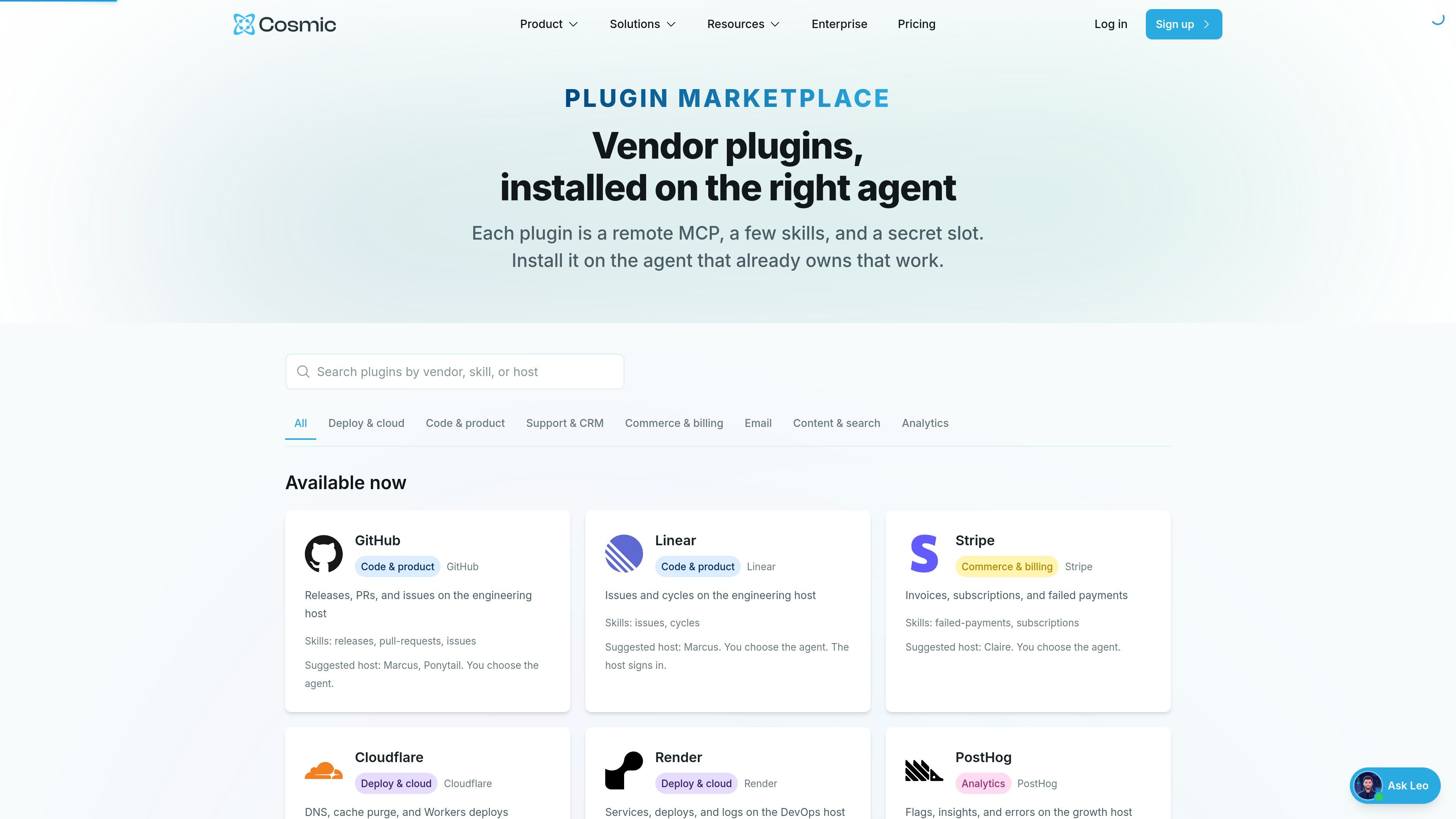
Agent Plugin Marketplace is Cosmic’s plugin catalog for installing vendor tools onto the agent that already owns the work. Each plugin is presented as a remote MCP integration with a small set of skills and a secret slot, so the relevant agent can use the external service without moving the task elsewhere.
The marketplace currently includes active listings for tools such as GitHub, Linear, Stripe, Cloudflare, Render, PostHog, Resend, Netlify, Sentry, Atlassian, Algolia, and Notion, along with a second group marked coming soon. The product is aimed at teams that want to route engineering, billing, deploy, content, search, and support-adjacent work to the right agent rather than a shared generic integration.
Each listing installs as a remote MCP with a defined set of skills and a secret field for the host agent, so the integration stays attached to the agent that owns the task.
The marketplace suggests a host agent for each plugin, but the user still chooses where it goes. That keeps the routing explicit rather than automatic.
Plugin pages list the skills that become available after install, such as GitHub releases, pull requests, and issues or Linear issues and cycles.
Several listings say the host agent signs in or stores credentials after install, including GitHub bearer tokens and Linear, Stripe, Cloudflare, Render, Netlify, Sentry, Atlassian, Algolia, and Notion sign-in flows.
The marketplace separates currently available plugins from coming-soon listings, giving users a clear view of what can be installed now and what is still pending review or OAuth support.
Give an engineering agent access to GitHub or Linear so it can summarize releases, open or review pull requests, file issues, or inspect the active cycle without moving the work to a different agent.
Connect billing or commerce plugins such as Stripe so a finance- or operations-oriented agent can look up invoices, subscriptions, failed payments, or other account activity on the host tied to that work.
Install deploy and infrastructure plugins such as Cloudflare, Render, Netlify, or Vercel coming soon so a DevOps-focused agent can handle deploys, status, logs, DNS, cache purge, and environment settings in one place.
Use content and search plugins such as Notion, Algolia, or PostHog so a content or growth agent can work with pages, databases, reindexing, flags, insights, and errors on the appropriate host.
Route support and CRM tools that are listed or coming soon, such as Intercom, Zendesk, HubSpot, and Slack, to the agent responsible for ticket clusters, notes, deals, search, or posting updates.
The marketplace is for installing vendor plugins onto the Cosmic agent that already owns the work. The listing says each plugin is a remote MCP, a few skills, and a secret slot, and that nothing installs until you choose an agent.
The plugin pages show that each listing is tied to a suggested host agent, but the user can choose a different agent. For example, GitHub suggests Marcus or Ponytail, and Linear suggests Marcus, while the page notes that the host signs in and the skills attach only to the host agent.
The source shows both available and coming-soon plugins. Available now includes GitHub, Linear, Stripe, Cloudflare, Render, PostHog, Resend, Netlify, Sentry, Atlassian, Algolia, and Notion; coming soon includes Intercom, Vercel, AWS Ship, Zendesk, HubSpot, Slack, Shopify, Figma, and Google Search Console.
The marketplace is built for team workflows where a specific agent handles a domain such as engineering, billing, content, search, or deploys. The plugin pages route each integration to a suggested host like Marcus, Claire, Kai, Ava, Nora, Elena, Leo, Priya, James, or Ponytail depending on the work.
Some plugins require connecting the vendor account on the host agent after install. The GitHub, Linear, Stripe, Cloudflare, Render, Netlify, Sentry, Atlassian, Algolia, and Notion pages mention signing in or pasting credentials on the host, while others note OAuth connect coming soon on their upcoming listings.

CreateOS Sandbox is an isolated compute environment for running code and agent workloads in Firecracker micro-VMs with private networking and SDK, CLI, or MCP control.

AakarDev AI helps teams manage AI provider access, project setup, logs, and analytics in one dashboard. BYOK support included.

Trigger.dev chat agent is a durable AI chat backend for stateful conversations that survive refreshes, crashes, and long-running turns with AI SDK useChat.

ByteAsk is a terminal-first AI coding agent for C and C++ that edits repos and verifies changes with compilers, debuggers, sanitizers, and tests.

Lasso is an ecommerce product data platform for enriching catalog records, processing supplier files, generating product content, and tracking competitors. It includes a web app, REST API, SDK, and MCP server.

Codex Plugins bundle reusable skills, app integrations, and MCP servers into workflows you can install in the Codex app or use from Codex CLI.