
Text, lyrics, and instrumental generation
Generate songs from text, lyrics, or instrumental-only prompts, with separate tools for text-to-song and lyrics-to-song workflows.

AI Song Maker is a web-based AI music generator for songs from text, lyrics, or audio, with vocal removal and track editing tools.
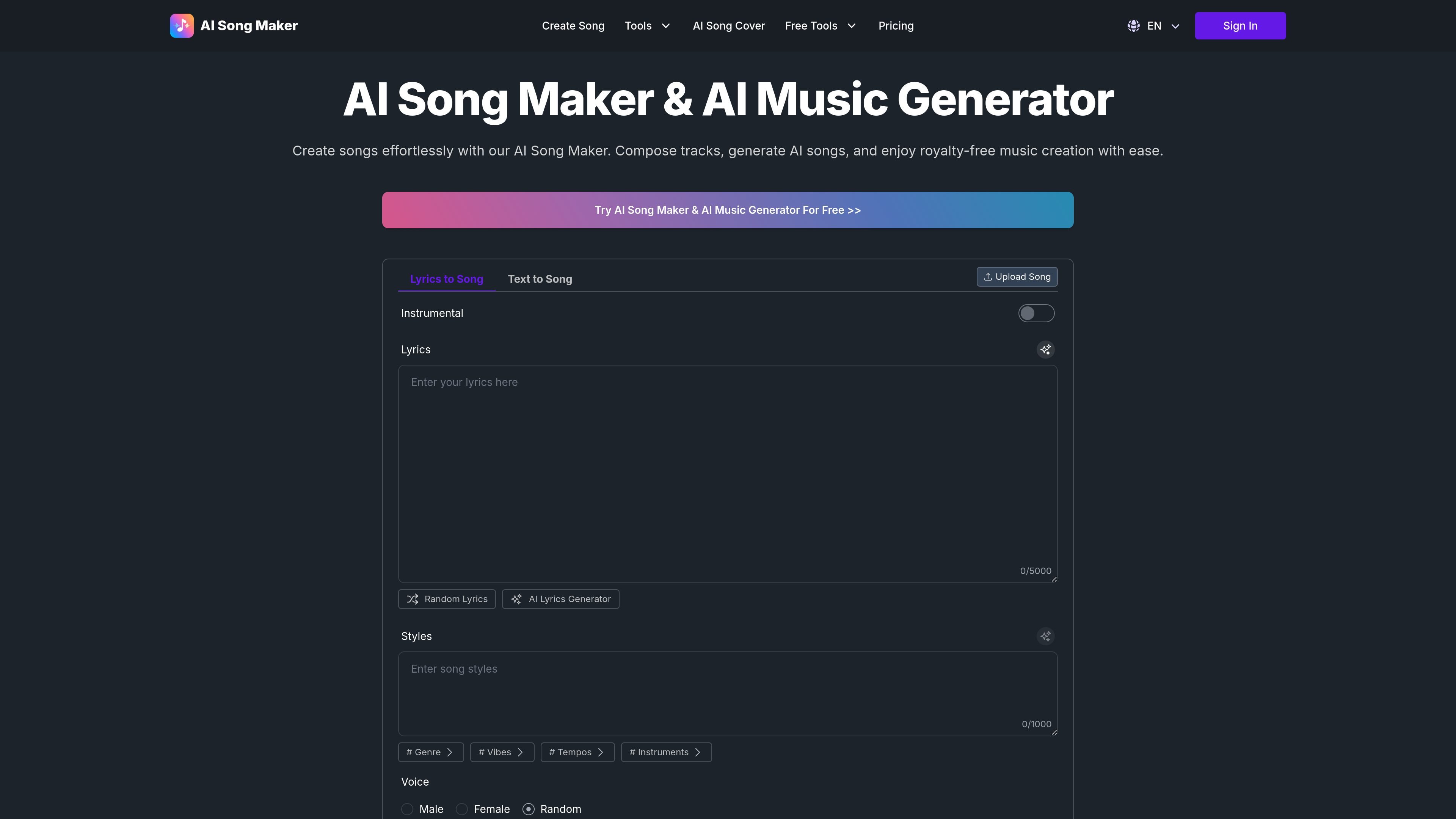
AI Song Maker is a web-based AI music generator for songs from text, lyrics, or audio, with vocal removal and track editing tools.
The product is organized around specific workflows such as text-to-song, lyrics-to-song, vocal removal, music extension, and section replacement. It also includes adjacent tools for song covers, singing photos, and lyric generation, so users can move from idea generation to track editing within the same site.
Generate songs from text, lyrics, or instrumental-only prompts, with separate tools for text-to-song and lyrics-to-song workflows.
Select styles, genres, vibes, tempos, instruments, and voice options to shape the result. The lyrics-to-song tool also exposes advanced controls such as weirdness and style influence.
Remove vocals from uploaded songs to create karaoke or acapella-style outputs, with a dedicated vocal remover tool and plan-based access.
Extend a track or replace individual sections such as an intro, chorus, bridge, or outro, which supports edits after the first generation.
Create related assets such as song covers, singing photos, and custom lyrics, giving the product a broader music-production workflow than generation alone.
Paid plans add download options like MP3, WAV, and MIDI, along with private generation, cloud storage, and commercial licensing.
Turn a text prompt into a song when you have an idea, scene, or theme but no finished lyrics yet.
Convert existing lyrics into a complete track with voice, style, and structure controls.
Remove vocals from an existing song to create karaoke or instrumental versions.
Extend a track or replace a section when you need a longer intro, chorus loop, or revised bridge.
Create covers, singing photos, or custom lyrics as supporting assets for music content.
AI Song Maker lets you create songs from text, lyrics, or uploaded audio, and it also includes tools for vocal removal, song extension, section replacement, song covers, and singing photos. The pricing page shows a free tier and paid plans with additional features and higher limits.
Yes. The pricing page states that free users can publish songs on platforms like YouTube or Spotify, but they must credit AI Song Maker. Subscribers get full commercial rights for songs they create, and those rights remain valid for songs made during an active subscription even after cancellation.
The site shows download options for MP3, WAV, and MIDI on paid plans. The pricing page does not clearly document every output type for every feature, so output availability depends on the plan and tool used.
The homepage explains a simple workflow: choose a music type such as text-to-song, lyrics-to-song, or instrumental-only, add a style and title, then generate the track. The lyrics-to-song tool page also shows options for styles, voice selection, and advanced settings.
The pricing page says monthly and yearly subscriptions are available, with yearly billing shown as 30% off. It also says unused credits roll over, credit packs are available to subscribers only, and PayPal can be used for subscription payments.

AI Song Maker is a web-based AI music generator that turns text or lyrics into songs, with vocal removal, track extension, and section replacement.

Kits AI is an AI music production platform for voice cloning, vocal generation, and vocal processing. Free plan, paid tiers, and Windows app.

LALAL.AI is an AI audio processing platform for stem separation, voice cleanup, and voice transformation, with browser upload, preview, and download.

Lyrica is a collaborative lyric writing platform designed to streamline the songwriting process with integrated AI assistance for inspiration and refinement.

ElevenMusic is a web-based music platform to discover tracks, remix music, and create original songs with prompt-led mood tags and account-based saving.

Typecast is an online AI voice generator that turns text into life-like speech with emotional delivery and hyper-realistic voices.