
Owner-based follow-up
Ayven reads due dates and ticket status, asks the relevant owner or decision-maker, and follows up when work is late or stalled.

Ayven is an AI coordination agent for Slack and Microsoft Teams that follows up with owners, tracks multi-week work, and hands off approved tasks.
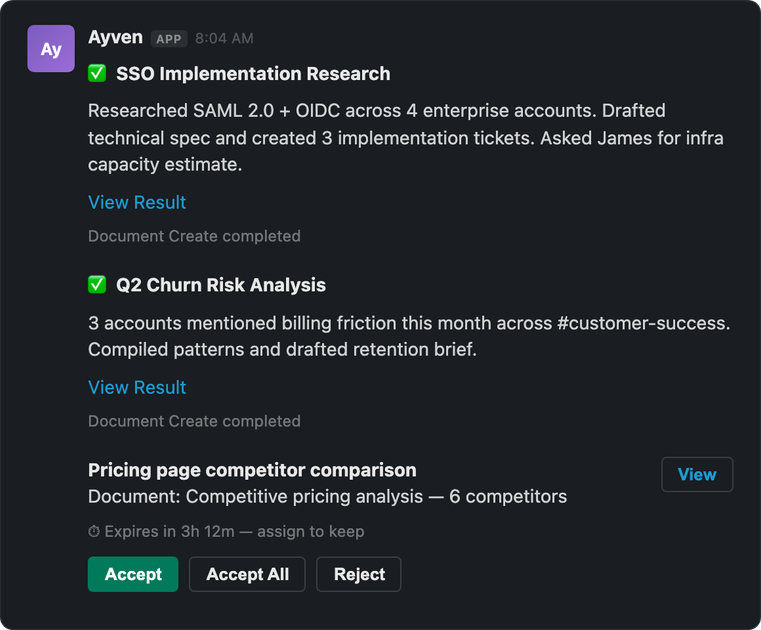
Ayven is an AI coordination agent for teams working in Slack and Microsoft Teams. It helps move open work forward by reading due dates and ticket states, identifying the person who can answer or act, sending targeted follow-ups, and tracking the resulting work.
Its workflow separates communication from controlled changes: Ayven can send messages and comments on its own, while ticket changes and certain handoffs wait for the user's approval. For longer-running work, missions retain owners, give-up dates, scheduled checks, and current facts so projects continue receiving follow-up after the original conversation fades.
Ayven reads due dates and ticket status, asks the relevant owner or decision-maker, and follows up when work is late or stalled.
For work that spans multiple weeks, Ayven records who owes an answer, sets a give-up date, schedules its next check, and can reroute an expired wait with context.
Ayven can send direct messages, ask a channel when a group can answer, and tell the original requester when a response or ticket update arrives.
When approved, Ayven can file or reassign work as a ticket with an owner and due date, then monitor the tracker until it reaches Done. It does not mark tickets Done itself.
Ayven checks connected sources such as documents, threads, and ticket trackers before asking questions or taking the next step, helping reconcile stale information.
The system recalculates follow-up timing after changes and can warn when a launch or other deadline is projected to slip.
When a launch ticket is overdue or a checklist has conflicting owners, Ayven checks the relevant tracker and documents, asks the person holding the decision, and warns if the projected launch date slips.
A sales or executive report about a recurring product problem can become an approved engineering ticket with an owner and due date. Ayven then watches the tracker and updates the person who raised the issue.
For a multi-week project such as a legal review, Ayven can wait on a named approver, stop waiting after the agreed date, reroute the request with context, and record the resulting response.
For an open-ended team trip, Ayven can ask different people for dates, venue options, headcount, and budget, then bring back the separate answers for the person making the decision.
Ayven is used through Slack and Microsoft Teams. The site also lists connections with Google Drive, Notion, SharePoint, Asana, Jira, YouTrack, and GitHub, among others.
Ayven can send messages and comments without approval, but changes to tickets wait for the user's approval. When it hands work to another person, it can file or reassign a ticket only after approval, depending on the workflow.
Ayven monitors work in the background through autonomous slots and responds to direct Slack or Teams messages through interactive slots. The number of concurrent slots depends on the plan.
The free plan includes 500 credits per month, one autonomous slot, and one interactive slot. Standard and Premium plans provide unlimited usage with more slots; Enterprise is custom. Credit packs are also available and do not expire.
Ayven is designed for work that needs follow-up over days or weeks. It records named owners and give-up dates, schedules checks, reroutes expired waits, and warns when a project is likely to slip.

Biji is a versatile platform designed to enhance productivity through innovative tools and features.

runevr is a connected workspace for creative teams, bringing boards, media review, chat, recordings, drive, calls, and AI agents into one room-based environment.

BotBoard is a task-management layer for AI agents to assign work, track progress, and review output via CLI, MCP, and HTTP.

Lasso is an ecommerce product data platform for enriching catalog records, processing supplier files, generating product content, and tracking competitors. It includes a web app, REST API, SDK, and MCP server.

hob is an independent workspace for coding agents, with local control over sessions, terminals, history, routing, and follow-up work.

Botacts is a web directory for finding AI bots and agents you can contact by phone, email, SMS, WhatsApp, Telegram, or Signal.