
Iris
Iris is a client-delivery platform for full-screen, cinematic creative presentations with pinned feedback and viewing analytics—share one link, no logins.
What is Iris?
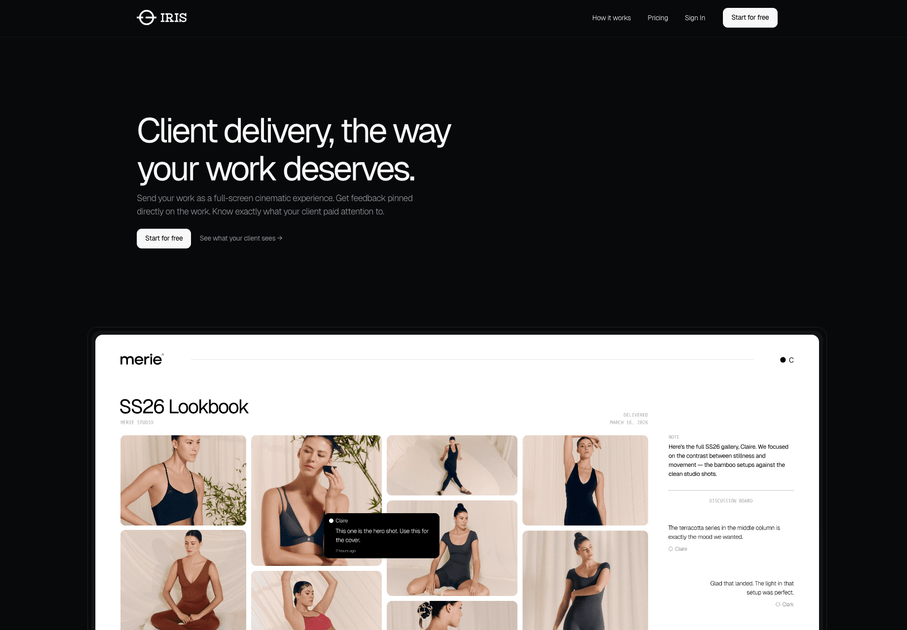
Iris is a client-delivery platform for presenting creative work as full-screen, cinematic experiences. Instead of sending a file via email or a generic viewer link, it provides a shareable link where clients can view the work and leave feedback directly on the exact places they’re referencing.
The core purpose is to make feedback and review more specific and easier to act on. Iris also includes discussion-style feedback and analytics so you can see what was viewed and where attention was focused.
Key Features
- Full-screen cinematic presentation for client delivery: your slides, images, PDFs, or full documents are shown in an experience designed around your work.
- Pinned feedback directly on the work: clients click on the content to add comments anchored to the precise point being discussed.
- Multiple display modes: presentation-style slides, document/proposal style delivery, and a gallery-style experience for photography and campaigns.
- Scene selection for how the work fills the screen: you choose a “scene” so the presentation uses a consistent viewing layout.
- Live discussion board: feedback can be managed in a board-style interface alongside the presentation.
- Viewing analytics (“Vision”): you can see what clients viewed and where they lingered or stopped.
How to Use Iris
- Upload your work and add context: upload slides/images/PDF/full documents, name the client, choose how it’s displayed, and include a personal note.
- Configure the experience: select the relevant display mode (slides, document, or gallery) and pick a scene so the work fills the screen.
- Send one link and review feedback: share the generated link with your client; they open it (no account or download mentioned) to view the full-screen presentation and pin feedback. You can then check analytics and the pinned comments.
Use Cases
- Designers sending client concepts: share a presentation link where clients can click on specific elements (for example, header or logo area) and leave targeted pinned comments.
- Photographers replacing file-transfer links: deliver a gallery-style experience so clients view images full-screen and comment on individual shots.
- Agencies handling recurring delivery needs: send branded presentations as a single link for each client delivery to understand which ideas were opened and where attention went.
- Architects delivering renders and mood boards: present visual materials as immersive, full-screen experiences so stakeholders can review in context.
- Consultants preparing proposals: deliver proposals as full-screen document experiences and use session analytics to see whether clients read and where they stopped.
FAQ
-
Does a client need an account to view the work? The page states there is “no login required” and that clients can click the link with “no account, no download.”
-
What file types can I upload? Iris supports slides, images, a PDF, or a full document (as described on the page).
-
How do pinned comments work? Clients click directly on the work to leave feedback exactly where it belongs; each comment is anchored to the precise point on the design being referenced.
-
Is there analytics available? Yes. The page mentions viewing analytics showing what clients viewed, where they lingered, and what they skipped/stopped.
-
What pricing information is available? The page includes a “Simple pricing” section with at least a free tier called “Basic ($0/month)” and mentions that the first Vision takes 5 minutes, but additional plan details are not fully shown in the provided content.
Alternatives
- File-based sharing (email attachments, shared folders): a common approach that can lack the in-context pinned feedback and session analytics described for Iris.
- Shared link document viewers: services that distribute PDFs or web documents; these typically don’t provide pinned, click-to-annotate feedback anchored to the design in the same way.
- Interactive design/proposal review tools: platforms that support commenting during review; these may focus more on annotation workflows than full-screen “cinematic” delivery.
- Gallery or portfolio hosting with comments: photo-focused options for presenting images; they may offer viewing but not necessarily the multi-mode presentation/document experiences and pinned feedback anchored to exact points.
Alternatives
SaveMRR
SaveMRR scans Stripe billing data to find SaaS MRR leaks and help recover failed payments, save cancellations, and win back churn—60-sec Free Revenue Scan.
Sleek Analytics
Lightweight, privacy-friendly analytics with real-time visitor tracking—see where visitors come from, what they view, and how long they stay.
Struere
Struere is an AI-native operational system that replaces spreadsheet workflows with structured software—dashboards, alerts, and automations.
beehiiv
beehiiv is an all-in-one newsletter and website platform with publishing, growth, analytics, and monetization tools for creators and brands.
App Signals
Track iOS app performance in App Signals with one dashboard for installs, revenue, ad performance, and trends—powered by App Store Connect data.
EchoTik
EchoTik is a TikTok e-commerce data analysis platform designed to assist sellers and e-commerce creators in making data-driven decisions for product selection and market analysis.
