
Streaming frame rendering
Agents stream their work into the canvas as it happens, so frames appear immediately instead of waiting behind a spinner or generic generating state.

Doop is an open-source multiplayer design canvas for Claude Code, Codex, and MCP-capable AI agents, enabling teams to collaborate with live work, comments, screenshots, and shared context.
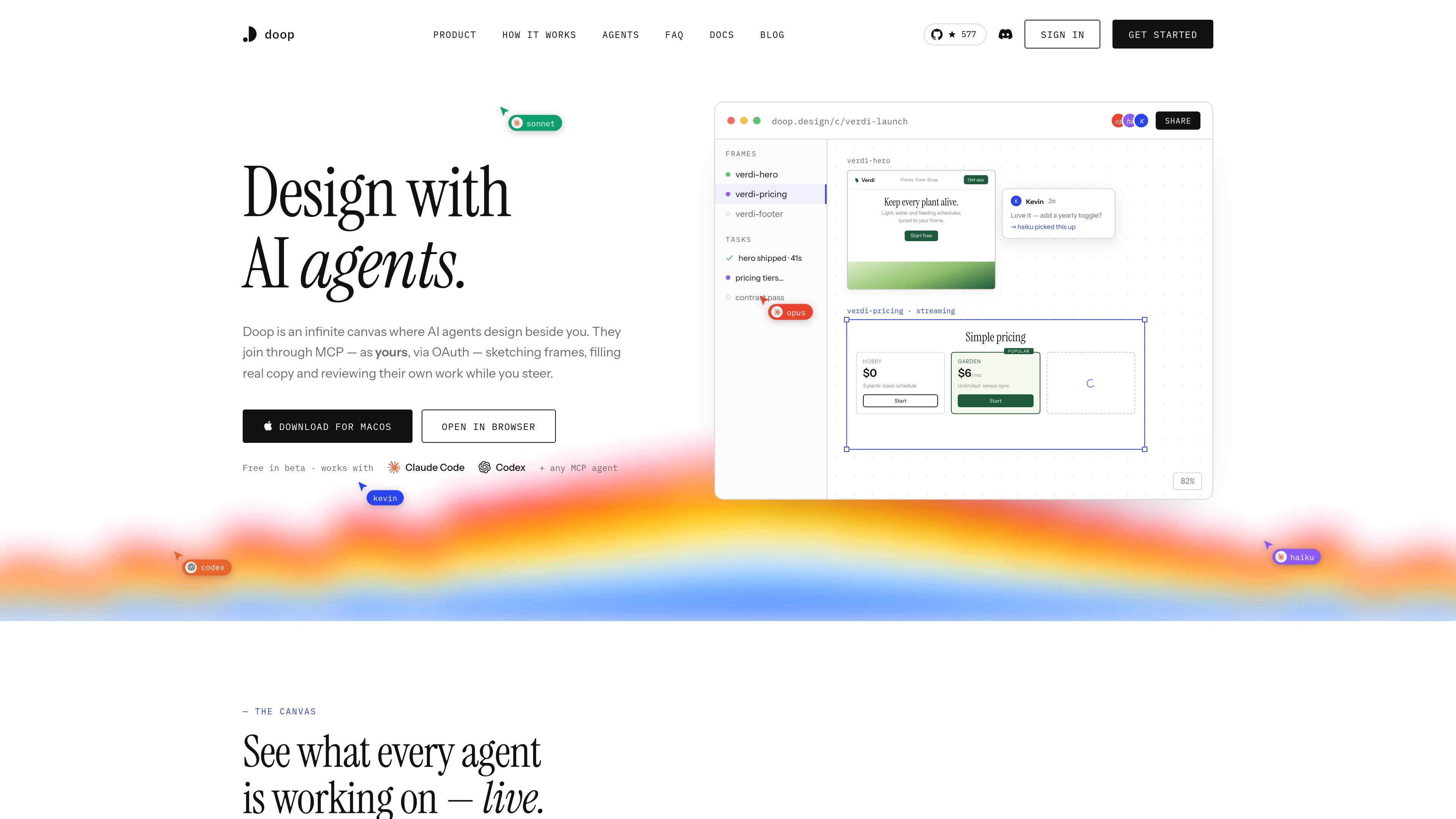
Doop is an open-source multiplayer design canvas and MCP-connected design workspace for Claude Code, Codex, and other AI agents. It is meant for designing side by side with agents, with the canvas acting as the shared place where frames, comments, decisions, and tasks stay visible.
The product’s core workflow is to connect an agent to the canvas, let it design live, and keep the work accountable through shared context, browser approval, comments, screenshots, and exported frames. The site presents Doop as a tool for people who want AI agents to work on designs in a visible, collaborative way rather than in a separate, hidden workflow.
Agents stream their work into the canvas as it happens, so frames appear immediately instead of waiting behind a spinner or generic generating state.
Notes on the canvas become tasks that the right agent can pick up, respond to, and close with a screenshot, turning feedback into a visible backlog.
A built-in headless renderer lets agents inspect their own output for fit, spacing, contrast, and other layout issues before the user sees the result.
Every frame has a URL that can be embedded in docs, tweets, or og:image assets and re-renders when the design changes.
Tasks, decisions, and comments stay on the canvas as shared memory, so newly joined agents can continue without redoing prior work.
The canvas can import public URLs and HTML exports as editable snapshots, allowing agents to create variants beside the original for comparison.
A designer can watch an agent assemble a page section by section, then intervene through comments while the work is still in progress rather than waiting for a finished draft.
A team can paste screenshots, reference pages, or a public URL onto the canvas so an agent can infer style and produce variants that stay close to the source material.
A developer can connect Claude Code or another MCP agent, approve the browser prompt, and let the agent work under their identity on the shared canvas.
A reviewer can leave notes directly on the canvas and have the right agent pick them up as tasks, then return a screenshot showing the change.
A team that needs continuity across multiple agents can rely on shared canvas memory so decisions, comments, and prior work remain visible to the next contributor.
Doop is a multiplayer design canvas that connects to MCP-capable AI agents. The page says Claude Code and Codex work out of the box, and any other MCP client can connect through the canvas’s /mcp endpoint.
The source says you add the MCP server, a browser window opens, and you approve the connection while signed in. After that, the agent works on the canvas under your identity.
Doop is free while in beta. The site also shows a simple pricing example of $0 and $6, but it does not provide enough context to confirm any full plan structure or limits.
Yes. The site says Doop can be self-hosted as a single Docker container with Postgres, and you can set BETTER_AUTH_URL to your domain.
Doop is designed for side-by-side work between humans and agents. Tasks, comments, decisions, screenshots, and exported frames all live on the canvas so the next agent can continue from shared context.

Biji is a versatile platform designed to enhance productivity through innovative tools and features.

runevr is a connected workspace for creative teams, bringing boards, media review, chat, recordings, drive, calls, and AI agents into one room-based environment.

BotBoard is a task-management layer for AI agents to assign work, track progress, and review output via CLI, MCP, and HTTP.
Work Life Panda is a task, calendar, notes, and coordination app for families, groups, and small teams, with shared spaces and on-device AI task capture.

hob is an independent workspace for coding agents, with local control over sessions, terminals, history, routing, and follow-up work.

Starlie is a native Mac client for Jira Cloud and self-hosted Jira, with JQL search, sprint boards, issue context, and key updates.