
Shared keyboard and mouse
Move the pointer to the edge of one screen and it continues on the next computer, with the keyboard following automatically. The app also translates Cmd and Ctrl so common shortcuts feel native on each platform.
EasySwitch lets you share one keyboard, mouse, clipboard and files across multiple computers on a local network, with paid plans for a real second monitor.
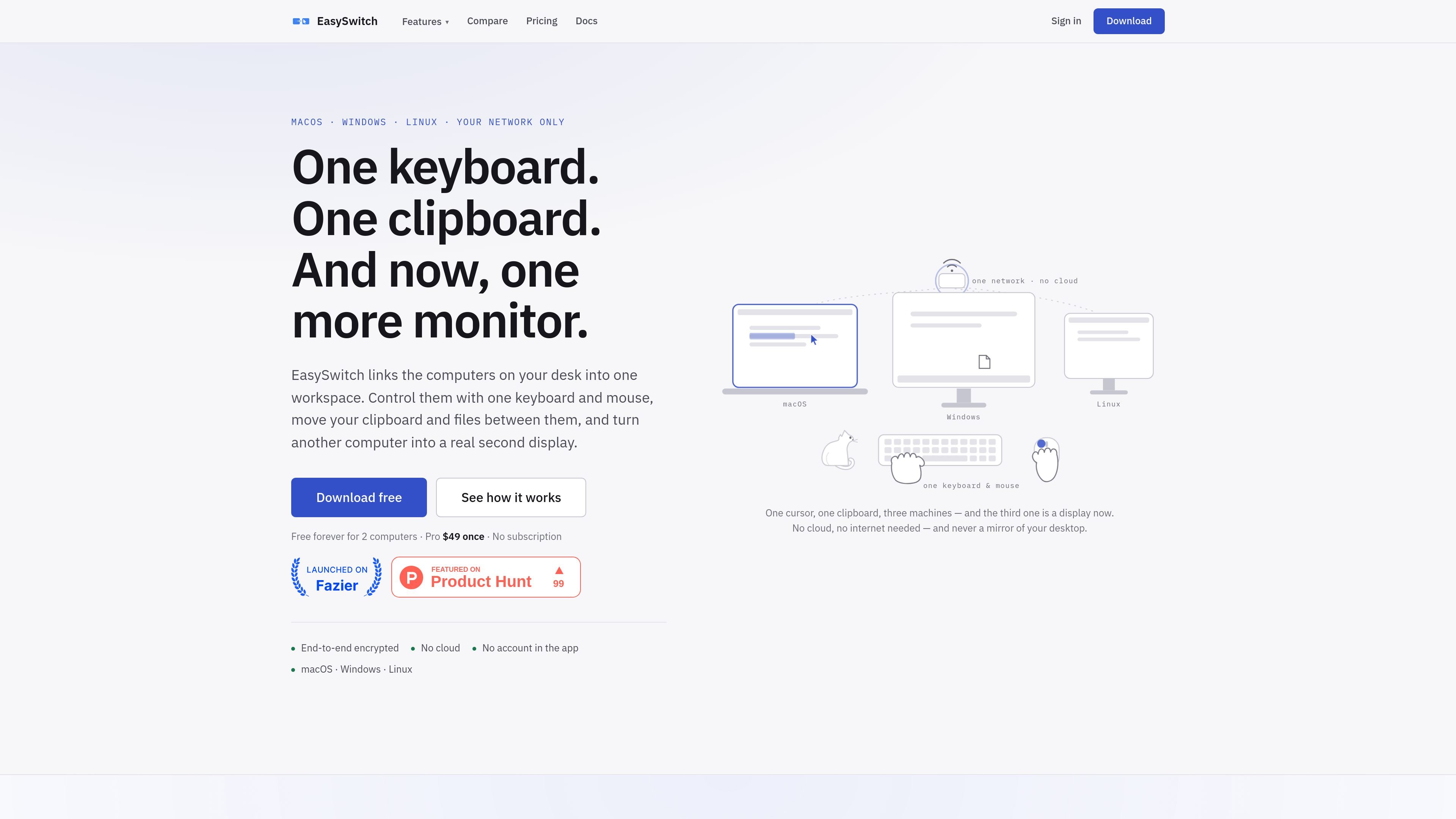
EasySwitch is a cross-platform desktop utility for controlling multiple computers with one keyboard and mouse, moving clipboard content and files between them, and—on paid plans—turning another computer into a second monitor. The site positions it as one workspace for Macs, Windows PCs, and Linux machines on the same local network.
Its main value is combining input sharing and display extension in one app. The keyboard and mouse can follow the pointer across machine boundaries, clipboard items and files can move between systems, and the virtual display feature creates a new empty monitor rather than mirroring an existing screen. The product is offered with a free tier for two computers, a one-time Pro purchase, and a higher-volume Business option.
Move the pointer to the edge of one screen and it continues on the next computer, with the keyboard following automatically. The app also translates Cmd and Ctrl so common shortcuts feel native on each platform.
Copy text, images, and files on one machine and paste or drop them on another. The source says copying itself does not send data across the network until you actually paste.
Drag files and folders between Macs, Windows PCs, and Linux computers. Free allows files up to 10 MB, while Pro removes that cap and supports unlimited drag-and-drop.
Use another supported computer as a real extra monitor. EasySwitch creates a new empty display, not a mirrored capture of your desktop, and it can run at 60 fps at the receiving screen’s native resolution.
Send text or files from a phone or browser through a QR-code-based bridge. The pricing page lists this on Pro and above, and notes that nothing needs to be installed on the phone.
Sessions are encrypted on the local network, with no cloud path or in-app account required. The site also says the app reconnects after sleep, a reboot, or a brief network interruption.
If you work with a Mac, Windows PC, and Linux box on the same desk, EasySwitch lets you move between them with one set of input devices instead of switching peripherals or using separate KVM hardware.
When you need to move a draft, screenshot, image, or small file from one machine to another, you can copy and paste or drag it across the edge instead of emailing it to yourself or relying on a separate file-sync workflow.
If you want more screen space for logs, docs, chat, terminals, or dashboards, Pro lets a supported computer act as an extra monitor without mirroring the original desktop.
For people who move between a main workstation and a spare laptop, EasySwitch can keep both machines connected so the cursor and keyboard follow naturally, including after sleep or a reboot.
If you need to send text or files from a phone or browser into your desktop workflow, the web bridge on paid plans provides a way to do that without installing an app on the sending device.
EasySwitch is installed on each computer, the computers find each other on the local network, and you pair them once by confirming the same fingerprint on both sides. After that, the cursor can move across screens and the keyboard follows it; if you want a second display, you turn on Extend for a supported machine.
It works across macOS, Windows, and Linux in mixed combinations. From the source pages, macOS 13 and later and Windows 11 can create a display, while macOS, Windows, and Linux can show one. Linux Wayland support is listed for GNOME and KDE Plasma, and Linux X11 can receive a display but not create one.
EasySwitch shares keyboard and mouse control, clipboard content, files, and, on Pro, the option to turn another computer into a second monitor. Copying does not send data until you paste it, and files can be dragged across the edge between computers.
No. The pricing page says there is no account needed in the app, the app works on your local network, and licenses verify once and then continue to work offline afterward.
Free is limited to two computers, the Pro plan adds up to five computers and the second-monitor feature, and Business raises the limit to up to 25 computers with priority email support. The pricing page also says there is a 14-day money-back guarantee.

ArtDeck is a visual reference board app for iPhone, iPad, and Mac. Collect mixed references on one canvas and study them with ToolBox lenses. Offline, optional iCloud sync, one-time purchase.

Biji is a versatile platform designed to enhance productivity through innovative tools and features.

Dcyde is a shared decision log for product teams to capture what was decided, why, and the source, with searchable records from Slack, Figma, or Dcyde.

Carbon Voice is an async voice messaging app for teams and individuals, with transcripts, AI catch-up, and cross-device access.

Goldfish is an AI memory app for macOS that helps you reply, write, summarize, and continue with context already on your Mac. It stores memory locally and writes in your tone.

Malyatko is a baby tracker for feeding, sleep, growth, teething, and milestones. Use it on iPhone, Apple Watch, and widgets offline, with iCloud sharing.