
Global candidate search
Search and shortlist candidates using role requirements, skills, experience, background, and AI match references to narrow the funnel faster.

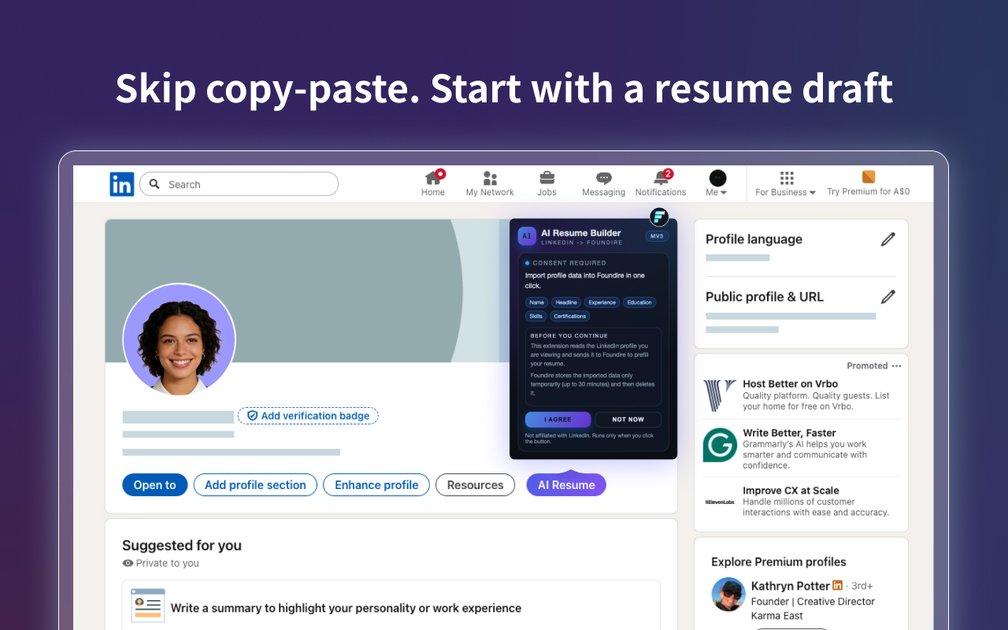
Foundire is an AI hiring workflow platform for recruiting teams, with global candidate search, resume screening, AI interviews, scorecards, and background checks. It also offers a Chrome extension that imports a LinkedIn profile into Foundire, tailors a resume with AI, and exports a PDF.
Foundire is an AI-powered hiring workflow platform that connects sourcing, resume screening, interviews, evaluation, offers, and background checks in one system. It is positioned for recruiting teams that want to reduce manual busywork while keeping the hiring process structured and consistent.
The platform combines Global People Search, resume screening, AI interview modes, scorecard-based review, and optional background checks. The Chrome extension page also shows a separate applicant-facing flow that lets users import a LinkedIn profile into Foundire, tailor a resume with AI, and export a PDF resume from a browser extension.
Search and shortlist candidates using role requirements, skills, experience, background, and AI match references to narrow the funnel faster.
Standardize first-pass review with resume parsing, structured criteria, and scoring that feeds into a consistent candidate evaluation workflow.
Run AI Dialogue, AI-Assisted Video, or AI-Assisted Voice interviews depending on the hiring stage and format you need.
Generate structured scorecards with question-and-answer summaries, competency scores, and an overall recommendation for team review.
Move candidates through interview invitations, reminders, and result notifications using Foundire’s built-in email system and customizable templates.
Support the later stages of hiring with optional background checks, including basic verification and employment or identity verification support where applicable.
Use the platform to search for candidates across regions, narrow the list by skills and experience, and move qualified people into a structured review process.
Standardize resume review when many applications come in for the same role, using structured screening instead of ad hoc manual comparison.
Run AI Dialogue, Video, or Voice interviews when you need a consistent first-round process that still adapts to candidate responses.
Use the scorecard and evaluation summary to help multiple teammates review the same candidate with the same evidence and recommendation format.
Import a LinkedIn profile into Foundire, tailor the resume to a target role with AI, and export a PDF when preparing application materials.
Foundire is an AI-powered hiring platform that combines global candidate search, resume screening, AI interviews, structured evaluation reports, and background checks in one workflow.
Yes. The Help Center says Foundire supports API and integrations and provides an API reference for developers. The provided sources do not list specific third-party integrations.
Foundire offers AI Dialogue, AI-Assisted Video, and AI-Assisted Voice interview modes, plus a structured scorecard after the interview.
Candidates can join interviews through a browser or mobile device, and the platform can automate invitations, reminders, and result notifications through its built-in email system.
The site says you can start a free trial or request a demo, publish a role, upload resumes, and run an AI interview in minutes.

Tiny CV is a markdown-first resume builder that previews a one-page CV, publishes a clean public link, and exports a PDF. It also provides role-based templates and an agent guide for fact-checked drafting.

AIApply is a job application AI for jobseekers that helps generate tailored resumes and cover letters, auto-apply to matched roles, and prepare for interviews. The site also presents resume scanning, a job board, and live interview help.

HiringPartner.ai is an autonomous AI recruiting platform for sourcing, screening, and interviewing candidates 24/7. It supports ATS-connected workflows, bulk resume uploads, and reviewable interview outputs for hiring teams.

nolainocr is an AI OCR tool that extracts structured data from PDF invoices, receipts, forms, contracts, and bank statements. It helps teams move document data into Excel, Google Sheets, JSON, or CSV without manual entry.

Elvixs is an AI job outreach tool for freshers and students that finds hiring contacts, writes personalized cold emails, sends from Gmail, and tracks opens and replies.
司马阅是一款面向企业的AI文档智能体平台,帮助团队把分散在文档中的知识转成可用于问答、检索、写作和审查的结构化能力。它适合对准确性和数据安全要求较高、且有大量文档工作流程的企业。