

Gemini Robotics-ER 1.6
Gemini Robotics-ER 1.6 is a robotics reasoning model for embodied tasks, improving spatial and multi-view understanding and instrument reading via Gemini API and Google AI Studio.
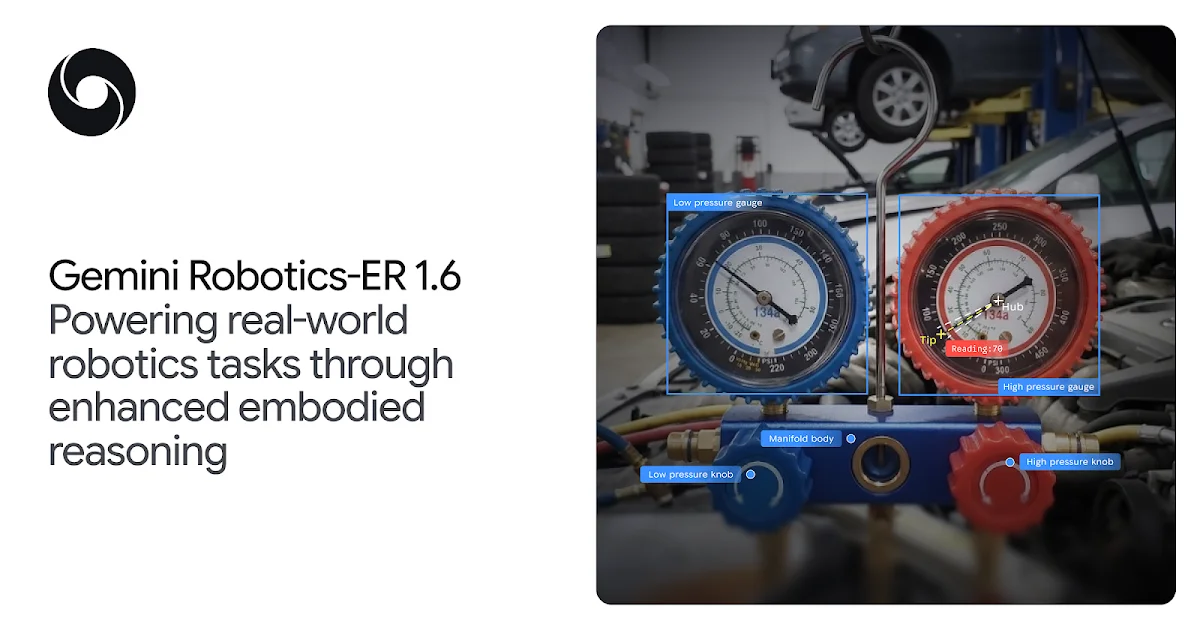
What is Gemini Robotics-ER 1.6?
Gemini Robotics-ER 1.6 is a robotics-focused reasoning model designed to help physical robots reason about the real world. It targets “embodied reasoning,” where a robot must connect perception to actions—such as interpreting what it sees, understanding spatial relationships, and deciding what to do next.
The model is presented as a high-level reasoning component for robots. It can execute tasks by natively calling tools, including Google Search, and it can work with vision-language-action (VLA) models or other third-party user-defined functions. The release highlights improvements to spatial reasoning and multi-view understanding, plus a new capability for reading instruments like gauges and sight glasses.
Key Features
- Enhanced spatial reasoning: Improves abilities such as pointing, counting, and using intermediate “points” to reason through multi-step tasks.
- Multi-view understanding: Advances reasoning across multiple camera streams (e.g., overhead and wrist views), including situations involving occlusion or changing scenes.
- Task planning and success detection: Supports planning and a core decision capability—detecting whether a task has succeeded so an agent can choose to retry or proceed.
- Tool-calling for task execution: Natively calls tools such as Google Search to find information needed during execution.
- Instrument reading (new capability): Enables robots to read complex gauges and sight glasses; introduced via a use case discovered through collaboration with Boston Dynamics.
How to Use Gemini Robotics-ER 1.6
- Access the model via Gemini tools: Start using Gemini Robotics-ER 1.6 through the Gemini API or Google AI Studio (as stated in the release).
- Configure prompts for embodied reasoning: Use the shared developer Colab examples to see how to configure the model and prompt it for embodied reasoning tasks.
- Connect to robot capabilities: In a typical setup, the reasoning model can call tools (including Google Search) and coordinate with VLA models or third-party user-defined functions to carry out actions.
Use Cases
- Reading complex instrument displays: A robot observes a gauge or sight glass and uses instrument reading to extract relevant information as part of an autonomous workflow.
- Counting and pointing in cluttered scenes: In a camera view containing multiple objects (e.g., tools), the model identifies counts and selects points that guide further reasoning or calculations.
- Multi-step spatial tasks using intermediate points: For tasks that require “from-to” movement logic or constraints (e.g., selecting objects that satisfy a spatial requirement), the model can use points to break the task into intermediate reasoning steps.
- Autonomy loops with success detection: A robot attempts an action and uses success detection to determine whether it should retry or move to the next stage of a plan.
- Robotics perception across multiple cameras: In setups with multiple views, the model uses multi-view reasoning to maintain a coherent understanding of what’s happening across time, even when parts of the scene are occluded.
FAQ
Is Gemini Robotics-ER 1.6 intended for conversational chat? No. The release frames the model as a reasoning-first robotics component focused on embodied reasoning, task planning, and success detection for physical agents.
What does “success detection” mean in this context? The release describes success detection as a decision engine for autonomy: the system uses it to decide whether a task has finished or whether it should retry versus proceed.
What tools can the model call? The page states it can natively call tools such as Google Search and can also work with VLAs or other third-party user-defined functions.
Where can developers access the model? According to the release, it is available to developers via the Gemini API and Google AI Studio.
How do I get example prompts and configuration guidance? The release mentions a developer Colab containing examples for configuring the model and prompting it for embodied reasoning tasks.
Alternatives
- Earlier embodied-reasoning model versions: If your workflow is already built around Gemini Robotics-ER, a practical alternative is using prior releases (e.g., ER 1.5) and evaluating whether the specific improvements you need (spatial reasoning, multi-view understanding, instrument reading) matter for your use case.
- General-purpose multimodal models with robotics tooling: Another option is combining a general multimodal model with separate robotics perception/control modules, where embodied reasoning is assembled from multiple components rather than using a dedicated robotics reasoning model.
- Standalone vision-language-action (VLA) approaches: For teams focused primarily on action generation, an alternative workflow is to rely more heavily on VLA models for perception-to-action while using external logic for success detection and planning.
- Tool-using agent frameworks without a dedicated robotics reasoning model: You can build agentic behavior by orchestrating perception inputs and tool calls in an agent framework, though you may need additional work to match the release’s embodied reasoning focus (spatial reasoning and success detection).
Alternatives

AakarDev AI
AakarDev AI is a powerful platform that simplifies the development of AI applications with seamless vector database integration, enabling rapid deployment and scalability.

Arduino VENTUNO Q
Arduino VENTUNO Q is an edge AI computer for robotics, combining AI inference hardware and a microcontroller for deterministic control. Arduino App Lab-ready.

Devin
Devin is an AI coding agent that helps software teams complete code migrations and large refactoring by running subtasks in parallel.

BenchSpan
BenchSpan runs AI agent benchmarks in parallel, captures scores and failures in run history, and uses commit-tagged executions to improve reproducibility.

open-codex-computer-use
open-codex-computer-use is an open-source “Computer Use” MCP server that lets AI agents run desktop GUI actions on macOS, Linux, and Windows.

Codex Plugins
Use Codex Plugins to bundle skills, app integrations, and MCP servers into reusable workflows—extending Codex access to tools like Gmail, Drive, and Slack.