

Jitera
Jitera is an AI workspace where teams collaborate with agents using org-specific context to stay aligned and avoid disconnected, copy-pasted outputs.
What is Jitera?
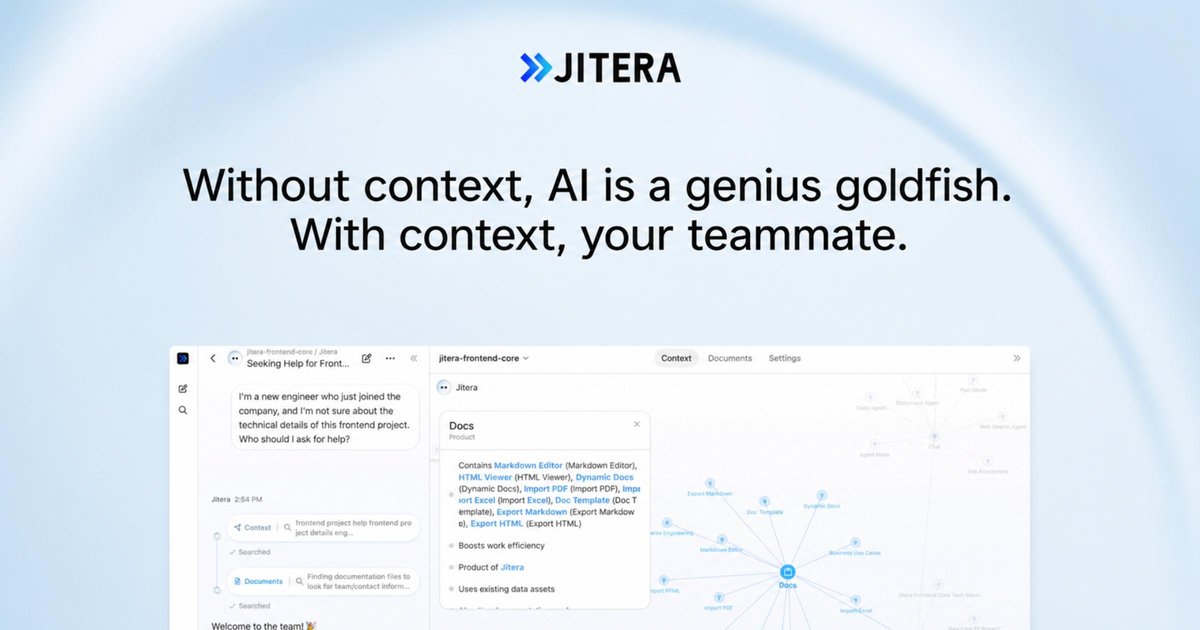
Jitera is an AI workspace where teams collaborate with AI agents using a shared, organization-specific context. The goal is to turn your code, documentation, decisions, and other tribal knowledge into “living context” that agents can use across day-to-day work.
Instead of everyone prompting separate AI tools and copy-pasting outputs that get lost, Jitera aims to keep the team aligned in one place—so agents can follow the conversation, use the same underlying context, and take actions with the team in the loop.
Key Features
- One shared AI workspace for teams: Bring chat, document work, and agent actions into a single environment so team output and activity don’t splinter across individual prompts.
- Real-time collaboration with agents: Chat in a shared thread where agents follow the conversation, co-edit documents, and help move work forward as discussions evolve.
- Team confirmation before agents act: Agents ask the team before taking actions, with the stated intent of reducing guesswork (the product describes this as avoiding hallucinations or surprises).
- Organization context map: A visual memory of teams, projects, and decisions, designed to help agents stay grounded in how your organization works.
- Resources import for context: Import existing files—PDFs, Word, Excel, and HTML are explicitly mentioned—so agents can work against the latest versions of your documentation.
- AI agent configuration and orchestration: Choose frontier LLMs, connect apps, and create agents with tailored instructions, skills, and tools.
- Automation and pipelines: Set up recurring workflows, scheduled jobs, and multi-step pipelines to run while you’re away.
- App integrations and in-workflow responses: Connect with tools like GitHub, Notion, and Linear; the product also mentions agents can reach you in Slack.
- Agent-to-agent delegation: Enable agents to delegate tasks to other agents to break complex work into smaller missions.
How to Use Jitera
- Start a workspace and invite your team so everyone can collaborate in the same AI environment.
- Add your organization context by importing your existing resources (files and documentation) and using the context map to represent teams, projects, and decisions.
- Create or select agents configured for your workflow by setting agent instructions, connecting required apps, and choosing the LLM(s) to use.
- Work in shared threads: use a single chat thread for discussion and agent action, and review outputs or edits as agents coordinate with your team.
- Automate repeatable workflows by scheduling recurring jobs or multi-step pipelines that use your context.
Use Cases
- Cross-functional decision tracking: When teams discuss decisions across channels and documents, Jitera’s shared workspace and context map help agents reference prior decisions instead of starting from scratch.
- Document iteration and verification: For co-editing drafts, agents can follow the ongoing thread and incorporate context while asking the team before taking actions, addressing “rewritten by AI—again” situations.
- Engineering workflow support: With integrations to GitHub and Linear, agents can assist with code-adjacent or issue-related workflows while maintaining alignment with the conversation and the organization’s context.
- Knowledge onboarding for new projects: Import PDFs, Word/Excel files, and HTML resources so agents can answer questions and work on tasks using the latest shared documentation rather than outdated snippets.
- Recurring operational automation: Set up scheduled workflows (multi-step pipelines and recurring jobs) that run while the team is offline, using the organization context and app connections to complete tasks.
FAQ
-
What does “context” mean in Jitera? The product describes context as your organization’s code, docs, decisions, and tribal knowledge organized into a shared memory (including a context map) that agents use.
-
Do agents act without approval? Jitera describes a workflow where agents ask the team before they act, intended to confirm the right information before taking action.
-
What kinds of resources can be imported? The site explicitly mentions importing PDFs, Word, Excel, and HTML.
-
Which apps can Jitera connect to? The page explicitly lists connections with GitHub, Notion, and Linear, and mentions that agents can respond in Slack.
-
Can agents delegate tasks to other agents? Yes. The product mentions agent-to-agent delegation, where agents can break complex work into smaller missions.
Alternatives
- General-purpose AI chat tools without a shared workspace: These can answer questions, but typically don’t maintain a team-wide, organization-specific context map and synchronized threads for collaborative agent work.
- Document-centric knowledge bases (e.g., wiki/knowledge management platforms): These store information, but may not provide an agent workspace that can co-edit, automate workflows, or coordinate actions with team confirmation.
- Workflow automation platforms: Tools focused on automation can run scheduled jobs, but may require more manual orchestration to create a context-aware agent workflow grounded in your documents and decisions.
- Agent frameworks or LLM orchestration tools: These can build custom agent systems, but may not come as a ready-made collaborative workspace designed for team threads, shared organization context, and agent confirmation flows.
Alternatives

Lasso
Lasso is an AI-first PIM for ecommerce teams that enriches product attributes and descriptions, processes supplier data, and monitors competitors via app or API.

Biji
Biji is a versatile platform designed to enhance productivity through innovative tools and features.

Codex Plugins
Use Codex Plugins to bundle skills, app integrations, and MCP servers into reusable workflows—extending Codex access to tools like Gmail, Drive, and Slack.

Struere
Struere is an AI-native operational system that replaces spreadsheet workflows with structured software—dashboards, alerts, and automations.

garden-md
Turn meeting transcripts into a structured, linked company wiki with local markdown and an HTML browser view. Sync from supported sources.

Falconer
Falconer is a self-updating knowledge platform for high-speed teams to write, share, and find reliable internal documentation and code context in one place.