
Evidence-backed prospect discovery
Interview-based ICP Builder and Prospect Finder search the open web for matching companies and people, attach evidence to candidates, and require review before import.

kōdlo is an AI sales workspace and CRM for high-ticket B2B teams and solo sellers, combining prospect discovery, web research, outreach, and pipeline management.
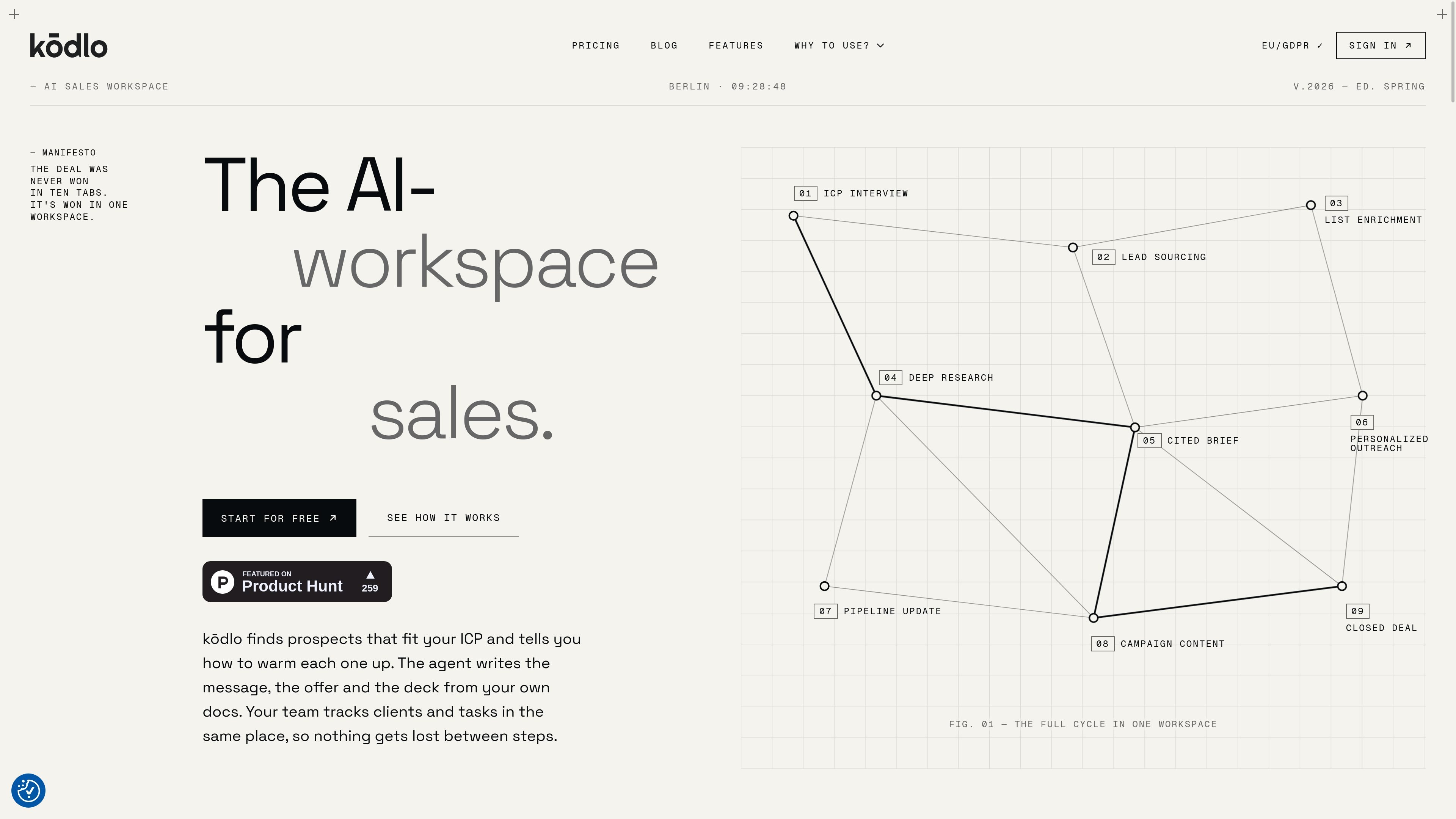
kōdlo is an AI sales workspace and CRM for high-ticket B2B sales. It combines ICP development, prospect discovery, public-web research, cited briefs, outreach drafting, contact and pipeline management, and sales-material generation in one workspace.
The product is designed to keep evidence and context attached to the sales record. Prospects retain the signals and source links behind their fit, research reports cite the pages used, and the agent can work from documents stored in the Knowledge Hub. Teams can also use tickets, scheduled jobs, and shared workspace features to continue work after the initial prospecting step.
Interview-based ICP Builder and Prospect Finder search the open web for matching companies and people, attach evidence to candidates, and require review before import.
Deep Search researches companies, markets, people, and topics across public web sources, producing reports with citations and an explicit limitations section when coverage is constrained.
The split-screen workspace keeps the agent beside Contacts, Tickets, Campaigns, Knowledge, Generate, and Deck records. Agent writes land in the same database rather than a separate sandbox.
Knowledge Hub ingests PDF, DOCX, XLSX, CSV, TXT, MD, and PPTX files, including scanned PDFs through OCR. Conversations can be limited to selected projects, whose retrieved passages provide the document citations.
The agent can draft personalized LinkedIn or email outreach, generate campaign content, and create pitch decks or proposals from company material and templates. Deck exports include PowerPoint and PDF.
Confirmed scheduled or long-running jobs can research account lists, open tickets, and deliver results to the workspace, Telegram, Google Chat, or a combination.
A seller can describe the offer and target market in an ICP interview, review evidence-backed company and people candidates, and import approved prospects into a campaign without moving the workflow to another system.
Before a high-value conversation, the agent can research an account, its market, a relevant person, or a topic and produce a cited report that makes the supporting sources and remaining gaps visible.
Sales teams can upload product documents, pricing material, case studies, or contracts into selected Knowledge Hub projects so the agent can ground replies, outreach, and generated materials in internal information.
A team can keep inquiries, contacts, tickets, attachments, and past threads together, then use the agent to draft replies and follow-ups based on workspace context.
Teams can confirm recurring or long-running jobs, such as checking accounts for news and opening tickets when something changes, with results delivered into the workspace or connected chat destinations.
kōdlo starts with an ICP interview, then searches the open web for matching companies and people. You review the staged candidates before importing approved contacts into a campaign, after which research, outreach, and pipeline work in the same workspace.
The agent interviews you about your offer, existing customers, target firms, buying roles, in-market signals, and disqualifiers, then works with you to document the ICP.
Prospect results include the person and company, links to their profiles, the reason they fit, supporting signals, and source links. Discovery can return up to 25 candidates per run, and existing campaign contacts are excluded before searching.
Deep Search uses public web sources only. It does not use paywalled or logged-in pages. If a run reaches its web-fetch budget, it returns a shorter report with a Limitations section rather than no result.
Starter accounts include a 7-day free trial and there is no free-forever plan. Starter is for one user, Pro supports up to three seats, and Custom plans can be scoped for different seat counts and workflow requirements.

Podium is an AI lead generation and lead management platform for local businesses. Centralize conversations, follow-up, reviews, payments, and booking with a 24/7 AI Employee add-on.

Ninjō AI is an AI sales agent platform for creators and agencies that qualifies leads, handles sales conversations, and supports multi-channel follow-up.

Sumora is an autonomous outreach agent for LinkedIn and Instagram that finds, qualifies, warms, and books leads, with replies managed in one inbox and final sends under review.

Blinked is a free Chrome extension for LinkedIn outreach to research leads, draft personalized messages, and manage follow-ups locally in your browser.

Salestrics is an AI-native CRM and revenue platform for startups, combining pipeline management, workspace files, analytics, automations, finance, and team communication.

Cold Mail Server provides dedicated outbound email infrastructure for cold outreach teams, agencies, and outbound SaaS operators, with isolated mail servers and deliverability monitoring.