Pinery icon

Pinery

Pinery is a Mac self-publishing studio for writing, editing, illustrating, previewing, and exporting book-length manuscripts with AI co-author Prose.

Pinery

Overview

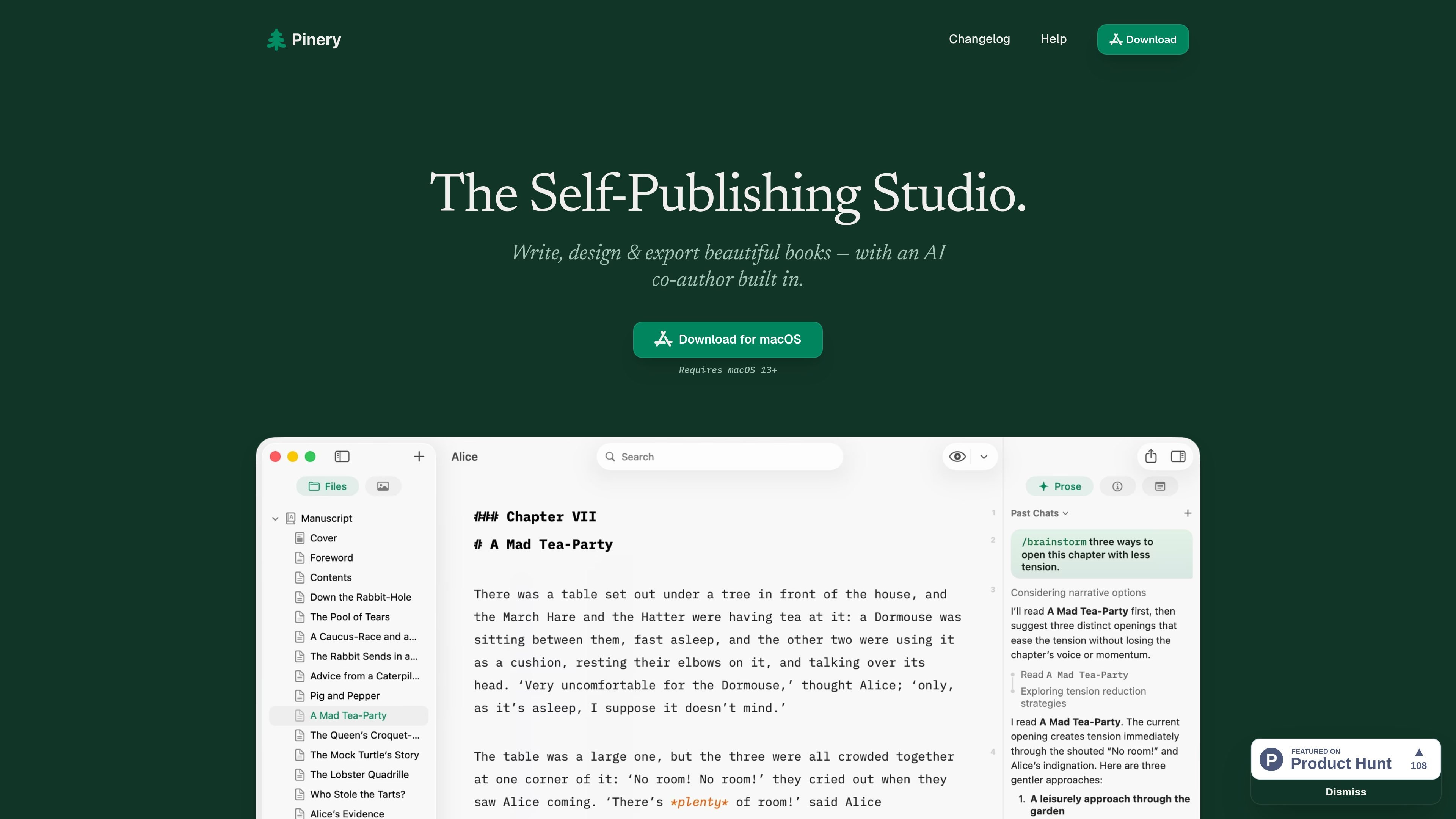
Pinery is a self-publishing studio for Mac built around a Markdown manuscript editor and an embedded AI co-author called Prose. It is designed for writing, editing, illustrating, previewing, and exporting book-length projects in one app.

The product focuses on keeping the writing workflow inside the manuscript rather than in a separate chat window. Prose can draft scenes, continue chapters, proofread, and generate illustrations, while the app also provides typesetting, page previews, and export tools for publishing workflows.

Features

In-manuscript AI writing skills

Ask in plain language or type slash commands to trigger writing skills directly inside the manuscript. Prose can draft scenes, continue chapters, perform developmental editing, tighten prose, analyze markets, and more without switching to a separate chat window.


Reviewable editing workflow

See edits as reviewable diffs with labeled changes such as grammar, wording, and formatting. You can accept or reject each change, which keeps the revision process explicit instead of automatic.

Context-aware illustration generation

Generate illustrations based on the surrounding chapter context, then place them into the book from project assets. The site says the artwork is grounded in the scene and saved for reuse inside the project.

Typesetting and live preview

Preview books in a paginated layout with fonts, spacing, alignment, and footers. The preview can switch between PDF pages and a Kindle-style e-ink simulator to check page breaks and readability before exporting.

Publishing export options

Export finished projects as ePub 3, digital PDF, or static websites. Pinery also says its ePub output is designed to work with Apple Books, Kindle, Kobo, and other eReaders.

Book project workspace

Use a distraction-free Markdown editor with reusable assets, automatic tables of contents, chapter notes in the inspector, and Word import for .docx files. The site also says your files remain as plain Markdown on your Mac or in iCloud.

Use Cases

  • Book drafting

    Draft chapters, scenes, or transitions with an AI assistant that stays inside the manuscript and works from your notes, outline, or nearby chapters.

  • Revision and proofreading

    Run a final pass for grammar, clarity, consistency, and style adjustments, then review each proposed change before accepting it.

  • Illustrated book production

    Create chapter-specific illustrations that are grounded in the surrounding text and saved into the project’s asset library for later placement.

  • Layout and pre-export review

    Check page breaks, spacing, and visual rhythm in a paginated preview or Kindle-style e-ink simulator before exporting the book.

  • Starting from an existing manuscript

    Import an existing .docx manuscript and continue working in Markdown with chapters, notes, reusable assets, and a built-in table of contents.

Pros and Cons

Pros

  • Combines drafting, editing, illustration, preview, and export in a single Mac app.
  • Keeps AI assistance inside the manuscript with reviewable diffs and explicit accept/reject controls.
  • Supports multiple publishing outputs, including ePub 3, digital PDF, and static websites.
  • Includes a Markdown-based workflow with reusable assets, chapter notes, and Word import.
  • Provides device-style previews so authors can check layout and readability before export.

Cons

  • The site does not provide pricing information on the home page, and the pricing URL shown in the crawl returned a 404 page.
  • Team collaboration, external integrations, and supported operating-system details beyond macOS 13+ are not clearly documented in the available source content.

FAQ

What is Pinery used for?

Pinery is a Mac app for writing, editing, designing, previewing, and exporting book-length manuscripts. It combines a Markdown editor with AI-assisted writing, illustration, and publishing tools in one workspace.

What platform does Pinery support?

The page states that Pinery is available for macOS and requires macOS 13 or later.

What file formats does Pinery work with?

Pinery can export professional ePub 3 files, digital PDFs, and static websites. The site also says it can import a .docx file and convert it into Markdown chapters.

How does Pinery handle AI-generated changes?

The site emphasizes that Prose edits appear as reviewable diffs and that you can accept or reject changes. It also says nothing lands in the book without your review.

Does Pinery support team collaboration?

The home page does not describe team features, collaboration roles, or shared workspaces, so team usage cannot be confirmed from the available source content.

Quick Facts

Category
AI book writing and self-publishing software
Platform
Mac
System requirement
macOS 13+
Output formats
ePub 3, digital PDF, static websites
Import support
.docx to Markdown chapters
Source domain
pinery.app
