

Plus AI
Plus AI makes native PPTX and Google Slides presentations inside PowerPoint and Google Slides—create or reformat decks with prompts, uploads, and templates.
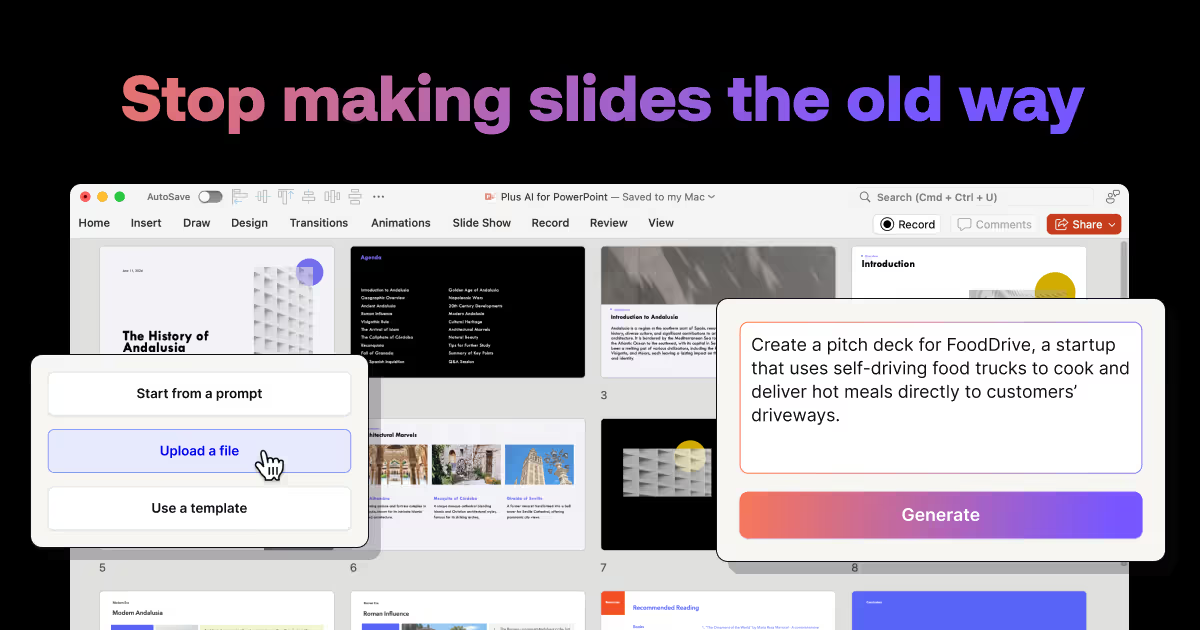
What is Plus AI?
Plus AI is an AI presentation maker that works as a native add-on inside PowerPoint and Google Slides. Its core purpose is to help professional slide creators generate or reformat slide content directly within the tools they already use.
Instead of producing presentations in a separate viewer or requiring a new workflow, Plus AI generates native slide files: PPTX for PowerPoint and Google Slides presentations. The product is designed to support existing templates and day-to-day slide creation workflows.
Key Features
- Native PowerPoint add-in and Google Slides add-on: Use Plus AI inside your presentation application rather than switching to a separate slide editor.
- Native PPTX and Google Slides outputs: Plus AI produces fully compatible presentations in your target format to match existing workflows.
- Template-aware slide creation: Create and edit slides in line with your existing slide templates, including branding/style conventions for enterprise customers.
- Upload-and-convert inputs: Upload PDFs, Word documents, text files, and other supported formats to automatically convert into a PowerPoint or Google Slides presentation.
- Slide-level and deck-level generation: Insert a single slide or generate a full presentation from prompts or longer text.
- Remix for formatting existing decks: Reformat or convert existing slides into new formats and layouts using Plus AI.
- Security and compliance for enterprise use: Plus AI follows enterprise-grade security practices and has achieved SOC 2 Type II compliance.
How to Use Plus AI
- Sign up for the free trial.
- Install the Plus AI extension/add-in for the presentation app you use (PowerPoint or Google Slides).
- In your slide app, use Plus features such as inserting a slide, uploading source documents for conversion, or using Remix to reformat existing slides.
Use Cases
- Convert existing documents into slide decks: Upload a PDF, Word doc, or text file and generate a PowerPoint or Google Slides presentation from it.
- Create one slide at a time during drafting: Use prompts or longer text in the Plus “Insert” flow to add individual slides without regenerating the entire deck.
- Reformat an existing presentation: Apply Remix to convert current slide layouts into new formats and layouts while working within your presentation workflow.
- Generate a complete deck from structured text: Use longer input text (such as an article or blog post) to create an entire presentation when you need a cohesive set of slides.
- Use an enterprise branding workflow: For organizations that require consistent branding, use customized presentation templates so generated or edited slides follow internal style guidelines.
FAQ
What sets Plus AI apart from other AI tools? Plus AI is designed for professional slide makers working in PowerPoint and Google Slides, generating native PPTX and Google Slides outputs that are compatible with existing templates and workflows.
How do I use Plus AI? Plus AI is a native add-on for PowerPoint and Google Slides. After you sign up for a free trial and install the extension, you can use its features directly inside your slide app.
Is Plus AI free? Yes. Plus AI offers a free 7-day trial. After that, it has multiple paid plans (plan details are not provided here).
Can Plus AI convert a PDF into a PowerPoint? Yes. You can upload PDFs, Word documents, text files, and other supported document formats to convert them into PowerPoint or Google Slides presentations.
How does security work for Plus AI? Plus AI follows enterprise-grade security practices and has achieved SOC 2 Type II compliance. More details are referenced on a separate security page.
Alternatives
- Standalone AI slide generators that export to PowerPoint/Google Slides: These can help create slide decks faster but may require exporting/reconciling with your existing templates and workflow rather than producing native output inside your slide app.
- PowerPoint or Google Slides add-ons focused on template management and design systems: These alternatives may emphasize consistent formatting and layout rules rather than AI-driven slide generation or document-to-slides conversion.
- Generic document-to-presentation tools (conversion-focused software): These focus on converting input documents into slide content, which may reduce manual effort but can be less integrated into slide authoring and remixing workflows.
- Presentation automation in office suites (macros/scripts or workflow tools): These can standardize slide creation for specific templates but typically require more setup and do not provide the same prompt-based generation workflow.
Alternatives

Slidesgo
Discover free Google Slides themes and PowerPoint templates on Slidesgo. Download and customize online to create presentations.

ChatBA
ChatBA is generative AI for slides: create slide deck content fast with a chat-style workflow, turning your input into a draft.

Beautiful.ai
Beautiful.ai is an AI presentation maker that automates design, layout, and spacing as you build content—so individuals and teams create polished slide decks.

MagicSlides
MagicSlides is an AI-powered PPT maker that transforms any content source into professional presentations in seconds.

Faces
Faces: AI platform for interactive presentations. Create engaging, explorable decks beyond static slides for better audience engagement.

okkslides
Create stunning presentations with okk AI slides maker. Transform ideas into professional PowerPoint slides in minutes.