

ShioriCode
ShioriCode is a desktop AI agent workspace for coding, with side-by-side models, checkpointed sessions, and live streaming edits and terminal activity.
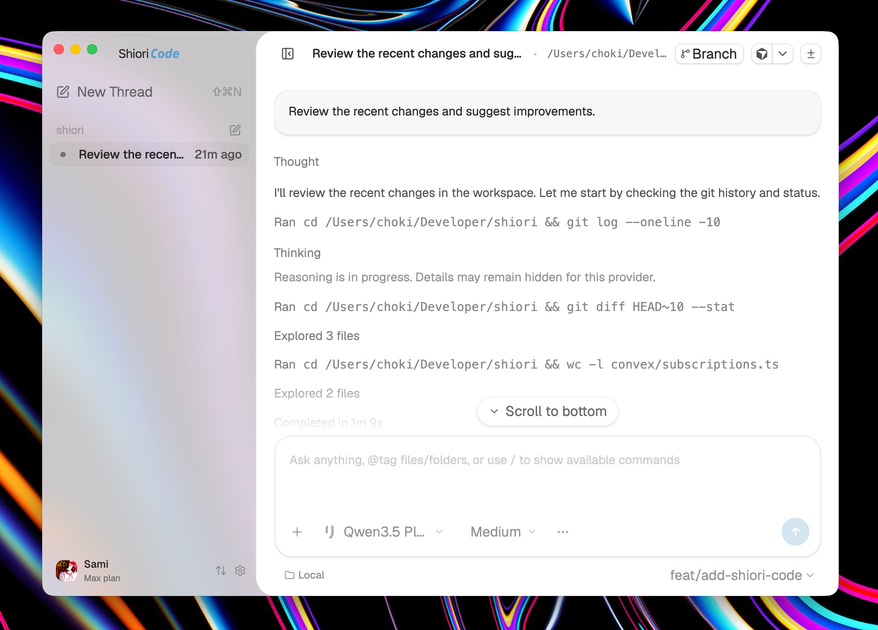
What is ShioriCode?
ShioriCode is a desktop workspace for coding with AI agents. It lets users run multiple models side by side in one checkpointed environment, including Codex, Claude, Gemini, Cursor, Kimi, and Shiori.
The product is designed around an agent workflow: you describe what to build or fix, watch the agent read the repository and work through tasks, then inspect changes turn by turn before merging. The page describes ShioriCode as available to active paid Shiori subscribers and shows downloads for macOS, Windows, and Linux.
Key Features
- Side-by-side model workspace: run Codex, Claude, Gemini, Cursor, Kimi, and Shiori in the same desktop app, which makes it easier to compare or switch between agents during a task.
- Git-checkpointed sessions: each turn is checkpointed, so you can rewind to earlier states instead of relying only on linear chat history.
- Streaming activity feed: file edits, shell commands, reasoning steps, and terminal output stream live to the screen for follow-along review.
- Embedded terminal: a terminal is included in each thread, so code changes and command output stay in the same workspace.
- MCP support: the page lists Model Context Protocol extensions, indicating support for extending the agent workflow with external tools.
- Multi-platform desktop downloads: installers are listed for macOS Apple Silicon, macOS Intel, Windows x64, and Linux AppImage.
How to Use ShioriCode
Start by downloading the version that matches your platform and opening the desktop app. Then describe the change or fix you want, let the agent inspect your repository and begin work, and monitor the live edits and commands as they happen.
When the agent finishes a turn, review the diffs, approve the changes you want to keep, or rewind to a prior checkpoint if you want to backtrack. The workflow is set up for iterative coding sessions where you can keep adjusting the result before merging.
Use Cases
- Repository maintenance: ask an agent to fix a bug or implement a small feature while you watch the repository changes and command output in real time.
- Model comparison: open the same coding task in multiple models and compare how each agent plans or edits code.
- Review-heavy workflows: use checkpoints and per-turn diffs to inspect each step before accepting changes.
- Cross-platform development: install the app on macOS, Windows, or Linux and keep a similar agent-based workflow across machines.
- Team or solo prototyping: use the embedded terminal and live streaming to move from request to working code with less context switching.
FAQ
Is ShioriCode a web app or a desktop app? It is presented as a desktop app.
Which operating systems are supported? The page lists downloads for macOS, Windows, and Linux, with separate macOS builds for Apple Silicon and Intel.
Which AI models can it run? The page names Codex, Claude, Gemini, Cursor, Kimi, and Shiori as available models.
Does it support checkpointing? Yes. The page says sessions are git-checkpointed per turn, and you can rewind to any checkpoint.
Can I use it if I am not a paid Shiori subscriber? The page says it is available to active paid Shiori subscribers, so access appears tied to a paid subscription.
Alternatives
- Traditional code editors with AI assistants: these tools usually add an assistant panel to an existing editor rather than centering the whole workflow on checkpointed agent sessions.
- Other desktop agent workspaces: similar products may also focus on autonomous coding agents, but differ in how they handle multi-model comparison, checkpointing, and terminal integration.
- Cloud-based coding agents: these are accessed through the browser or hosted environments, which can reduce local setup but may feel different from a desktop workspace tied to your local machine.
- General-purpose IDEs with extensions: these are better suited to users who want to stay in a familiar editor and add AI capabilities incrementally instead of adopting a dedicated agent workspace.
Alternatives

Devin
Devin is an AI coding agent that helps software teams complete code migrations and large refactoring by running subtasks in parallel.

AakarDev AI
AakarDev AI is a powerful platform that simplifies the development of AI applications with seamless vector database integration, enabling rapid deployment and scalability.

Arduino VENTUNO Q
Arduino VENTUNO Q is an edge AI computer for robotics, combining AI inference hardware and a microcontroller for deterministic control. Arduino App Lab-ready.

imgcook
imgcook is an intelligent tool that converts design mockups into high-quality, production-ready code with a single click.

open-codex-computer-use
open-codex-computer-use is an open-source “Computer Use” MCP server that lets AI agents run desktop GUI actions on macOS, Linux, and Windows.

Codex Plugins
Use Codex Plugins to bundle skills, app integrations, and MCP servers into reusable workflows—extending Codex access to tools like Gmail, Drive, and Slack.