

Timebase
Timebase is a calm world clock and meeting planner for comparing cities, checking time zones, and finding meeting slots across regions.
What is Timebase?
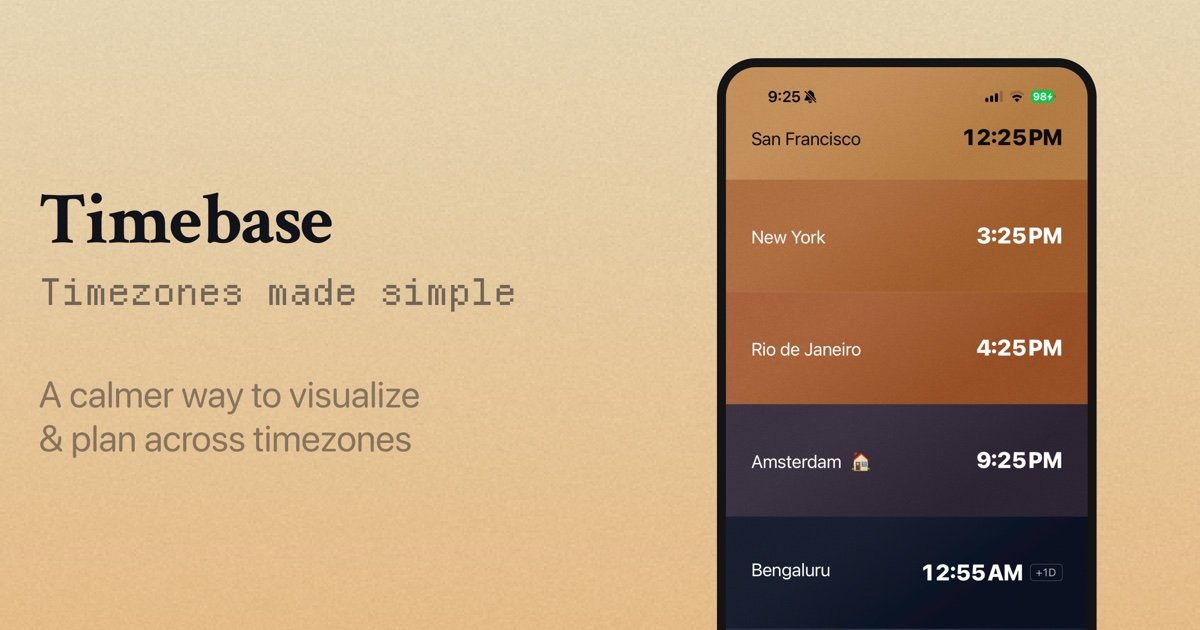
Timebase is a world clock and meeting planner for checking time across cities and finding a meeting time that works across multiple time zones. It shows cities in a stacked hourly view and lets you move through the day to see how local times line up.
The product is designed to make timezone planning calmer and more visual. Instead of switching between separate clocks or calculators, users can drag, scroll, or scrub through time, compare cities at once, and open a planner to settle on a shared meeting time.
Key Features
- Multi-city world clock view — Stack the cities you care about in one view so you can compare local times side by side.
- Time scrubbing controls — Drag, scroll, or use keyboard shortcuts to move through the day in 15-minute, hourly, or daily increments.
- Jump back to the present — A dedicated snap-to-now action quickly returns the view to the current time.
- Meeting planner — Open the planner to pick a time and see how that choice affects every listed city at once.
- 24-hour time option — Switch to 24-hour time for a format that is often easier to read across time zones.
- Theme controls — Use system, light, or dark mode depending on your preference or environment.
- Keyboard shortcut guidance — Built-in shortcut hints show how to scrub by time, plan a time, add a city, and open help.
How to Use Timebase
Start by adding the cities you want to track, then move through the day by dragging, scrolling, or using the listed keyboard shortcuts. Use the planner when you need to choose a meeting time and review the result across all cities before sharing it with others.
Use Cases
- Scheduling a cross-time-zone meeting — Compare candidate times for attendees in different cities before sending out an invite.
- Checking business hours abroad — See whether a colleague, client, or vendor is likely to be online in their local time.
- Planning travel communication — Work out when to call, message, or coordinate with someone in another region.
- Managing a distributed team — Keep several team locations visible at once so daily overlap is easier to spot.
- Orienting yourself in a new timezone — Use the scrubbed timeline to understand how your day maps to another city’s clock.
FAQ
Can I view more than one city at a time? Yes. The interface is built around stacking multiple cities together so you can compare them in one view.
Does Timebase support keyboard shortcuts? Yes. The page shows shortcuts for scrubbing time, snapping back to now, planning a time, and adding a city.
Can I switch between time formats or themes? Yes. The interface includes a 24-hour time option and system, light, and dark theme settings.
Does Timebase help choose a meeting time for multiple people? Yes. The planner is specifically presented as a way to pick a time and see how it lands for every city at once.
Alternatives
- Standard world clock apps — These typically focus on checking the current time in different cities, but may not offer a timeline scrubber or meeting-planning workflow.
- Calendar scheduling tools — These are better for sending invites and coordinating availability, but they usually center on calendars rather than a dedicated world-clock comparison view.
- Timezone conversion websites — These can convert between cities or zones quickly, though they often provide a simpler one-off calculation instead of an interactive day view.
- Manual spreadsheet or note-based planning — Useful for custom coordination, but more error-prone and less immediate than a purpose-built timezone interface.
Alternatives

LIAM
LIAM is an AI copilot that drafts email replies, organizes your inbox with auto-labels and prioritization, and schedules meetings from your calendar.

Gemma AI
Gemma AI is a smart application that calls you directly with personalized, intelligent voice reminders to ensure you never miss important tasks, appointments, or deadlines.
Side Reminder
Side Reminder brings Apple Reminders to your screen edge with keyboard/voice capture, focus timer, inline link previews, and optional Claude Code AI execution.

Tactiq
Tactiq is an AI meeting assistant that provides live transcription, AI summaries, action items, and custom AI prompts for Google Meet, Zoom, and Teams.

garden-md
Turn meeting transcripts into a structured, linked company wiki with local markdown and an HTML browser view. Sync from supported sources.

ClawTick
ClawTick is a CLI-first AI agent automation platform for scheduling webhook tasks on cron with monitoring, alerts, retries, and execution logs.