
Local-first agentic coding
Voidleap Code is presented as a local harness for agentic coding. The desktop app runs on your machine, supports your own provider keys or a local model, and keeps inference out of Voidleap’s servers.

Voidleap Code is a local-first agentic coding IDE for running AI-assisted workflows on your own machine with provider keys or a local model.
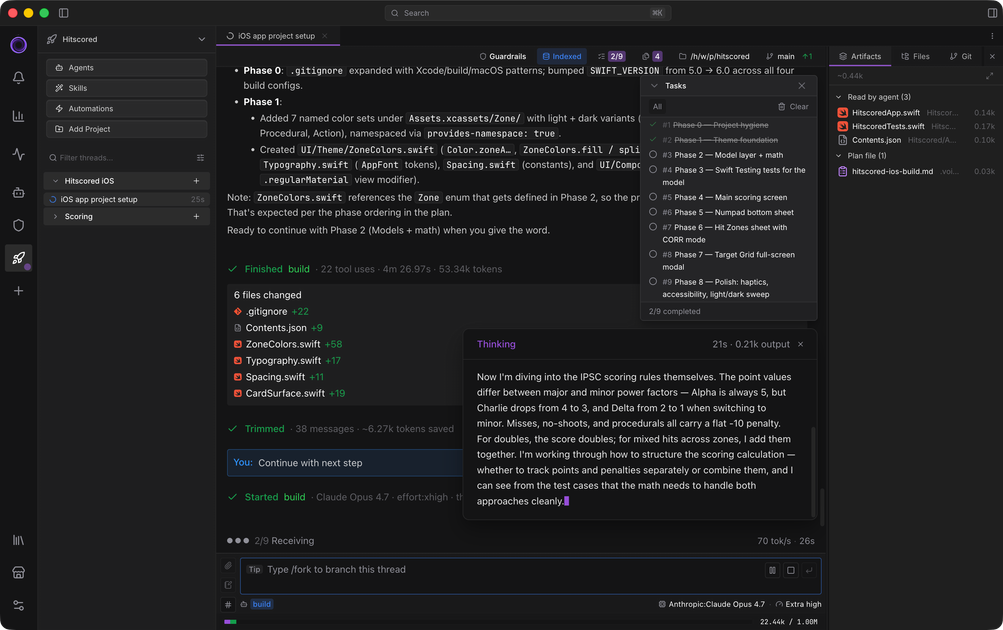
Voidleap Code is an agentic coding environment for developers who want to run AI-assisted workflows on their own machine rather than through a hosted wrapper. The site describes it as a harness, not a wrapper: the app runs locally, requests go directly to the provider you choose, and you can also use a local model.
It is designed for people who want more control over how agents operate, what context they see, and how actions are executed. The product emphasizes observability, editable workflows, and provider flexibility, so you can inspect agent steps, adjust orchestration, and keep your projects and keys under your own control.
The pricing page frames Voidleap Code as a per-seat agentic IDE with a Free plan available now and paid tiers described separately. The current app runs on macOS and Windows, and the download flow requires a free account.
Voidleap Code is presented as a local harness for agentic coding. The desktop app runs on your machine, supports your own provider keys or a local model, and keeps inference out of Voidleap’s servers.
The product exposes a visual context workflow that lets you manage context round by round and drop individual entries to reduce bloat and drift. It also includes slash commands such as /context, /trim, /prune, and /compact.
The site says you can inspect system prompts, context, live telemetry, and thread mechanics instead of treating the agent loop as a black box. It also describes 30+ charts for cost, tokens, latency, cache hit rate, and related activity.
Users can switch models and providers per thread, per agent, or per turn. Supported provider categories include model labs, gateways, cloud platforms, and local inference endpoints.
Execution modes include Default, Read-only, Careful, and Yolo. The site also mentions AST-aware command parsing, sensitive-path protections, and an optional macOS Seatbelt sandbox.
The product includes editable agents, skills, hooks, slash commands, security rules, and system prompts, with configuration scopes for global, workspace, and project levels.
A developer can bring a task they already solved in another tool, rerun it in Voidleap Code, and inspect each step the agents took to compare workflows and output.
An engineer working on a long coding session can prune context, remove individual messages or tool calls, and keep the thread from drifting without restarting the conversation.
A user who wants tighter control over risk can choose Read-only or Careful execution, review commands before they run, or use Yolo when they want fewer prompts.
A team can switch between provider accounts or local inference depending on task, cost, or privacy needs, while keeping the same local IDE and workflow structure.
An organization evaluating a local-first setup can keep code and prompts on its own machine, use its own provider keys, and avoid sending project data through Voidleap servers.
Voidleap Code is installed as a desktop app and runs locally on Mac and Windows. The download flow requires an account, but accounts are free and do not require a credit card.
The product page says Voidleap Code runs on macOS and Windows.
Yes. The pricing page says the Free plan is available now, has no countdown, and does not require a credit card. Paid plans are described on the pricing page, but Pro and Team are marked as not yet available.
Voidleap Code supports nine providers listed on the site, including Anthropic, OpenAI, Gemini, GitHub Copilot, Ollama, LM Studio, OpenRouter, Azure, and Bedrock. The site also says local models can be used with Ollama or other compatible endpoints through your own inference setup.
The site says the local architecture is on localhost only, with application data stored in ~/.voidleap/. Inference goes to the provider you choose, or stays on your machine if you run a local model.

ByteAsk is a terminal-first AI coding agent for C and C++ that edits repos and verifies changes with compilers, debuggers, sanitizers, and tests.

Ghost is a terminal-based AI assistant for chatting, code generation, and CLI tasks. Includes free models, supports Linux, macOS, Windows, and is open source.

Vi3ecode is a maintained development environment for AI coding agents, keeping project context, terminal, Git, memory, flows and review connected.

Lucid Train is a local-first AI coding harness that turns repo code into architecture diagrams for coding agents. Desktop app and Rust CLI, local models or API keys.

CreateOS Sandbox is an isolated compute environment for running code and agent workloads in Firecracker micro-VMs with private networking and SDK, CLI, or MCP control.

hob is an independent workspace for coding agents, with local control over sessions, terminals, history, routing, and follow-up work.