
VWFNDR MBL
VWFNDR MBL is a free Android camera app with Bayer RAW capture, manual controls, and Content Credentials provenance for verifiable mobile photography.
What is VWFNDR MBL?
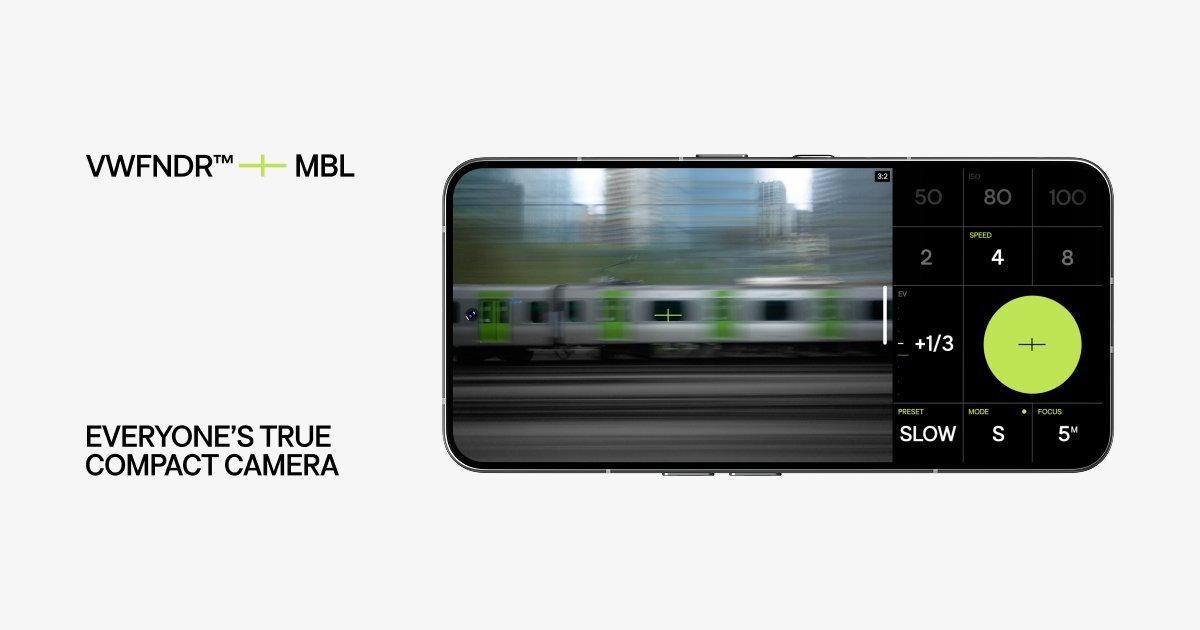
VWFNDR MBL is a free Android camera app built around real photographic capture rather than computational image processing. It uses Bayer RAW capture, supports DNG output, and adds transparent provenance through Content Credentials so images can be verified after capture.
The app is designed as a compact camera interface for phones, with manual controls, priority modes, aspect ratio selection, and a customizable layout on a single screen. According to the source, it is intended to keep more of the capture process visible and under the photographer’s control while still working as a practical mobile camera app.
Key Features
- Bayer RAW capture with DNG output: MBL records unprocessed still images as DNG, which preserves sensor data for later editing and review.
- Content Credentials support: each capture includes tamper-evident provenance data based on the open C2PA standard, allowing images to be verified at verify.vwfndr.camera.
- Manual and priority exposure modes: the app supports Auto, Program AE, Shutter Priority, and Manual exposure modes, plus exposure compensation from -2.0EV to +2.0EV.
- Flexible focus and exposure controls: it includes continuous fixed AF, single-point AF, fixed focus distances, center-weighted and spot metering, and shutter speed control from long exposures to fast shutter speeds where supported by the phone.
- Multiple aspect ratios and viewfinder framing: users can choose from traditional aspect ratios such as 1:1, 4:3, 3:2, 16:9, 2:1, and others, with the viewfinder coverage described as approximately 100%.
- Customizable interface and hardware shortcuts: the interface is fully reorderable, and the app maps common actions to touch gestures and volume buttons for faster operation.
How to Use VWFNDR MBL
Install the app on a compatible Android device and open it like a camera. From the main screen, choose your framing, select an exposure mode if needed, and adjust focus, ISO, shutter speed, or exposure compensation based on the shot.
After capture, the app produces image files in DNG and/or JPG depending on the selected mode. If you need to verify provenance, you can check the Content Credentials record using the verification flow provided by the product.
Use Cases
- Photographers who want unprocessed captures for editing: shoot DNG files and make tonal and color decisions later in Lightroom or another RAW workflow.
- Users who prefer manual control on a phone camera: set shutter priority or full manual exposure when automatic processing is not desired.
- Journalistic or documentary capture: use Content Credentials to retain a verifiable record that the image came from a real camera capture.
- Mobile photographers who care about framing: switch between aspect ratios before shooting instead of cropping later.
- People who want a simpler camera interface: use the single-screen layout, gesture shortcuts, and volume-button controls to keep the workflow close to a dedicated camera.
FAQ
Does VWFNDR MBL replace the phone’s default camera app? It is presented as a separate Android camera app focused on manual, unprocessed capture and provenance, rather than as a system camera replacement.
What file formats does it produce? The source lists Bayer RAW DNG as the main still-image format, with JPEG also supported in some modes.
Can captured images be verified? Yes. The product says each capture includes Content Credentials, and verification is available at verify.vwfndr.camera.
What Android devices does it support? The source says Android 10 (API 29) or higher, but some features may vary by phone because camera-module support differs across devices.
Is image processing disabled? The app is described as using unprocessed RAW capture with no HDR stacking, tone mapping, or computational tricks, although some phone-level behavior may still vary by device.
Alternatives
- Default Android camera apps: these are usually tuned for convenience and automatic processing, with less emphasis on RAW capture controls or provenance metadata.
- Pro camera apps for Android: many third-party camera apps offer manual exposure and RAW output, but may not focus on Content Credentials or verified capture records.
- Dedicated compact cameras: these provide a separate physical camera experience and often stronger hardware controls, but they do not integrate with a phone-based workflow.
- RAW editors after capture: apps like mobile photo editors do not control capture itself; they are alternatives for post-processing once a photo has already been taken.
Alternatives

Pixelcut
Easy-to-use AI tools to make your photos stand out!
Petalica Paint
Petalica Paint is an automatic coloring service for line art, designed to enhance digital artwork with ease.
Wearvue AI
Wearvue AI creates outfit previews from your photo, helps refine the look for any occasion, and finds similar real products to shop.

Upscale.media
Upscale.media AI image enhancer upscales photos (2x/4x) and improves clarity with sharpening, deblurring, dehazing, portrait face enhancement, and restoration.

SnapEdit
SnapEdit is an AI online photo editor for quick retouching—remove objects, remove backgrounds with templates, enhance photos & HD export.

PhotoAid AI Image Enlarger
Resize images online without losing quality using advanced AI technology.