

CanopyAI
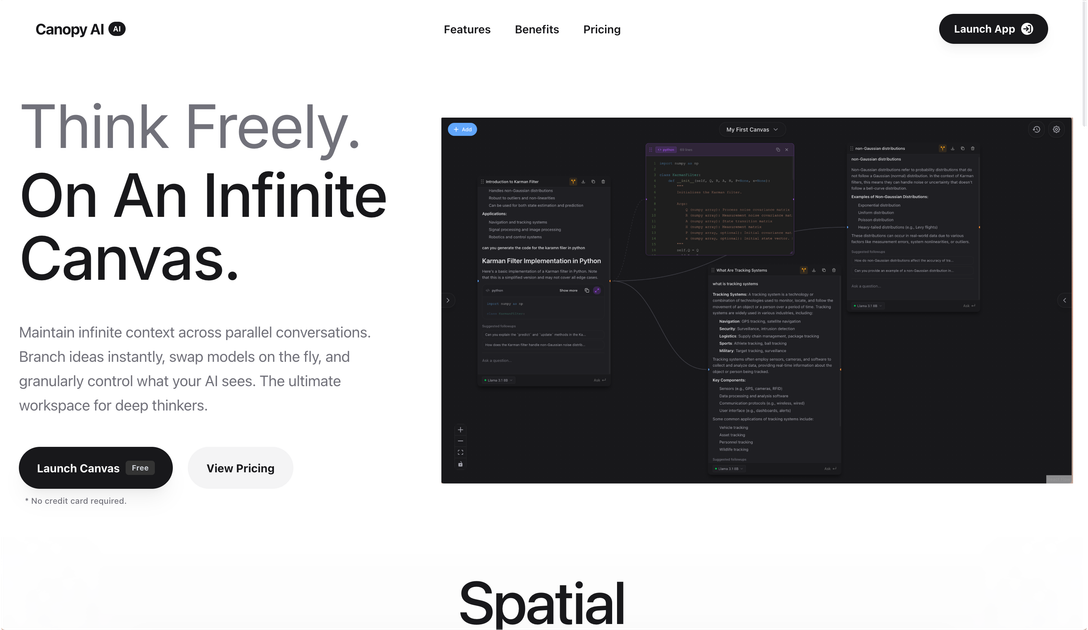
CanopyAI is an AI conversation workspace with an infinite canvas for branching ideas, keeping context across parallel threads, and switching models per node.
What is CanopyAI?
CanopyAI is an AI conversation workspace designed around an “infinite canvas” for thinking and writing across multiple, parallel threads. Instead of keeping ideas trapped in a single linear chat, it lets you branch conversations, maintain context across nodes, and reorganize exploration as your ideas evolve.
The core purpose is to help you work with many ongoing prompts while keeping a clear thread of reasoning. The site also describes controls for what the AI sees per node and the ability to switch between models during a session.
Key Features
- Infinite canvas with parallel conversations: maintain context across branching “nodes” rather than treating each chat as isolated.
- Instant branching from any point: fork a conversation to pursue new ideas without losing the original context.
- Multiple model switching on the fly: change the reasoning model used for a branch to compare outputs within the same canvas context.
- Fine-grained generation and visibility controls: control what the AI sees and adjust generation parameters per node (e.g., temperature and token limits).
- “Searchable, permanent memory” for your work: save, annotate, and return later to prior outputs and notes.
- Streamed responses: receive output progressively rather than waiting for a full response.
- Workspace meant for heavy workflows: a single control center to manage many ongoing dialogues instead of many separate browser tabs.
How to Use CanopyAI
- Start a new canvas/session and enter your initial prompt.
- When you want to explore an alternate direction, fork/branch the conversation from the message you’re working on.
- For each branch, switch models as needed and adjust node-level generation parameters (such as temperature or maximum tokens) to match the kind of reasoning you want.
- Save and annotate results so you can return to earlier branches later, including using the workspace’s searchable memory.
- Continue refining by branching again, keeping the original context intact while you explore tangents.
Use Cases
- Research-style exploration: investigate competing hypotheses by forking the chat at key decision points while keeping a shared context across branches.
- Model comparison on the same problem: use multiple models within the same canvas to compare how different reasoning engines approach a question while preserving the same upstream context.
- Long-form analysis with controlled scope: adjust what the AI sees and tune generation parameters per branch to keep outputs consistent across related sub-questions.
- Active projects with many threads: manage ongoing discussions for an initiative (e.g., multiple drafts, variants, or follow-up questions) in a single organized workspace.
- Workflow reviews and retrieval: save and annotate important outputs, then search and revisit earlier branches when returning to the work.
FAQ
-
Does CanopyAI support branching conversations? Yes. The site highlights “infinite branching” and the ability to fork a conversation instantly while maintaining the original context.
-
Can I switch AI models during a session? Yes. CanopyAI is described as allowing you to swap models on the fly and compare outputs across branches.
-
Can I control how the AI generates responses? The page indicates advanced control per node, including generation parameters such as temperature and a maximum token setting.
-
Can I use my own AI provider credentials? The site states: “Bring Your Own API Key” and “Use your preferred providers with no usage limits.”
-
Is there a way to save and find past work? The page mentions “searchable, permanent memory” where you can save and annotate your works and return later.
Alternatives
- Notebook-style AI assistants (multi-note workspaces): Better fit if you want document-oriented organization, but you may not get the same node-based branching with preserved context.
- Chat-based multi-thread tools without branching context: These can handle multiple chats, but often treat threads as separate, making it harder to maintain shared context across variants.
- General-purpose IDE or developer workspaces with LLM integrations: Useful when your workflow is code-centric, but may require more setup to replicate an “infinite canvas” branching experience.
- Project management tools with AI features: Suitable for tracking tasks and drafts, though they typically don’t provide the same per-node model switching and generation controls described for CanopyAI.
Alternatives

Falconer
Falconer is a self-updating knowledge platform for high-speed teams to write, share, and find reliable internal documentation and code context in one place.

BookAI.chat
BookAI allows you to chat with your books using AI by simply providing the title and author.

skills-janitor
Audit, track usage, and compare your Claude Code skills with skills-janitor—nine focused slash commands and zero dependencies.

Lasso
Lasso is an AI-first PIM for ecommerce teams that enriches product attributes and descriptions, processes supplier data, and monitors competitors via app or API.

Struere
Struere is an AI-native operational system that replaces spreadsheet workflows with structured software—dashboards, alerts, and automations.

garden-md
Turn meeting transcripts into a structured, linked company wiki with local markdown and an HTML browser view. Sync from supported sources.