
Persistent task visibility
Keep the current task visible in Dynamic Island while messaging, browsing, watching videos, listening to music, or taking a call.

DOYT is an iPhone productivity app that keeps tasks visible in Dynamic Island and on the Lock Screen, with quick actions, focus timers, recurring tasks, and local history.
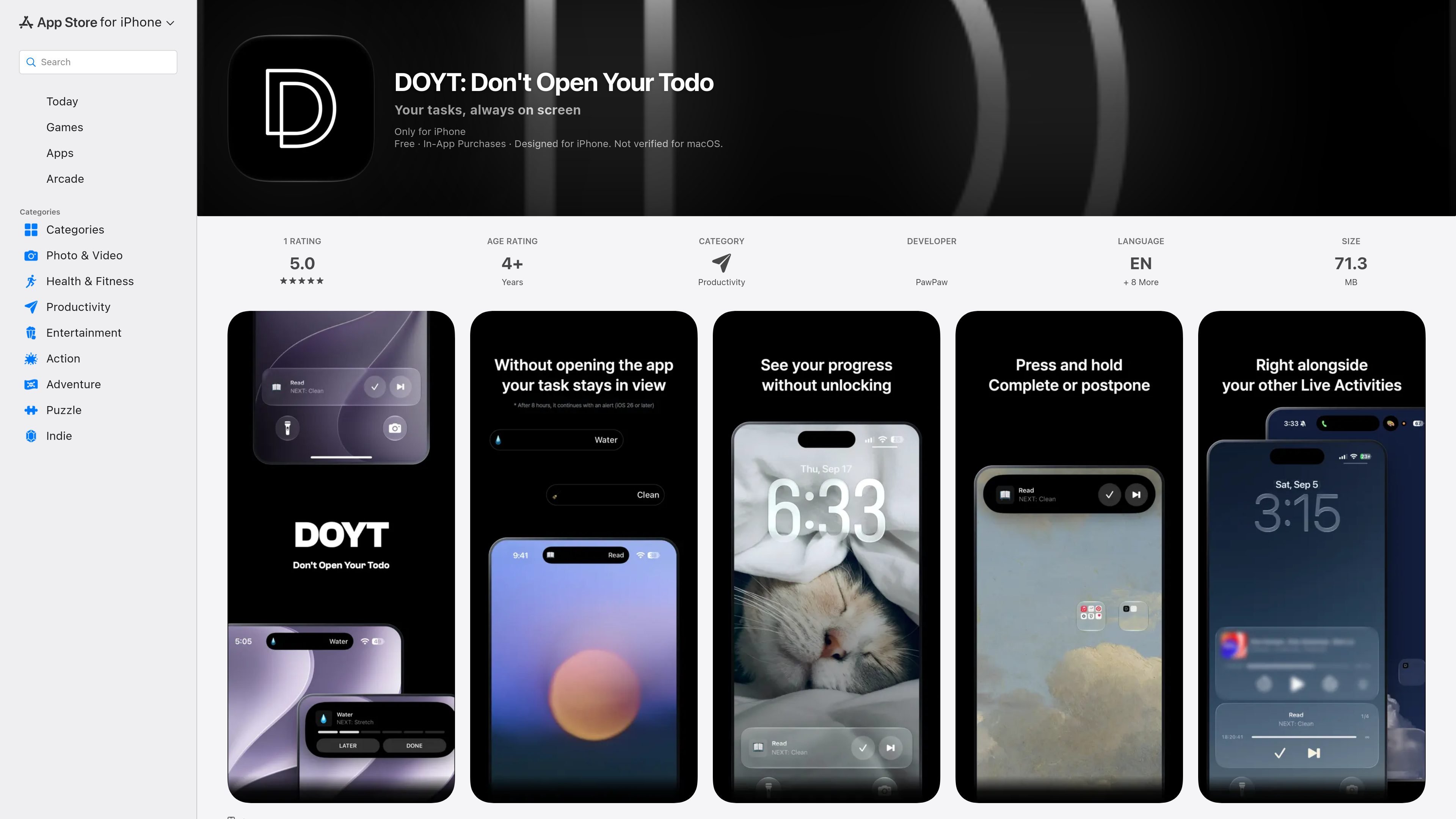
DOYT is an iPhone productivity app built around keeping one current task visible after you leave the app. It places the task in Dynamic Island and on the Lock Screen through Live Activities, so you can see what to work on while using other apps without reopening a task list.
The workflow is intentionally lightweight: add tasks, tap Start, and act from the Dynamic Island or Lock Screen. You can complete the current task, move it later in the queue, optionally run a timed session, and review completed work in a history calendar. DOYT does not require an account, and the listing says task lists and completion history remain on the iPhone rather than being sent to external servers.
Keep the current task visible in Dynamic Island while messaging, browsing, watching videos, listening to music, or taking a call.
View the active task in a Lock Screen Live Activity, including on iPhones without Dynamic Island, and check it without unlocking the phone.
Touch and hold Dynamic Island or use Lock Screen controls to complete a task, move it later in the queue, or view remaining time and progress.
Optionally run sessions for 30 minutes, 90 minutes, 3 hours, or 8 hours, with a notification or, on iOS 26 or later, an alarm when the session ends.
Record completed tasks by date, search past tasks and completion records, and undo a task completed by mistake.
Use repeating schedules for daily, weekday, weekly, every-two-weeks, or monthly tasks; customize layouts and colors with DOYT Pro.
Keep the next concrete action visible while switching between messaging, browsing, video, or other apps, reducing the need to reopen a task list.
Start a timed 30-minute, 90-minute, 3-hour, or 8-hour session and choose whether to receive a notification or supported alarm when it ends.
Use Lock Screen Live Activities to check the task without unlocking the iPhone; this also supports iPhones that do not have Dynamic Island.
Complete tasks or defer them from the Dynamic Island or Lock Screen, then use the history calendar and search to review what was finished on a given day.
Schedule tasks to repeat daily, on weekdays, weekly, every two weeks, or monthly, with a specified time that brings the task to the front.
DOYT is designed for iPhone and requires iOS 17.0 or later. Control Center controls require iOS 18 or later, and iPhones without Dynamic Island can still use Lock Screen Live Activities.
Add tasks, tap Start, or start a session through Control Center, Shortcuts, or Siri. The current task can then be viewed and managed from Dynamic Island or a Lock Screen Live Activity without reopening the app.
The core features are free with no stated time or usage limits. Customization is unlocked automatically for the first three days after installation; continued customization requires the one-time DOYT Pro purchase. The listing states that there are no ads or recurring subscriptions.
The app listing says task lists and completion history are stored locally on the iPhone and are not sent to external servers. Apple’s listing also indicates that the developer may collect purchase history and analytics data that is not linked to the user, and notes that this privacy information has not been verified by Apple.
An active session may disappear from Dynamic Island and the Lock Screen after eight hours without interaction under iOS policies. Tasks are not automatically completed and the list does not change; opening DOYT and leaving it again makes the session reappear. On iOS 26 or later, the listing says Live Activities can extend automatically with an alert after eight hours.

Goldfish is an AI memory app for macOS that helps you reply, write, summarize, and continue with context already on your Mac. It stores memory locally and writes in your tone.

ArtDeck is a visual reference board app for iPhone, iPad, and Mac. Collect mixed references on one canvas and study them with ToolBox lenses. Offline, optional iCloud sync, one-time purchase.

Biji is a versatile platform designed to enhance productivity through innovative tools and features.

Malyatko is a baby tracker for feeding, sleep, growth, teething, and milestones. Use it on iPhone, Apple Watch, and widgets offline, with iCloud sharing.

Redline is a budgeting tool for Claude Code that paces sessions by time, tokens, cost, or plan percentage, helping them end with a usable result.

Claude Overlay is a Windows desktop overlay for Claude Code that reads your screen, so you can ask questions, inspect content, and request edits without leaving the app. Uses your existing Claude subscription via Claude CLI.