

DropShare
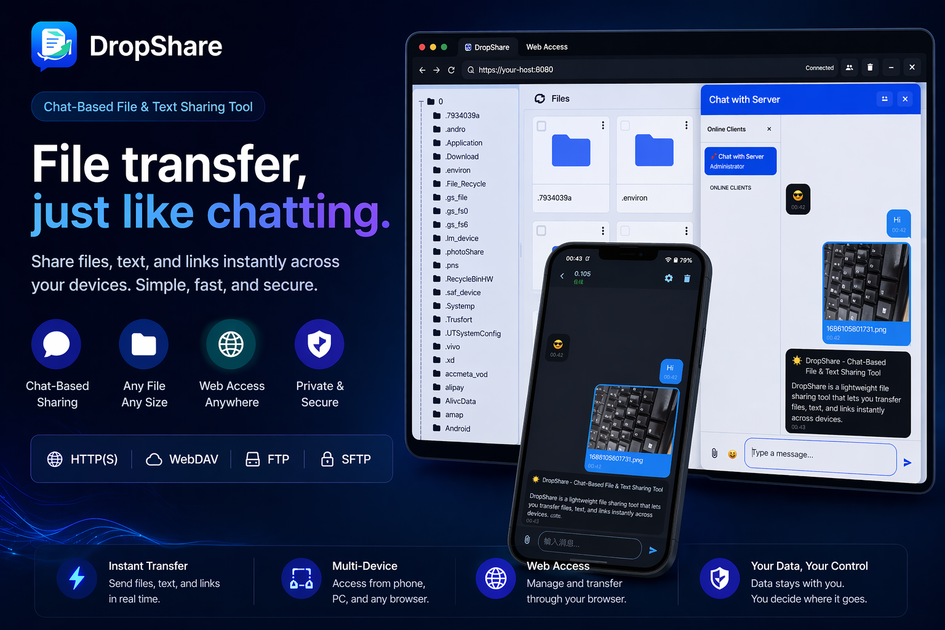
DropShare is a chat-based tool for sharing files, messages and links across devices, with browser access and HTTP, WebDAV, FTP, SFTP options.
What is DropShare?
DropShare is a chat-based file and text sharing tool that lets you send files, messages, and links across devices. The core idea is to start a chat session, share content quickly, and then allow the receiver to open it from a browser or via standard transfer protocols.
It’s designed for low-friction sharing, including local network or hotspot scenarios, where receivers may only need a browser to view or download the shared content. DropShare also supports additional access methods (HTTP, WebDAV, FTP, and SFTP) for workflows that require more than simple link-based access.
Key Features
- Chat-style sharing interface: Send files, plain text, and links from a conversation-like UI to reduce the steps needed to initiate a transfer.
- Browser-based access for receivers: Receivers can open shared content using a link in “almost any browser,” lowering compatibility friction across devices.
- Multi-protocol access: Supports HTTP, WebDAV, FTP, and SFTP so different environments can choose a protocol-based workflow.
- Shared media preview: Shared media such as images and videos can be previewed instantly from the receiving side.
- Easy access links: Sharing generates easy-to-open links so another device can view or download content without repeating the sending workflow.
How to Use DropShare
- Start a sharing session in the DropShare app (chat-based sharing) and select what you want to share—files, text, or a link.
- Send the content so it becomes available immediately through the chat interface and the generated access link.
- Open from another device using the provided link in a browser. If you prefer protocol-based access, use the available methods such as HTTP, WebDAV, FTP, or SFTP.
Use Cases
- Phone to phone sharing over a local hotspot: Quickly share a document or photo between nearby devices where the receiver can use a browser to open the link.
- Phone to PC transfer with browser access: Send a file from a mobile device and let a desktop open and download it via the browser-friendly link.
- Sharing notes and links between devices: Use chat-based sending to share text and URLs without setting up a complex transfer workflow.
- Local network file access via WebDAV: In environments where users manage files through network shares, use WebDAV access instead of browser-only viewing.
- Technical workflows using FTP/SFTP: For users who need protocol-specific access (e.g., FTP or SFTP), use those supported methods alongside the link-based approach.
FAQ
What is DropShare? DropShare is a chat-based file and text sharing tool for transferring files, messages, and links across devices, with browser support and multiple access protocols.
Can a receiver access content using only a browser? Yes. In many scenarios, the receiver can open the generated sharing link in a browser to view or download the shared content.
Does DropShare support WebDAV, FTP, or SFTP? Yes. DropShare supports multiple access methods including HTTP, WebDAV, FTP, and SFTP.
Is DropShare suitable for local network sharing? Yes. The product is described as well-suited to local network and hotspot-based sharing where quick, lightweight transfer matters.
Alternatives
- Saying-it-through chat apps (file sharing via messaging platforms): Useful when your main goal is quick handoff inside an existing chat ecosystem; however, protocol-based access (like WebDAV/FTP/SFTP) and browser-only workflows may not match DropShare’s options.
- General-purpose web file upload tools: Helpful for generating links to files, but they may not provide the same chat-style sharing flow or the specific protocol access methods listed for DropShare.
- Network file sharing (WebDAV/FTP/SFTP servers with clients): Useful if you primarily need protocol-based access and file management; it typically requires more setup than a chat-style “share then open” flow.
- Local peer-to-peer file transfer tools: Designed for nearby transfers without traditional cloud workflows; they may focus on one transfer method rather than combining chat UI with browser and multiple protocols.
Alternatives

Codex Plugins
Use Codex Plugins to bundle skills, app integrations, and MCP servers into reusable workflows—extending Codex access to tools like Gmail, Drive, and Slack.

Struere
Struere is an AI-native operational system that replaces spreadsheet workflows with structured software—dashboards, alerts, and automations.

garden-md
Turn meeting transcripts into a structured, linked company wiki with local markdown and an HTML browser view. Sync from supported sources.

Falconer
Falconer is a self-updating knowledge platform for high-speed teams to write, share, and find reliable internal documentation and code context in one place.

Snapmark for VS Code
Snapmark for VS Code helps you annotate screenshots before pasting into AI chat tools—blur sensitive areas, add numbered steps, auto-compress large images.

BookAI.chat
BookAI allows you to chat with your books using AI by simply providing the title and author.