

Figma Canvas (AI agent canvas)
Start using AI agents to design directly on the Figma canvas, following your decisions with Figma’s design system context.
What is Figma Canvas?
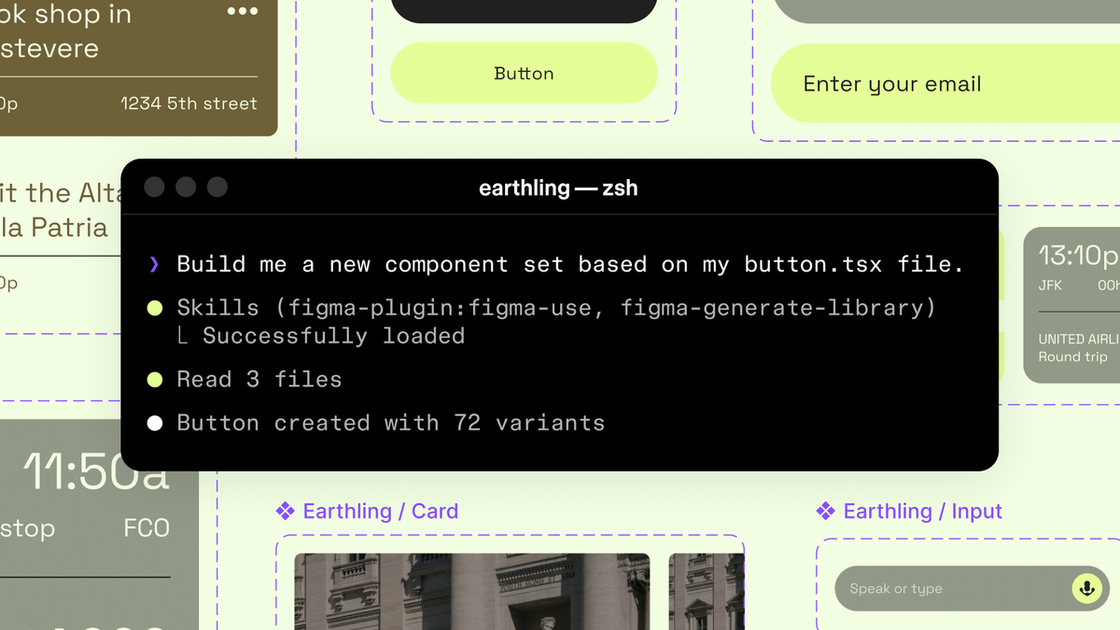
Figma Canvas, as described in this Figma blog post, is Figma’s canvas workflow opened to AI agents so they can design directly inside Figma files. The core purpose is to let agents create and update design assets while using the same design context teams maintain in Figma—such as a design system, components, variables, and team conventions.
The post also introduces a beta Figma MCP server to connect Figma into developer workflows, enabling LLM-driven tooling to generate and modify design work in a way that stays linked to existing design structure.
Key Features
- AI agents can write directly to Figma files on the canvas so generated work can be created or modified in the same place teams iterate on designs.
- A beta Figma MCP server that brings Figma into the developer/LLM workflow to support design-informed code generation and design asset operations.
- The
use_figmatool for canvas operations enabling MCP clients (including Claude Code and Codex mentioned in the post) to generate and modify design assets tied to the design system. - Shared context between code and canvas so agents can move fluidly between updating code-derived UI and refining designs in Figma.
- Skills to guide agent behavior using markdown instructions where skills define the workflow steps, sequencing, and conventions agents should follow in Figma.
How to Use Figma Canvas
- Use an MCP client that supports Figma’s MCP server (the post mentions tools such as Claude Code and Codex) to access Figma capabilities via MCP.
- Use the
use_figmatool to direct the agent to create or update components and other design assets inside Figma using your design system context. - Add guidance through skills by providing markdown-based instructions the agent can follow for how to execute tasks in Figma (including the foundational
/figma-useskill referenced in the post). - Optionally synchronize from live UIs using
generate_figma_designwhen starting from HTML/code, then switch touse_figmato edit those designs with existing components and variables.
Use Cases
- Turn a codebase into initial Figma components: Use a skill like
/figma-generate-libraryto create new components in Figma from a codebase. - Generate new screens using existing components and variables: Use
/figma-generate-designso the agent builds designs in Figma while relying on components/variables rather than freeform layout. - Apply accessibility specs from UI descriptions: Use
create-voiceto generate screen reader specs (VoiceOver, TalkBack, ARIA) from UI specs. - Enforce spacing conventions through system-aware rules: Use
rad-spacingto apply hierarchical spacing patterns in Figma. - Connect or remap existing designs to system components: Use
apply-design-systemto align designs to system components instead of leaving them as disconnected layers.
FAQ
Is this a paid feature?
The blog post states that support for AI agents on the Figma canvas will eventually become a usage-based paid feature, but it is available for free during the beta period.
What tools enable agents to work in Figma?
The post describes a use_figma tool for agents to operate on the canvas using design system context. It also references an existing generate_figma_design tool for translating HTML from live apps/websites into editable Figma layers.
What are “skills” in this workflow?
In the post, skills are sets of instructions written as markdown files that shape how agents operate in Figma—covering workflow steps, sequencing, conventions, and domain knowledge needed to produce durable, brand-aligned designs.
Do I need to build a plugin to author skills?
No. The post says anyone can author a skill, and that writing one does not require building a plugin or writing code.
Are tools mentioned only for specific agents (e.g., Claude Code)?
The post names Claude Code and Codex as MCP clients that can use use_figma, and it describes “other MCP clients” as well. It does not list a complete compatibility matrix.
Alternatives
- Design-to-code translation workflows (without direct canvas agent editing): You can generate designs outside Figma or treat Figma as a read-only target, then manually rebuild assets in Figma. This differs by lacking direct agent edits tied to your design system within the canvas.
- Use existing Figma-only automation or plugins: If you need consistent components and variables without AI agents, you can rely on Figma plugins or template-driven approaches. This trades agent autonomy for more deterministic behavior.
- Agent workflows that generate design artifacts outside Figma: Some LLM toolchains may output design files or specs for a designer to implement. Compared with the approach described here, agents won’t modify the same Figma components/variables directly through
use_figma. - HTML-to-Figma translation only: If your focus is importing existing UIs into Figma (via the
generate_figma_design-type capability) without the agent canvas editing loop, that can reduce complexity but may require more manual follow-up to align with the design system.
Alternatives

Codex Plugins
Use Codex Plugins to bundle skills, app integrations, and MCP servers into reusable workflows—extending Codex access to tools like Gmail, Drive, and Slack.

Wallie
Wallie is an open-source AI streamer framework with real-time vision, persona profiles, chat, TTS, and avatar output for VTuber-style streams.

AakarDev AI
AakarDev AI is a powerful platform that simplifies the development of AI applications with seamless vector database integration, enabling rapid deployment and scalability.

Whirr
Whirr is a quiet macOS menu bar app that mirrors Claude Code agent activity to your Mac’s notch—so you can glance without watching the screen.

AgentMail
AgentMail is an email inbox API for AI agents to create, send, receive, and search email via REST for two-way agent conversations.

Arduino VENTUNO Q
Arduino VENTUNO Q is an edge AI computer for robotics, combining AI inference hardware and a microcontroller for deterministic control. Arduino App Lab-ready.