
Model access for coding workflows
The plan provides access to GLM-5.3, GLM-5.2, and GLM-5-Turbo for AI coding tasks in supported tools and IDEs.

GLM Coding Plan from Z.ai for AI-assisted coding in terminals and IDEs, with access to GLM-5.3, GLM-5.2 and GLM-5-Turbo.
GLM Coding Plan is Z.ai’s subscription product for AI-assisted coding in terminals and IDEs. It gives developers access to GLM-5.3, GLM-5.2, and GLM-5-Turbo so they can delegate code generation, tool use, and multi-step development tasks to the model inside supported coding tools.
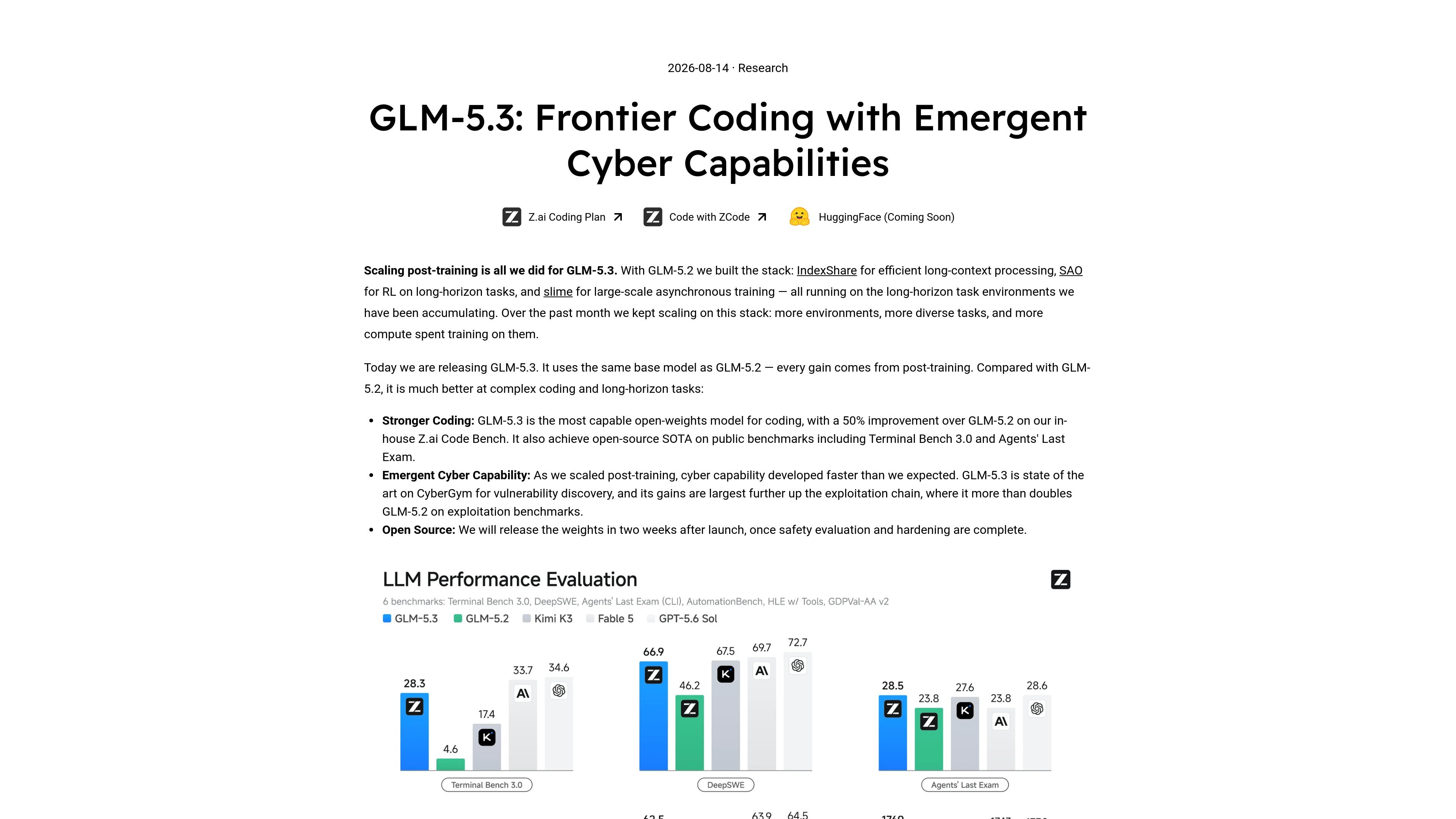
The launch post positions GLM-5.3 as the latest coding-focused model in the stack, while the subscription pages frame the plan as the way to use these models in everyday development workflows. The offering is split into Individual and Team plans, with different quotas, access levels, and workspace features depending on the tier.
The plan provides access to GLM-5.3, GLM-5.2, and GLM-5-Turbo for AI coding tasks in supported tools and IDEs.
A quick-install helper, npx @z_ai/coding-helper, is provided to load the coding package into a terminal or IDE setup.
The subscription page says Lite supports 20+ agent tools, and the plan pages mention MCP tools such as Vision Analysis, Web Search, Web Reader, and Zread.
Individual plans include rolling access to the latest flagship models and features, while Pro and Max add priority or first access plus faster generation or dedicated resources.
Team plans include unified seat and permission management, team analytics and dashboard, flexible usage billing, and centralized billing and invoicing.
The product materials describe a 1M context window and long-horizon task support for end-to-end development workflows.
Use the plan to write, refactor, or debug code inside a supported IDE or terminal workflow, with the model handling natural-language development instructions.
Use the long-context and long-horizon workflow support for larger repositories, multi-step changes, and tasks that need continuity across a development session.
Use team plans when multiple developers need shared access, centralized billing, seat controls, and usage analytics for a common coding setup.
Use the bundled MCP tools and integration helper to connect the plan to coding tools, web access, and other agent workflows before starting a task.
Use the plan for agentic development tasks where the model must follow instructions, use tools, and produce code-oriented outputs rather than chat-only responses.
The Coding Plan is built for AI-assisted development in terminals and IDEs. The source pages describe support for tools such as Claude Code, Kilo Code, Cline, OpenCode, and OpenClaw, along with a terminal helper for loading the package into a coding tool.
The plan is offered in Individual and Team options. Individual plans are priced monthly, quarterly, or yearly, while Team plans add seat, permission, analytics, and invoicing features for shared usage.
Yes. The subscription pages say the plan includes access to GLM-5.3, GLM-5.2, and GLM-5-Turbo for coding workflows.
The FAQ on the subscribe page says the plan has both a 5-hour usage limit and a weekly usage quota limit. The exact quota depends on the plan and is referenced in the Usage Policy.
The subscription page says the plan supports both terminal and IDE workflows, and setup is described in three steps: choose a plan, install the IDE integration, then install MCP tools before starting to code.

ByteAsk is a terminal-first AI coding agent for C and C++ that edits repos and verifies changes with compilers, debuggers, sanitizers, and tests.

GitBot is a local browser workspace for reusable coding bots powered by Claude Code, Codex, or OpenCode, with persistent threads and configurable permissions.

Ghost is a terminal-based AI assistant for chatting, code generation, and CLI tasks. Includes free models, supports Linux, macOS, Windows, and is open source.

Vi3ecode is a maintained development environment for AI coding agents, keeping project context, terminal, Git, memory, flows and review connected.

CreateOS Sandbox is an isolated compute environment for running code and agent workloads in Firecracker micro-VMs with private networking and SDK, CLI, or MCP control.

hob is an independent workspace for coding agents, with local control over sessions, terminals, history, routing, and follow-up work.