
Auto clip generation
Upload a long-form video and have the app generate shortened highlight reels from it rather than editing everything manually.

HeyGen Instant Highlights turns long videos into short, platform-ready highlight reels with styled captions and multiple output formats.
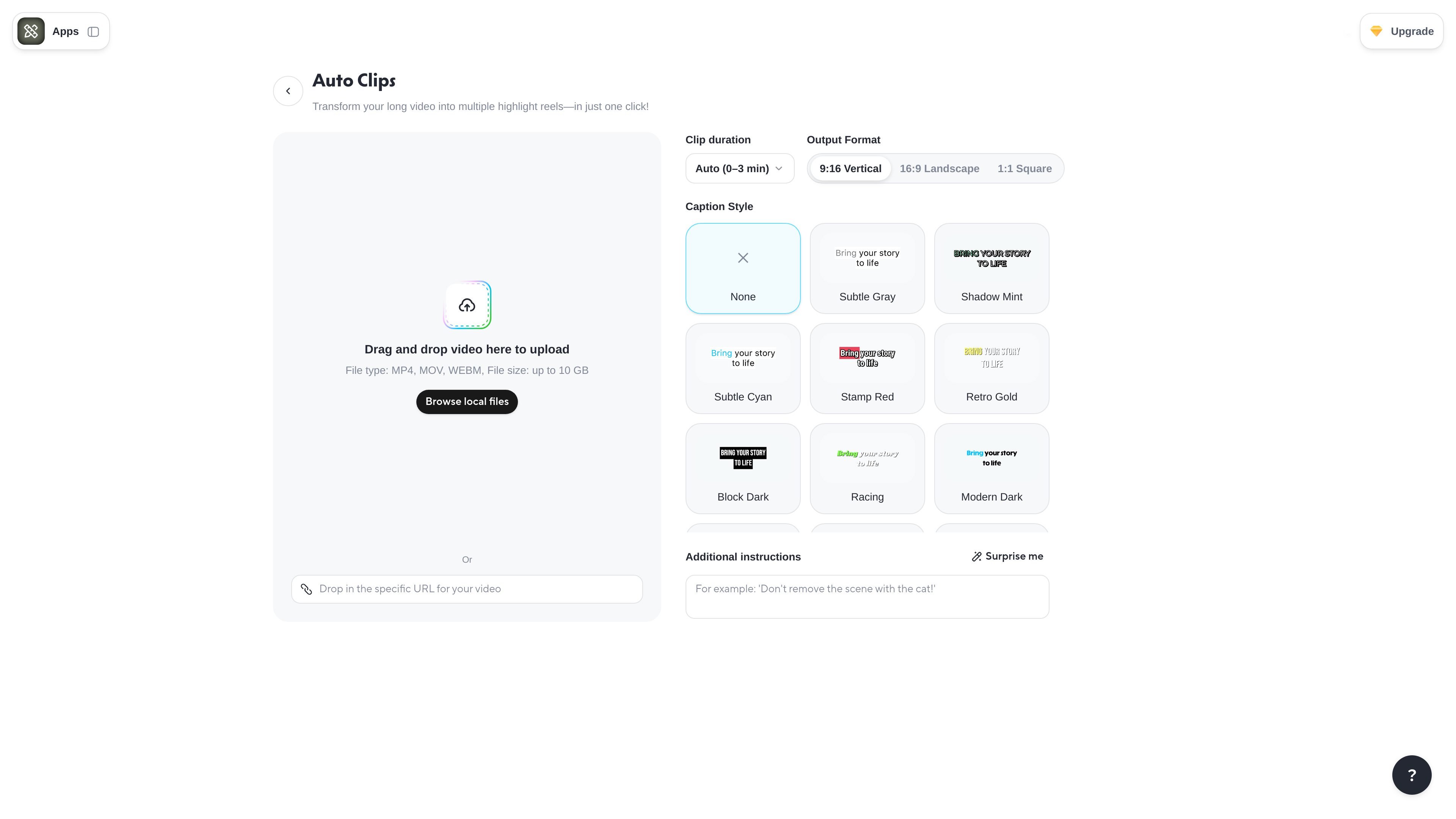
Instant Highlights is a HeyGen app for turning a long video into shorter highlight reels. The page positions it as an automatic clipping workflow that can take an uploaded source video and produce platform-ready outputs in minutes.
The interface exposes upload, clip duration, output format, and caption style controls, which suggests the product is meant for quick repurposing rather than manual timeline editing. It is part of the HeyGen app suite, alongside other AI video creation tools such as AI Video Generator, One Shot Edit, and Auto Clips.
Upload a long-form video and have the app generate shortened highlight reels from it rather than editing everything manually.
Choose a clip duration setting, including an automatic option shown as 0–3 minutes, to control how long the resulting highlights should run.
Select from vertical, landscape, or square outputs so clips are prepared for different publishing formats.
Pick from a range of caption styles, including subtle, bold, modern, neon, and other visual treatments.
Add an instruction such as “Surprise me” to guide the generation process before clips are created.
Accepts MP4, MOV, and WEBM uploads up to 10 GB, which makes the tool usable for larger source files.
Repurpose a long recording, webinar, or interview into shorter clips for social posting without cutting everything by hand.
Prepare platform-ready versions of the same highlight reel in vertical, landscape, or square formats for different destinations.
Create captioned clips quickly when you need readable subtitles and a styled presentation without using a separate editor.
Generate a first-pass set of highlight reels from a source video when you want the app to choose and assemble the cuts automatically.
Yes. The app is designed to turn an uploaded long video into shortened highlight reels automatically, with the option to add instructions before generating clips.
The page shows an upload workflow where you drag and drop a video, choose clip duration and output format, and set a caption style before generating results.
The visible settings support 9:16 vertical, 16:9 landscape, and 1:1 square output formats, along with multiple caption styles.
The upload field shown on the page accepts MP4, MOV, and WEBM files up to 10 GB.
The pricing page indicates HeyGen is an AI video generator with sign-in and account-based access, but it does not provide a public price for this app on the pages provided.

FlexClip is an AI-powered online video maker and editor for creating videos from templates or from scratch with browser-based editing, scripting, voiceover, subtitles, translation, and background removal.

Virvid is an AI shorts generator for faceless TikTok, Instagram Reels, and YouTube Shorts, with manual creation and automated daily posting.

Bansi is an AI video editor for long-form content that turns raw footage into a polished first draft with cuts, captions, zooms, and audio cleanup.

Dina is a macOS app for polished screen recordings with automatic zoom, cursor smoothing, captions, transcript editing, and presentation-ready layouts.

CAMB.AI Streams dubs live audio in real time for YouTube, Twitch, X and other platforms, using existing live workflows and no post-production.

Video Effects SDK adds real-time webcam effects like background blur, replacement or removal, denoising, framing, beautification, and color grading for live video apps.