

Second Brain
Second Brain is a self-hosted memory layer for AI tools to store notes, decisions and project context once and recall them across Claude, ChatGPT and Cursor.
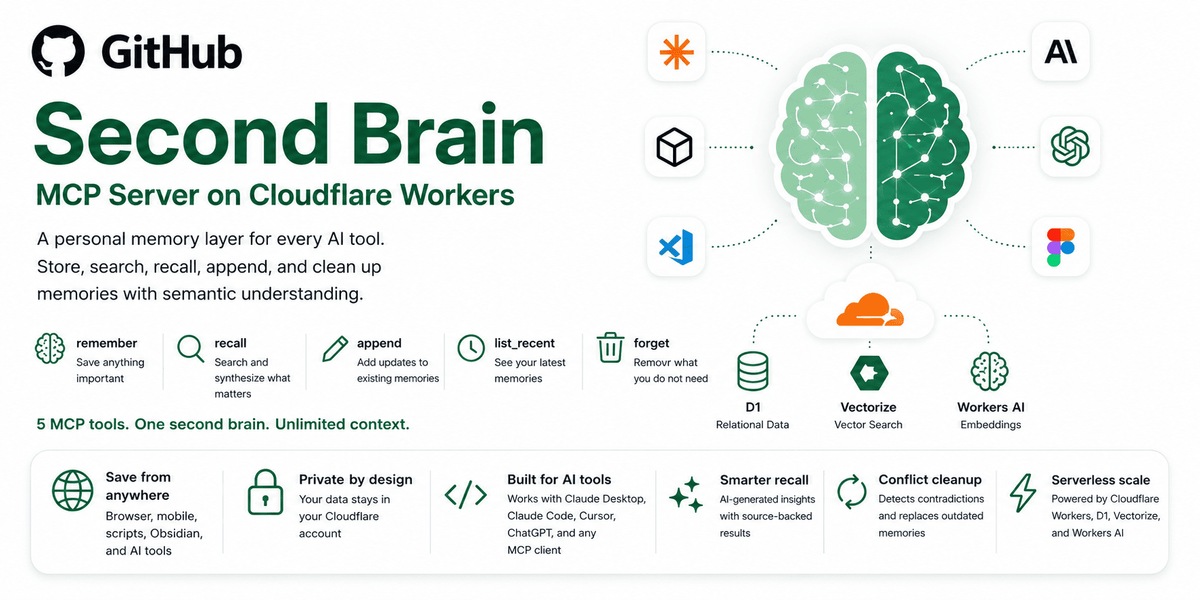
What is Second Brain?
Second Brain is a self-hosted memory layer for AI tools. It lets users store notes, decisions, project context, and other memories once, then retrieve them later through connected clients such as Claude, ChatGPT, Cursor, and other MCP-compatible tools.
The project is designed to keep memory under the user's control rather than inside a single AI app. It runs on Cloudflare and is described as deployable on Cloudflare's free tier, with support for semantic recall, entry updates, and deletion.
Key Features
- Shared memory across AI tools: store context once and access it from multiple clients instead of re-entering the same information in each app.
- Semantic recall: search by meaning rather than exact wording, so a question can surface a relevant memory even if the original phrasing differs.
- Memory management actions: supports remembering, appending to an existing entry, replacing content, listing recent memories, and forgetting entries.
- Multiple capture surfaces: includes CLI commands, Obsidian sync via a community plugin, iOS shortcuts, a browser extension, a bookmarklet, and direct use from AI conversations.
- OAuth support for browser-based clients: the /mcp endpoint supports OAuth 2.0 for clients that authenticate through a browser, while token-based access remains available for desktop and CLI clients.
- Self-hosted deployment on Cloudflare: deployment is automated with a one-click path, and the repository notes setup for an AUTH_TOKEN and a KV namespace for OAuth.
How to Use Second Brain
Deploy the service to Cloudflare, set an AUTH_TOKEN, and connect the AI clients you want to use. After that, save context through the available capture methods and ask your connected tools to recall it later by meaning.
A typical workflow is to remember a decision or note once, then retrieve it in a later conversation, update it if the context changes, or delete it when it is no longer needed.
Use Cases
- Cross-app project memory: keep project decisions available in Claude, ChatGPT, and Cursor without rewriting the same background information.
- Developer terminal workflow: capture and retrieve context from the command line using the CLI when working outside a chat interface.
- Note-to-AI sync from Obsidian: store notes in a local knowledge base and have them sync into the shared memory layer for later recall.
- Quick capture from mobile or browser: save a page, highlighted text, or a short idea through the browser extension, bookmarklet, or iOS shortcuts.
- Conversation follow-up and correction: append new details to an existing memory, replace outdated content, or remove entries when they are no longer relevant.
FAQ
Does Second Brain store memory inside one AI app? No. The project is intended as a shared memory layer that can be used across multiple AI tools.
Can it be used with browser-based clients like claude.ai or ChatGPT? Yes. The repository states that the /mcp endpoint supports OAuth 2.0 for browser-based clients that authenticate through a hosted login page.
What do I need to set up first? The source says you need to set an AUTH_TOKEN during deployment. For OAuth-based browser clients, a KV namespace is also required, and the deploy flow provisions it automatically.
How does recall work? The repository describes recall as semantic search, meaning the system can find memories by meaning instead of exact wording.
Can I delete or update stored memories? Yes. The documented actions include append, update, list_recent, and forget.
Alternatives
- Built-in memory inside a single AI app: easier to start with, but limited to that platform rather than shared across tools.
- Personal knowledge base apps: note-taking or PKM tools can store context, but they usually do not provide the same AI-client-facing memory API and MCP workflow.
- Self-hosted vector memory or retrieval services: similar in goal if you want semantic search over saved context, though they may require more custom integration work than this project.
- Manual prompt snippets or saved notes: simplest option, but they do not provide automated capture, semantic recall, or centralized memory management.
Alternatives

Falconer
Falconer is a self-updating knowledge platform for high-speed teams to write, share, and find reliable internal documentation and code context in one place.

Theneo
Theneo is an all-in-one developer portal for API docs, guides, changelogs, and private customer docs—built for real-time co-editing.

dumppp
dumppp delivers fast mobile capture to Notion with quick launch, context switching, and offline-first sync. Type instantly, review via timeline.

Lasso
Lasso is an AI-first PIM for ecommerce teams that enriches product attributes and descriptions, processes supplier data, and monitors competitors via app or API.

Struere
Struere is an AI-native operational system that replaces spreadsheet workflows with structured software—dashboards, alerts, and automations.

garden-md
Turn meeting transcripts into a structured, linked company wiki with local markdown and an HTML browser view. Sync from supported sources.