

Supaste
Supaste is a local-first Mac clipboard and screenshot history manager. Save text, links, images, files, code, colors, and screenshots in a searchable timeline.
What is Supaste?
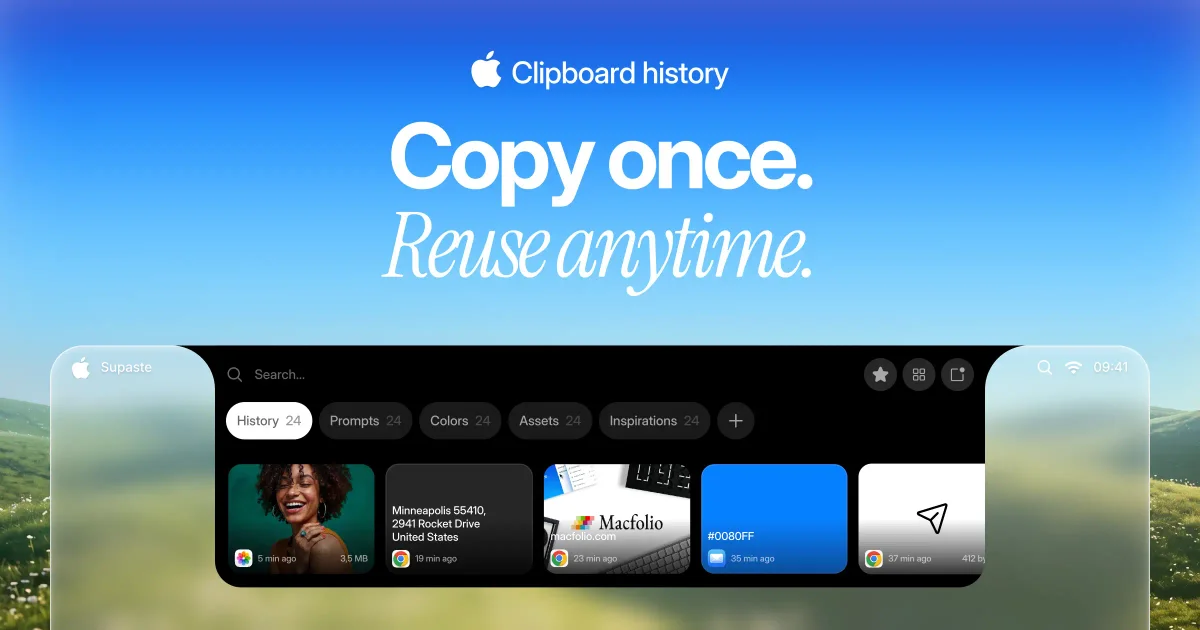
Supaste is a clipboard history manager for Mac that stores copied content and screenshots in a searchable visual timeline. It is designed to help users recover, organize, and reuse items they have copied without needing to keep switching between apps or rely on the system clipboard alone.
The app is described as local-first and fully offline, with clipboard history stored on the Mac. It supports a broad set of content types including text, links, images, files, code, colors, SVG icons, templates, and screenshots, and it can group items by app, type, and custom categories.
Key Features
- Visual clipboard timeline: shows copied items in a clean history view, making it easier to scan recent clips than a plain list.
- Search and filters: lets users search clipboard history and filter by app or content type, which helps narrow down large histories quickly.
- Screenshot history: saves screenshots alongside other copied content so they can be found and reused later.
- Notch shelf and quick paste: provides fast access from the Mac notch shelf and a global shortcut (
Control + Command + V) to open search and paste without switching contexts. - Recent clip shortcuts: supports
Control + Command + 0–9for bringing back the last 10 clips directly. - Custom categories: allows users to create their own spaces for projects, templates, brand assets, snippets, and other reusable material.
- Sensitive content detection and pause controls: includes tools to detect sensitive content and pause clipboard capture when needed.
- Drag and drop support: allows clips such as images, text, colors, SVG icons, screenshots, and files to be dragged into other apps.
How to Use Supaste
Install the macOS app, then let it save the clipboard and screenshot history locally in the background. Open the notch shelf, use the global shortcut, or switch to the Library view to search, browse, and organize saved items.
From there, users can filter by app or type, assign items to custom categories, and paste or drag reusable content into other apps when needed.
Use Cases
- Designers can keep colors, icons, screenshots, gradients, SVGs, and visual references available for reuse in design work.
- Developers can save code snippets, commands, JSON, error messages, API responses, and links they want to paste again later.
- Sales and support teams can reuse customer replies, email templates, product links, notes, and screenshots without searching old threads.
- Content and marketing users can capture hooks, taglines, keywords, research links, drafts, and campaign ideas before they disappear from the clipboard.
- Personal users can find copied addresses, tracking numbers, recipes, quotes, links, and screenshots in one history instead of copying them again.
FAQ
- What types of content does Supaste support? It supports text, links, images, files, code, colors, SVG icons, templates, and screenshots based on the page content.
- Where is clipboard history stored? The product is described as local-first and fully offline, which indicates history is kept on the Mac.
- Can I search past clips? Yes. The page describes search across clipboard history and filtering by app or type.
- Can I pause capture or handle sensitive items? Yes. The page mentions sensitive detection and the ability to pause clipboard capture.
- Is Supaste a subscription? No. The pricing section says it is a one-time purchase with lifetime access.
Alternatives
- macOS built-in clipboard behavior: suitable if you only need the most recent copied item and do not need a searchable history.
- General clipboard managers: similar tools focused on storing and searching past clips, often with different interfaces, sync options, or pricing models.
- Screenshot organizers: useful if your main need is managing screenshots rather than a broader clipboard history that also includes text, files, and code.
- Note or snippet apps: better for manually curated reference material, while Supaste is centered on automatic capture from everyday copying.
Alternatives

Lasso
Lasso is an AI-first PIM for ecommerce teams that enriches product attributes and descriptions, processes supplier data, and monitors competitors via app or API.

Biji
Biji is a versatile platform designed to enhance productivity through innovative tools and features.

Codex Plugins
Use Codex Plugins to bundle skills, app integrations, and MCP servers into reusable workflows—extending Codex access to tools like Gmail, Drive, and Slack.

Struere
Struere is an AI-native operational system that replaces spreadsheet workflows with structured software—dashboards, alerts, and automations.

garden-md
Turn meeting transcripts into a structured, linked company wiki with local markdown and an HTML browser view. Sync from supported sources.

Falconer
Falconer is a self-updating knowledge platform for high-speed teams to write, share, and find reliable internal documentation and code context in one place.