
Gaze-based focus
Look toward a display, window, or pane to focus it and move the pointer to the area you are viewing. Optional eyebrow confirmation can keep the target highlighted until the switch is confirmed.
Winq is a hands-free Mac input utility using gaze, winks, and facial gestures to focus windows, click, and run shortcuts for efficient workflows.
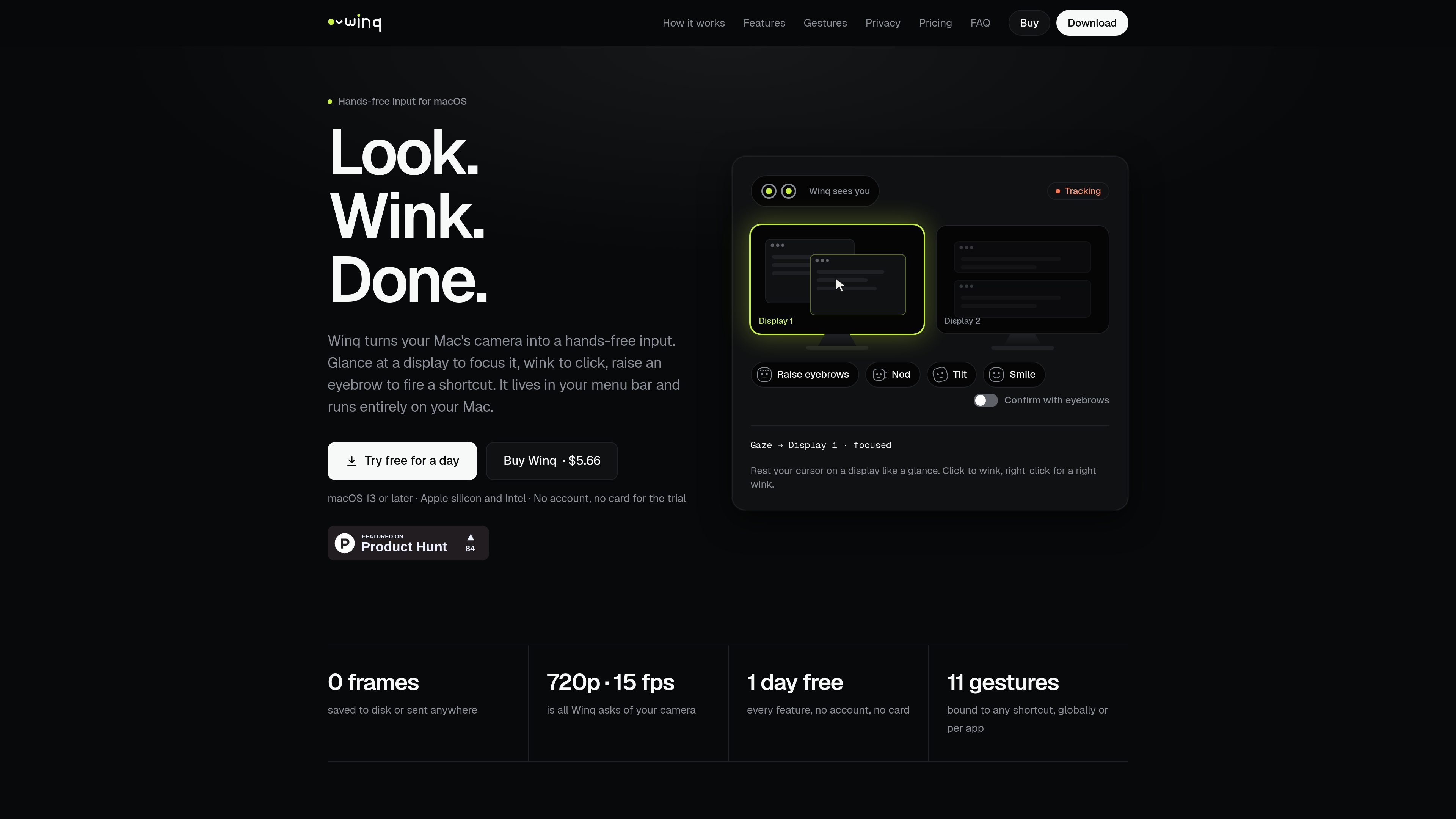
Winq is a hands-free input utility for macOS that uses the Mac’s camera to turn gaze, winks, and facial gestures into computer actions. Looking toward a display, window, or pane can focus it; winking can click; and gestures such as an eyebrow raise or nod can trigger shortcuts.
The app runs from the menu bar and is designed to reduce mouse and pointer handling for multi-monitor work, keyboard-focused workflows, creative work, and people whose hands are busy. It processes face measurements on the Mac, supports macOS Accessibility actions, and does not require an account for its trial.
Look toward a display, window, or pane to focus it and move the pointer to the area you are viewing. Optional eyebrow confirmation can keep the target highlighted until the switch is confirmed.
Use left and right winks for the corresponding mouse clicks. Double-winks can double-click, long winks can drag, and calibration adapts to each eye’s normal open and closed positions.
Map eyebrow raises, head movements, nods, smiles, mouth movements, and other supported gestures to keyboard shortcuts, Apple Shortcuts, AppleScript, shell commands, or built-in Winq actions.
Use different gesture bindings for different applications, with global bindings available as well. Profiles are selected by app, and thresholds such as settle time and typing pause can be configured.
Follow a moving dot during setup so Winq learns how head and eye movement correspond to your displays. It continues learning from use, and offers calibration when a new screen is connected.
Process camera input in memory on the Mac through Apple’s Vision framework. Winq says frames are not saved or uploaded; settings and calibration measurements remain locally stored.
Look at a target display or window to bring it forward, then continue typing without searching for the correct screen or pane with the mouse.
Keep hands on a keyboard, pen tablet, or instrument while using gaze for focus and facial gestures for selected commands.
Use dwell-to-click or mouth-corner actions when winking is difficult, and combine Winq with macOS Head Pointer or Voice Control for a lighter hands-free setup.
Assign app-specific gestures to actions such as saving in a code editor, while using different bindings in a browser, design tool, or calls.
Winq requires macOS 13 or later and works with Apple silicon and Intel Macs. Initial setup uses a roughly two-minute dot-calibration process across the displays you use.
Winq uses the Mac’s built-in camera at up to 1280 × 720 and 15 fps. It processes face landmarks and related measurements on the Mac using Apple’s Vision framework, then discards camera frames rather than uploading or saving them.
Gaze can focus a display, window, or pane, while winks can produce left- or right-clicks. Winq also supports double-winks for double-clicking, long winks for dragging, and dwell-to-click or mouth-corner actions as alternatives.
Face gestures can be bound globally or per app to keyboard shortcuts, Shortcuts actions, AppleScript, shell commands, or Winq actions. The site gives examples such as saving in an editor and triggering a different action in a mail app.
The site documents a one-day free trial with every feature, no account, and no card. It also describes a one-time purchase option, but does not state the purchase price in the supplied content.

Goldfish is an AI memory app for macOS that helps you reply, write, summarize, and continue with context already on your Mac. It stores memory locally and writes in your tone.

ArtDeck is a visual reference board app for iPhone, iPad, and Mac. Collect mixed references on one canvas and study them with ToolBox lenses. Offline, optional iCloud sync, one-time purchase.

Biji is a versatile platform designed to enhance productivity through innovative tools and features.

Malyatko is a baby tracker for feeding, sleep, growth, teething, and milestones. Use it on iPhone, Apple Watch, and widgets offline, with iCloud sharing.

Redline is a budgeting tool for Claude Code that paces sessions by time, tokens, cost, or plan percentage, helping them end with a usable result.

Claude Overlay is a Windows desktop overlay for Claude Code that reads your screen, so you can ask questions, inspect content, and request edits without leaving the app. Uses your existing Claude subscription via Claude CLI.