
Static frame to looping animation workflow
Create looping animations from static design frames, which suggests a workflow for turning still case study visuals into motion without rebuilding the design from scratch.
Loopcase turns static design frames into seamless looping case study animations with templates and parameters instead of keyframes.
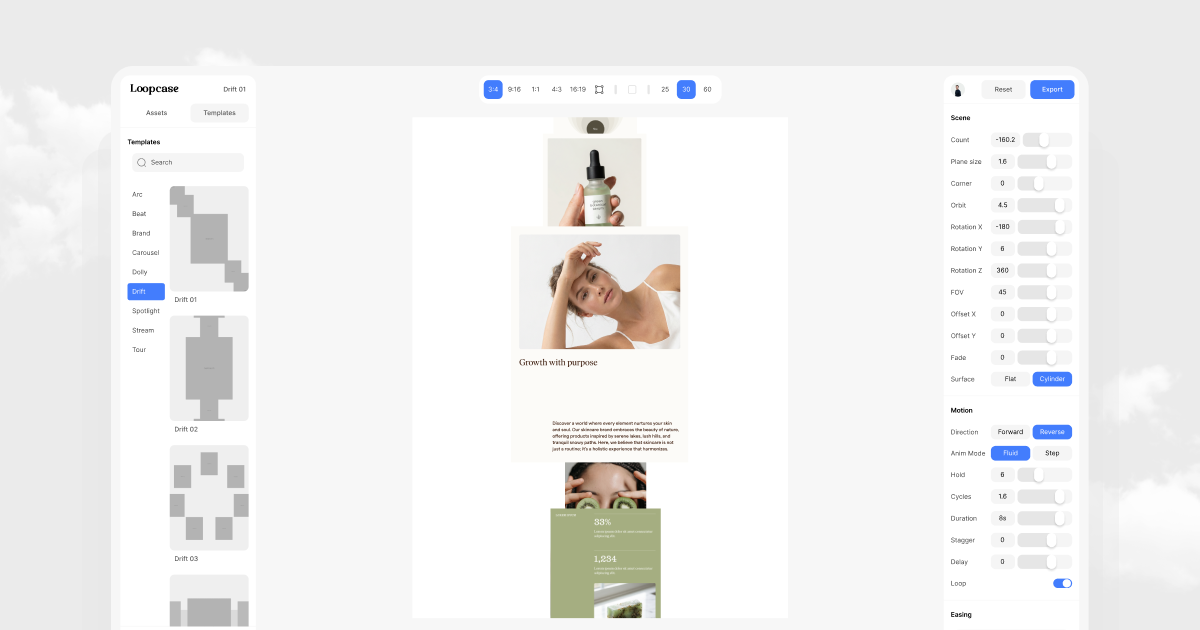
Loopcase is a design tool that turns static design frames into seamless looping case study animations. Its stated workflow centers on templates and parameters rather than keyframes, which points to a more structured way of creating motion from still layouts.
The product is positioned for people who need to present design work in motion without manually animating every transition. Based on the source, the core job is to convert existing frames into repeatable loops that can be used in case study presentations and related visual storytelling.
The available pages do not provide file-format, integration, or export details, so the safest description is that Loopcase focuses on animation creation from design frames using a template-and-parameter workflow.
Create looping animations from static design frames, which suggests a workflow for turning still case study visuals into motion without rebuilding the design from scratch.
Use templates to speed up the creation of repeated case study animation formats and keep outputs more consistent.
Adjust animations with parameters rather than individual keyframes, reducing the need for frame-by-frame motion editing.
Focus on seamless loops so animations can repeat continuously without an obvious start or end point.
Built around case study animations, making the tool relevant for product, portfolio, and presentation-style storytelling where static screens need motion.
Create animated versions of static design mockups for case studies so the work is easier to present in a portfolio or project write-up.
Turn product screens into repeating motion pieces for presentations where a looping visual is preferable to a static screenshot.
Reuse templates and parameters to produce a consistent animation style across multiple frames or projects.
Make case study content feel more dynamic without building complex keyframe timelines from scratch.
Loopcase is designed to turn static design frames into seamless looping case study animations using templates and parameters instead of manual keyframing.
The source does not specify supported file types, integrations, or design apps. It indicates a workflow built around static design frames, templates, and parameters.
The product page does not describe a formal export format or output specifications beyond looping case study animations.
The provided sources do not list plan names, limits, or prices, so pricing details are not available here.

PixelDrive is a bulk image generation API for on-brand images from one template via browser editor, REST API, CSV batch, or MCP.

图像大厨imgcook 是一款设计转代码工具,可将设计稿转换为前端代码,支持 Sketch、Photoshop、VS Code 和 CLI 工作流。

Napkin AI turns text into editable visuals for presentations, documents, and shareable content. Text-first generation, collaboration, and export to PPT, PNG, SVG, or PDF.

appdesigns creates App Store and Google Play screenshots from app images. Add device frames, customize layouts, and export unlimited PNGs without watermarks or an account.

Beautiful.ai is an AI presentation platform for teams and enterprises. Create branded slide decks with Smart Slides, collaboration, and export options.

Shotie is a Mac app for localized App Store and Google Play screenshots from captures, generated screens, or uploads, with chat editing and one-zip export.