
Paraphrasing
Rewrite text instantly with the Paraphraser, which is presented as a core writing tool on the site.

Quillbot is an AI writing workspace for paraphrasing, grammar checking, summarizing, and related editing tasks across browsers, Word, desktop, and mobile.
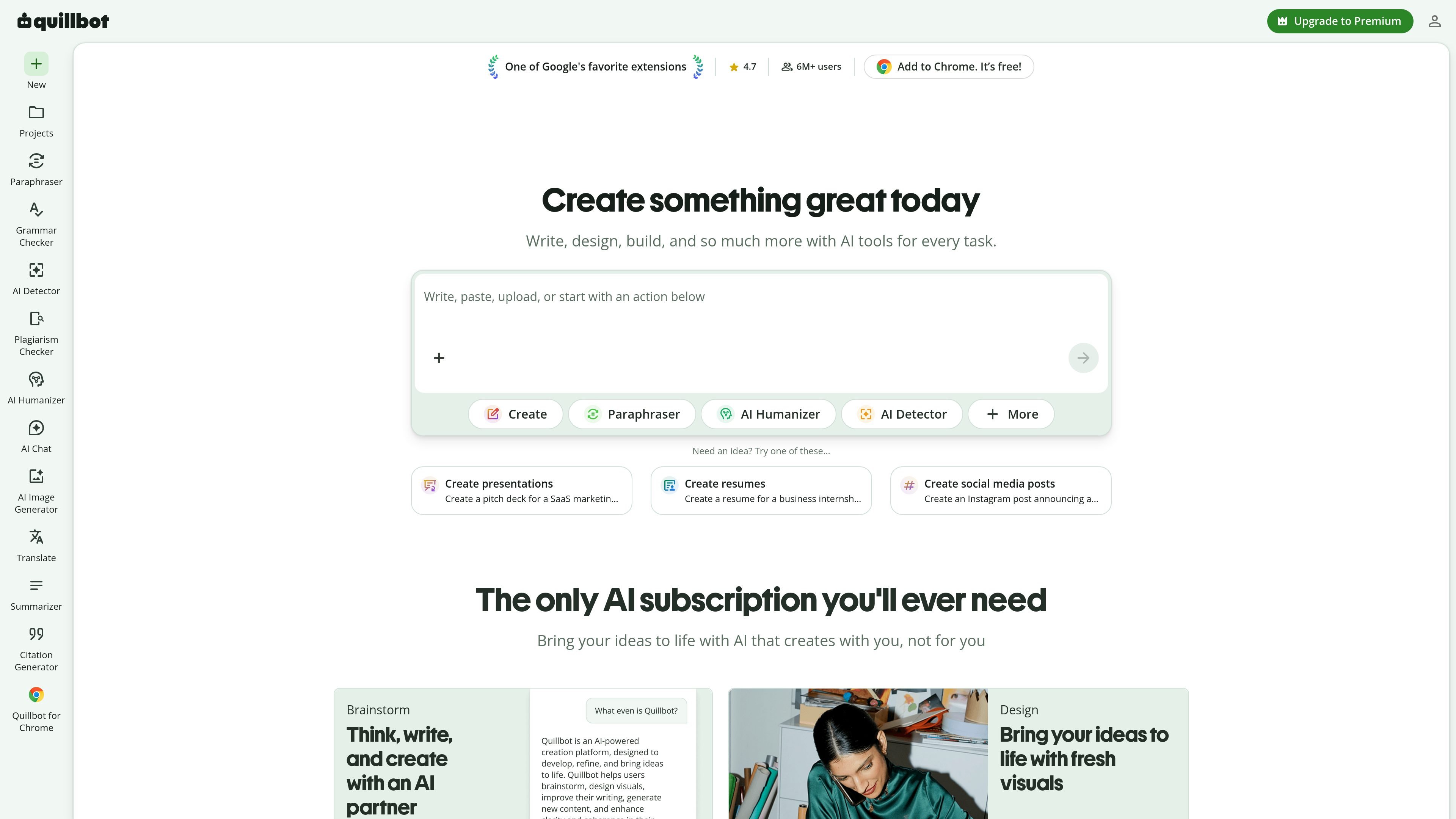
Quillbot is an AI writing and content workspace centered on rewriting, grammar correction, summarization, detection, and related writing tasks. The site presents it as a tool for writing, designing, and creating, with entry points for paraphrasing, grammar checking, AI detection, plagiarism checking, translation, citation generation, image creation, and PDF tools.
The product is built for people who work with text across browsers, documents, and apps. The source highlights Chrome, Edge, Safari, Word, iOS, Android, Windows, and macOS access, along with a Summarizer that can condense up to 600 words for free and a Grammar Checker that fixes grammar, spelling, and punctuation without sign-up.
Rewrite text instantly with the Paraphraser, which is presented as a core writing tool on the site.
Fix grammar, spelling, and punctuation issues from pasted text with the free Grammar Checker.
Condense long articles, reports, or documents into paragraph, bullet, or custom summaries.
Identify AI-written text and AI-generated images with the detector tools listed on the site.
Translate text, generate citations, and check plagiarism from the writing tools menu.
Use browser extensions, a Word add-in, and desktop or mobile apps to work across different environments.
Draft or revise text by rewriting sentences, improving fluency, and checking grammar before sharing it.
Turn long articles, research papers, or notes into shorter summaries for faster reading and review.
Create resumes, cover letters, and other application materials with tools for rewriting and polished writing.
Work across browsers, Word, and desktop or mobile apps when you need the same writing tools in different places.
Check for AI-generated text or plagiarism before publishing or submitting content.
No sign-up is required to use the free grammar checker and summarizer pages shown in the source. Other tools and premium features may have different access requirements, but the provided pages only confirm free access for those tools.
Quillbot's Summarizer condenses long articles, research papers, or other documents into short paragraphs or bullet points while preserving the original context. The source also describes custom summaries and a free limit of up to 600 words per summary on that page.
The Grammar Checker is designed to fix grammar, spelling, and punctuation errors from pasted text using AI. The source page describes it as free and available without sign-up.
The source shows browser extensions for Chrome, Edge, and Safari, plus apps for Android, iOS, Windows, and macOS, and a Word add-in. This suggests Quillbot is meant to work across both browsers and desktop or mobile apps.
The source does not provide a complete pricing table. It does show free tool access on some pages and a Premium upgrade prompt, so pricing appears to include at least a free experience and a paid tier, but the exact plans are not shown in the supplied evidence.

ProWritingAid is a writing assistant for storytellers with grammar checking, style editing, paraphrasing, and story analysis in popular writing apps.

Dictro is a private AI dictation app for Mac that turns speech into polished text in any editable app. Runs locally on Apple Silicon Mac by default, with optional Fast Mode.
Rubriq is an AI tool for academic paper editing and translation, with personal subscriptions, institutional plans, and plagiarism-check services.
MagickPen is an AI writing tool for drafts, templates, and polished text from a topic prompt, with customizable roles, languages, tones, and formats across Web, Chrome, Windows, and Mac.

Goldfish is an AI memory app for macOS that helps you reply, write, summarize, and continue with context already on your Mac. It stores memory locally and writes in your tone.

SpeakoFlow is a free, open-source desktop voice-to-text app for Windows, macOS, and Linux. Dictate into any app, use Flow, cleanup, translation, and a screen-aware assistant.