

Ribbet.ai
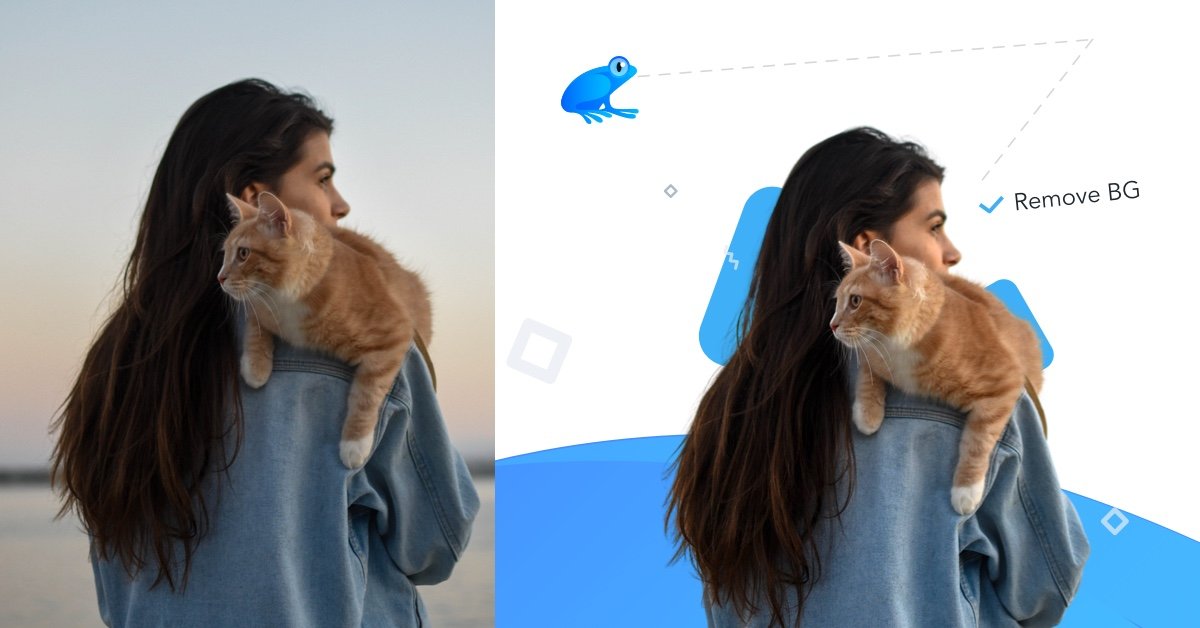
Ribbet.ai is a free online AI photo editor for background removal, object removal, cartoon effects, colorization, stylization & upscaling.
What is Ribbet.ai?
Ribbet.ai is a web-based suite of AI tools for editing photos. It provides multiple image transformation features—such as removing backgrounds, removing selected objects, cartoon-style rendering, colorization, and clarifying/upscaling images—available online and aimed at getting results quickly.
The site also indicates that developer-focused functionality is planned via an API release for several of its tools, including background removal, cartoonization, object removal, and face detection.
Key Features
- Background removal (AI, online, free): Automatically removes the background from an uploaded image or from a selected demo/stock photo.
- Object removal (AI, online, free): Lets you paint the area you want removed; the tool then erases the selected object region automatically.
- Cartoonize and Toonify styles (AI, online): Turns a photo into a cartoon/toon using selectable one-click style transformations.
- Colorize for black-and-white photos (AI, online): Converts greyscale photos into color, with the site noting it can be useful for restoring old photos.
- Deep Dream and painting-style stylization (AI, online): Applies psychedelic “Deep Dream” pattern exaggeration or classic painting styles to everyday images.
- Clarify + Upscale (AI, online): Enlarges small images to help increase detail without quality loss (as stated on the site).
- Face detection (developer-oriented AI): Identifies coordinates of major facial features in a photo, described as intended for software developers.
How to Use Ribbet.ai
- Go to Ribbet.ai and upload an image or use demo images/stock photos.
- Choose the editing tool you want (for example, Background Removal, Cartoonize, Remove Objects, Colorize, Deep Dream, Stylize, Clarify+Upscale, Toonify, or Face Detection).
- For tools that require user selection (notably Remove Objects), paint the area you want erased.
- Apply the effect and download a high-resolution result (download is referenced on the page).
Use Cases
- Remove backgrounds for product or profile images: Upload a photo and use the background removal tool to isolate the subject for reuse elsewhere.
- Remove unwanted objects from a photo: Paint the unwanted region and run object removal to automatically erase it.
- Create stylized portraits or social images: Use Cartoonize/Toonify for cartoon effects or apply Deep Dream and classic painting-style transformations.
- Restore older black-and-white photos: Run the colorize tool to turn greyscale images into color.
- Enhance small images for better viewing: Use Clarify+Upscale when you need to enlarge a small picture without the quality loss described on the site.
- Developer workflow for face feature coordinates: Use the planned Face Detection API (site notes it’s intended for software developers) to obtain facial feature coordinates.
FAQ
Is Ribbet.ai only for uploads, or can I use demo images?
The page indicates you can upload an image or search demo images/stock photos to try the tools.
Which tools support selecting an area to remove?
Remove Objects specifically mentions that you can paint the area you want erased before the AI removes it.
Are the editing tools free to use online?
The page describes several tools (notably Background Removal, Cartoonize, Remove Objects, and Colorize) as free and online.
Does Ribbet.ai provide an API?
The page states that an API will be released soon, including for tools such as background removal, cartoonization, object removal, and face detection.
What does Face Detection output provide?
Face detection is described as identifying the coordinates of major facial features, intended for software developers.
Alternatives
- Standalone AI photo editors with background removal/object masking: These typically focus on consumer workflows (upload → mask/select → export) and may offer different levels of control over masking vs. one-click style effects.
- Graphic design tools with AI-assisted retouching: Instead of dedicated AI effects, you may use a design/editor to combine AI-based selections with manual refinement before exporting.
- Photo restoration and enhancement software: For black-and-white restoration or upscaling, tools in this category often concentrate on denoising, upscaling, and color restoration pipelines.
- Developer image processing services (API-based): If you’re building an app, you can look for services that provide endpoints for background removal, object removal, stylization, or face detection—then integrate them into your workflow.
Alternatives

Pixelcut
Easy-to-use AI tools to make your photos stand out!

SnapEdit
SnapEdit is an AI online photo editor for quick retouching—remove objects, remove backgrounds with templates, enhance photos & HD export.

Airbrush
Airbrush is an AI-powered portrait editor to enhance, retouch, erase, remove backgrounds, and reshape photos—online and via mobile/desktop apps.
Aaavatar
Aaavatar is a Mac tool for team portrait photos—one-drop background removal, background customization, and one-click retouching for export to LinkedIn and Slack.

Upscale.media
Upscale.media AI image enhancer upscales photos (2x/4x) and improves clarity with sharpening, deblurring, dehazing, portrait face enhancement, and restoration.

PhotoAid AI Image Enlarger
Resize images online without losing quality using advanced AI technology.