

Stella
Stella is a macOS semantic search app that finds local files by what they contain, with on-device search, no account, and no cloud upload.
What is Stella?
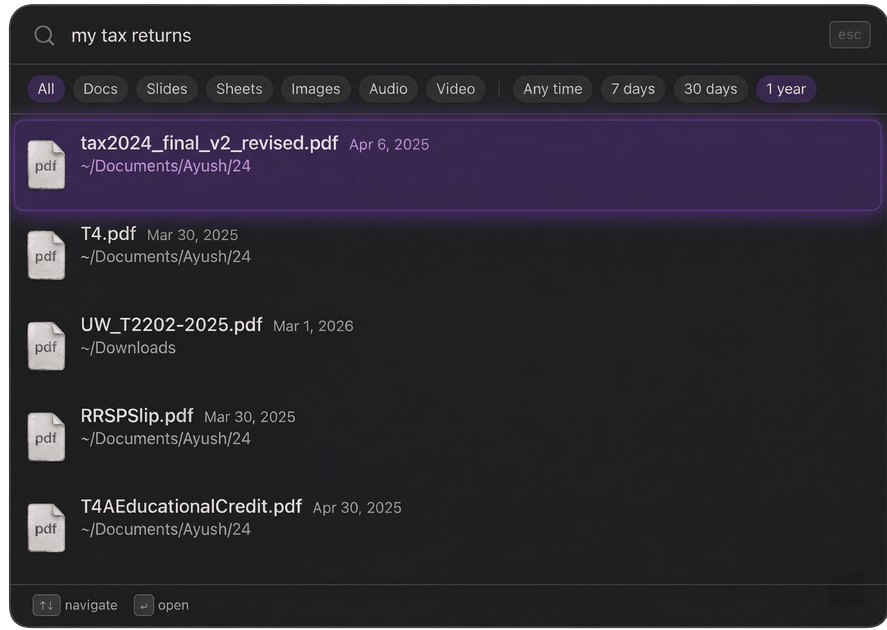
Stella is a local semantic search app for macOS that helps people find files by meaning instead of filename. It watches selected folders, indexes text-based documents on-device, and lets users search in natural language for things like topics, phrases, or document intent.
The product is positioned as a private, local-first alternative to filename-based search tools. According to the site, it works with PDFs, notes, docs, and spreadsheets, and all processing stays on the user’s machine with no accounts, telemetry, or cloud upload.
Key Features
- Natural-language search over local files — Users can type a description such as a report topic or concept, and Stella attempts to find the matching document by content meaning, not just filename.
- On-device indexing — Stella indexes selected folders locally, so the search index is built from documents stored on the user’s machine rather than in the cloud.
- Private by design — The site says no telemetry is collected, no account is required, and no data leaves the device, including temporarily during search or indexing.
- Supports common text-based file types — The product mentions PDFs, notes, documents, and spreadsheets as searchable sources.
- Offline use — Because indexing and search run locally, Stella is designed to work without an internet connection.
- Mac-specific beta with Apple Silicon support — The download is for macOS, requires Apple Silicon (M1 or later), and the site notes macOS 13 Ventura or later.
How to Use Stella
A typical workflow starts by downloading the macOS beta and granting Stella access to the folders you want it to watch. Stella then indexes those folders on your machine. After that, you can search by describing what you need in plain language, and Stella returns files that match the meaning of your query.
Use Cases
- Finding a document when the filename is unclear — For example, searching for a “Q3 revenue report” even if the file is named something like finance_2024_v3.xlsx.
- Searching across mixed personal or work documents — Useful when relevant material is spread across PDFs, notes, spreadsheets, and other text-based files in different folders.
- Working without cloud storage — Suitable for users who want search that stays entirely on-device and do not want to upload documents to a remote service.
- Using search offline — Helpful on planes, while traveling, or in other situations without reliable connectivity.
- Organizing a local knowledge base — Useful for people who keep reference material in local folders and need a way to retrieve it by topic or meaning.
FAQ
Does Stella require an account? No. The site says no account is required.
Does Stella send files to the cloud? No. The product page says everything runs on the user’s machine and that no data leaves the device.
What kinds of files can it search? The page mentions PDFs, notes, documents, and spreadsheets. It does not describe support for every file type.
What platform does it run on? The download is for macOS. The site also says Apple Silicon (M1 or later) is required and that macOS 13 Ventura or later is needed.
Is it free to use? Yes. The site says it is free to use, with no subscription, no freemium tiers, and no account required.
Alternatives
- Spotlight — Built into macOS and good for quick file lookup, but the site positions Stella as more semantic and content-aware than filename-focused search.
- Cloud-based document search tools — These often index files in the cloud and may support collaboration or web access, but they do not match Stella’s local-only privacy model.
- Desktop file search utilities — Traditional local search tools can help locate files by filename, metadata, or full-text search, but they may not interpret a query by document meaning in the same way.
- Note and document managers with search — Apps that organize notes or files may include search, but they are usually centered on managing content inside the app rather than indexing a user’s broader local folders.
Alternatives

Wikiwand
AI-driven wiki aggregator created to enhance user experience on Wikipedia by streamlining knowledge consumption.

Lasso
Lasso is an AI-first PIM for ecommerce teams that enriches product attributes and descriptions, processes supplier data, and monitors competitors via app or API.

Codex Plugins
Use Codex Plugins to bundle skills, app integrations, and MCP servers into reusable workflows—extending Codex access to tools like Gmail, Drive, and Slack.

Struere
Struere is an AI-native operational system that replaces spreadsheet workflows with structured software—dashboards, alerts, and automations.

garden-md
Turn meeting transcripts into a structured, linked company wiki with local markdown and an HTML browser view. Sync from supported sources.

Falconer
Falconer is a self-updating knowledge platform for high-speed teams to write, share, and find reliable internal documentation and code context in one place.