
Paragraph-based notes and subnotes
Write notes as regular paragraphs without creating a title or filename first, then add subnotes to build trees of related ideas.

Understory is a Mac notes and outlining app for students, researchers, bloggers, and writers. Collect research, draft in Markdown, and publish as PDF, Rich Text, Markdown, or a website.
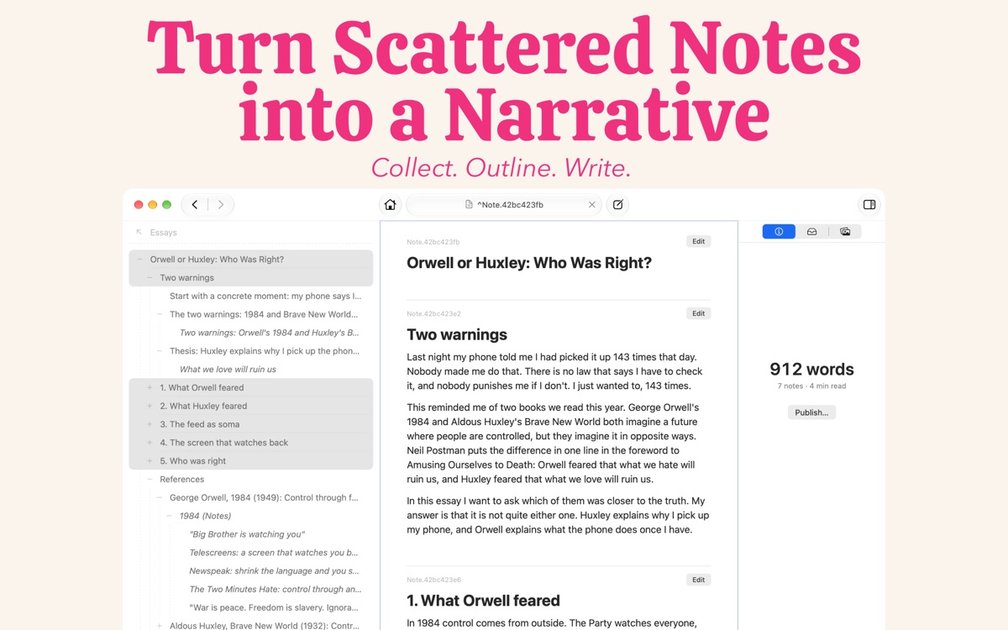
Understory is a Mac notes and outlining app for turning research into finished writing. It is designed for students, researchers, bloggers, and other writers who need to collect source material, organize an argument, draft sections, and produce a shareable document without copying notes between separate apps.
Notes are written as regular text and can be arranged into flexible trees of subnotes. A note can appear in more than one tree, allowing the same research or idea to support different subjects. From an outline, users can select the sections they want to read or publish as a PDF, Rich Text file, Markdown, or website.
Write notes as regular paragraphs without creating a title or filename first, then add subnotes to build trees of related ideas.
Place one note in multiple trees without duplicating it. Edits remain consistent wherever the shared note appears.
Search as you type, jump from results to a note's place in its tree, and navigate the browser with keyboard commands.
Attach PDFs or images to notes, add links in note text, and follow links in both directions.
Arrange research beneath the points it supports, write each draft section in Markdown, collapse supporting notes, and read selected main points as a continuous piece with a word count.
Publish a selected set of notes or a complete outline as PDF, Rich Text, Markdown, or a website. Earlier versions of notes are retained for review.
Create a note for a book, add chapter subnotes, and capture quotes or ideas beneath their sources. PDFs and images can be attached to the relevant notes for reference.
Build a new outline for an essay or research paper, then place existing research beneath the main points it supports. The source notes remain available in their original tree as well.
Write each section of a paper, article, script, or book in its corresponding note while keeping supporting material visible below it. Collapse the research to review the main points as a continuous draft.
Select individual sections or an entire outline and export it as a PDF, Rich Text document, Markdown file, or website for printing, sharing, or finishing elsewhere.
No. Understory is free to try, and a one-time payment of $24.99 USD removes the note limits. The App Store may show a different regional price, and there is no subscription.
It is a Mac-only app for now. An iPhone or iPad version is not currently available.
A Personal Notebook is stored in the user's iCloud account and syncs between Macs. A Project Notebook is a folder selected on the Mac that contains Markdown files and attachments. Project Notebooks work offline, and no Understory account is required.
Notes or complete outlines can be published as PDF, Rich Text, Markdown, or a website. PDFs can use US Letter, paperback, or hardback book sizes, and the output can also be printed.
Yes. Rich Text can be opened in a word processor, while Markdown can be used in another writing app, blog, or site that supports it.

Contextberg records your screen, input, browser, and AI agent history locally, then shares work context via MCP with Claude Code and Cursor for resumptions, search, and reviews.

Goldfish is an AI memory app for macOS that helps you reply, write, summarize, and continue with context already on your Mac. It stores memory locally and writes in your tone.

ArtDeck is a visual reference board app for iPhone, iPad, and Mac. Collect mixed references on one canvas and study them with ToolBox lenses. Offline, optional iCloud sync, one-time purchase.

Dcyde is a shared decision log for product teams to capture what was decided, why, and the source, with searchable records from Slack, Figma, or Dcyde.

Yattayo: Slider To-Do Board turns tasks into a tactile slider board with sticky notes, widgets, reminders, iCloud sync, and Premium recurring habits.

recall is an AI flashcard app that turns reading and notes into study cards with Claude, ChatGPT, or another MCP client. One-time lifetime access with spaced repetition review.