
Screen-wide retro shaders
Apply live CRT, VHS, and classic computer looks to your entire desktop, a single window, or all connected displays.
RetroMac is a macOS app that adds live retro visual effects, classic OS themes, and a themed Dock to modern Macs. It is free to download on macOS 14 or newer, with an optional one-time Pro upgrade for extra presets and webcam shaders.
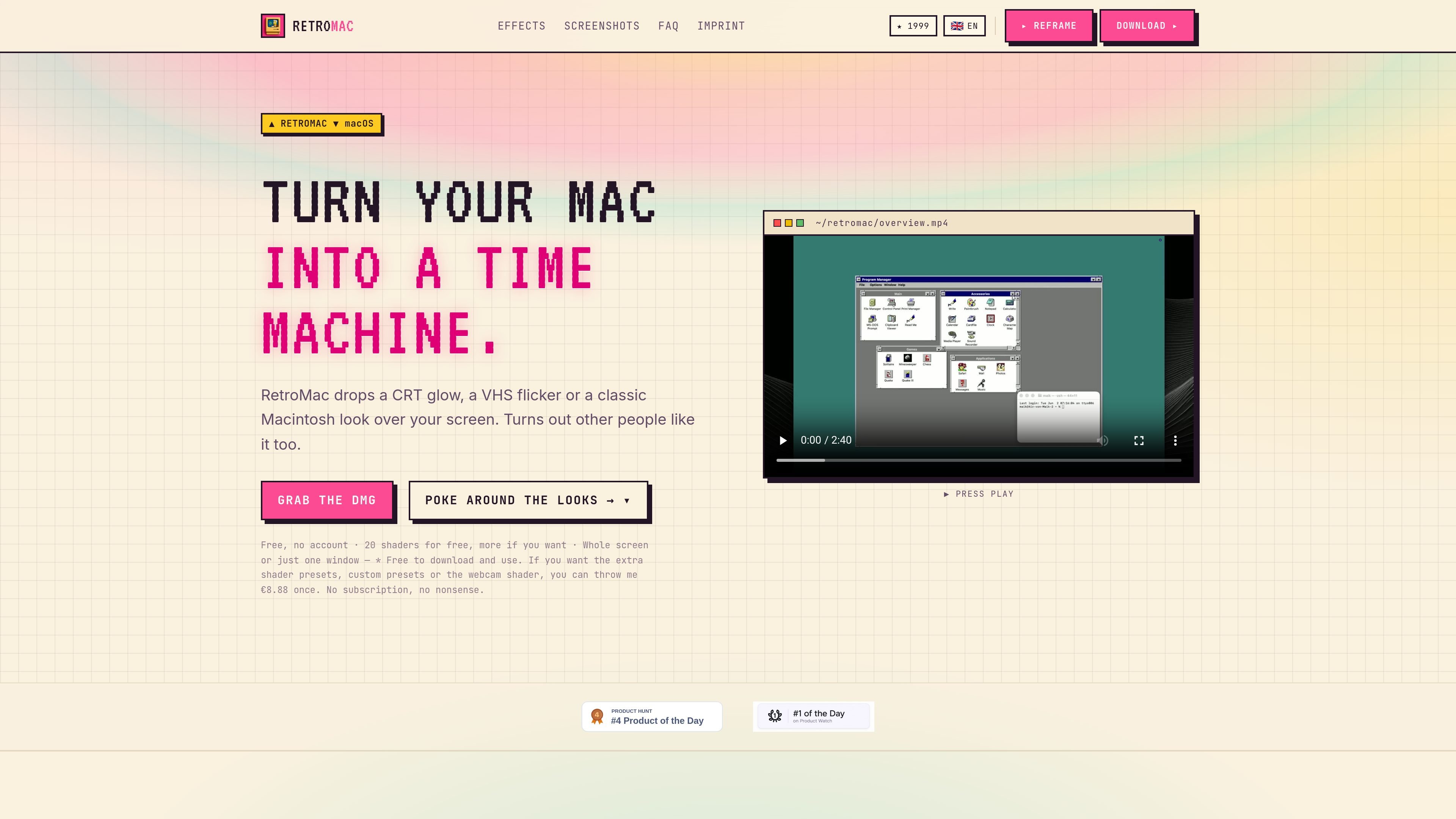
RetroMac is a macOS app that applies live retro visual effects to your screen, including CRT glow, VHS flicker, and classic Macintosh or Windows-inspired themes. It also includes a themed retro Dock, so the same vintage styling can extend beyond the wallpaper or window chrome.
The app is designed for flexible use: you can apply the look to the whole screen, a single window, or multiple displays, and the site says the effects do not change your apps or files. RetroMac is free to download and use on macOS 14 or newer, with an optional one-time Pro upgrade for extra shader presets, custom presets, and webcam shader use.
Apply live CRT, VHS, and classic computer looks to your entire desktop, a single window, or all connected displays.
Choose from styles such as CRT, Sony Trinity, NTSC Composite, Retro LCD, VHS, VCR, Macintosh Classic, Game Boy, amber terminal, and black-and-white looks.
Switch the Dock to classic Mac and Windows-era appearances, with custom icons, clock, transparency, and animated options.
Use theme support to transform the desktop into old operating systems, including classic apps from those eras, with newer Windows 98, XP, Mac OS 9, Mac OS X, and BeOS themes mentioned on the site.
Match a look to individual apps automatically, capture themed screenshots, and tune intensity, colors, and icons to your preference.
Apply retro shader effects to your webcam for calls and streams, and use eco modes to keep performance smooth.
Use RetroMac when you want your Mac to feel like an older CRT, VHS deck, or classic computer while you work, browse, or present on screen.
Use the app to style a single window instead of the entire desktop when you only want one app or one piece of content to carry the retro treatment.
Apply the retro Dock and themed OS looks when you want the desktop itself to resemble a specific era such as Mac OS 9, Mac OS X, Windows 98, or Windows XP.
Turn on webcam shaders when you want your camera feed to match the same visual style for calls, recordings, or streams.
Use the themed screenshot and performance options when you need to capture the look cleanly or keep the interface responsive while the effects are active.
RetroMac is a macOS app that applies live retro visuals such as CRT, VHS, and classic computer themes to your screen, with optional themed Dock styling. It is designed for people who want to give modern macOS a vintage look without changing their files or apps.
Yes. The download page says RetroMac is free for macOS 14 or newer, with no account or email required. An optional Pro key unlocks extra shader presets, custom presets, and webcam shader use for a one-time payment of €8.88.
The source says the app can be applied to your whole screen, just one window, or multiple displays. It also mentions themed screenshots and auto-matching looks per app.
The site says RetroMac is not a subscription and that the app runs locally on your Mac with no tracking, analytics, or telemetry. The download page also notes the DMG is signed and notarized by Apple.
The homepage says RetroMac includes classic Mac and Windows themes, a retro Dock, and support for webcam shaders. The site also notes that it can stay fast using eco modes and that the look can be customized with intensity, colors, and icons.

Pixelcut is an AI photo editor for creating and editing product images, social content, and video assets. It offers free and paid plans, plus mobile app and browser access for individual users and teams.

Petalica Paint is a web service for automatically coloring line art and tracing line drawings from photographed images. The home page says it can be used under the stated terms for commercial and noncommercial work, but it is scheduled to end on 2025-07-31 at 16:00 JST.

Wearvue AI generates personalized outfit previews from a photo, lets users refine the style for an occasion, and surfaces similar real products to shop. It is aimed at people who want to preview outfit ideas before buying and compare them with shoppable alternatives.

Upscale.media is an AI image upscaling and enhancement tool from Pixelbin that enlarges low-resolution or pixelated images and improves clarity in the browser. It offers free individual image use, paid credit plans, and team-oriented workflows such as bulk processing and API integration.

PhotoAid’s AI Image Enlarger is a free browser-based tool for upscaling images without a standard blur-heavy resize. It supports JPEG, WEBP, and PNG uploads and is described as working best for photos with faces.

MacYaps is a macOS menu bar app that plays funny audio clips for system events, with built-in voice packs, custom uploads, and a one-time lifetime license.